

Kan Do: Project Management
Stephen Robles · Productivity
Independent analytics for this App Store listing. AppTracker is not affiliated with Stephen Robles.
Chart standing · US
What changed · US
Listing changes AppTracker has observed for this app in this storefront — new versions, price moves, rating shifts, and store copy.
Subtasks - The subtasks list in a task now folds away: tap the arrow at the right end of the Add Subtask row to hide it. The Subtasks pill in the header brings it back Settings - New About tab: the app icon, version and build number, and links to kandotasks.app for questions, feedback, guides, and release notes Notes editor - Checking off a to-do on iPhone no longer brings up the keyboard (tester report) - A numbered or bulleted item whose first word is one long unbroken run (a URL, a pasted token) now wraps beside its number instead of dropping below it (tester report) - Reopening a note no longer pushes a short numbered list a digit to the right until the first edit snaps it back (tester report) - The link pencil on iPhone and iPad keeps its place beside the link after the keyboard or header moves the note (tester report)
Price & rating history · US
Reconstructed from the listing changes AppTracker has observed in this storefront. A field is charted once it has changed more than once, and each line starts at the value it moved from.
Average rating · ★ 4.50 now · 20 changes on record
Ratings breakdown · US
The star breakdown behind this app's rating in this storefront.
In-app purchases · US
No in-app purchases.
Screenshots




Keywords this app targets
Search terms AppTracker associates with this app — estimates, not search volume. ❝ = in the app's title; a highlighted number is its current position for that term.
Similar apps
Competitors and close alternatives, as estimated by AppTracker.
 Organize.me
Sukhjinder Singh
3 shared topics
Organize.me
Sukhjinder Singh
3 shared topics
 Boardly - Project & Task Board
Jakub Kalamarz
2 shared topics · 1 shared title word
Boardly - Project & Task Board
Jakub Kalamarz
2 shared topics · 1 shared title word
 iKan Boards
CREAIT LLC
1 shared topic
iKan Boards
CREAIT LLC
1 shared topic
 My Task Board - To Do Tracker
PaulJAdam.com
1 shared topic
My Task Board - To Do Tracker
PaulJAdam.com
1 shared topic
 To do cards by Frido
Madsen Vale
1 shared topic
To do cards by Frido
Madsen Vale
1 shared topic
 KanbanApp
Alex Tamayo
KanbanApp
Alex Tamayo
 Todoist: To Do List & Calendar
Todoist Inc.
1 shared topic
Todoist: To Do List & Calendar
Todoist Inc.
1 shared topic
 Lucidium – Kanban Boards
Crafted Syntax Limited
1 shared topic
Lucidium – Kanban Boards
Crafted Syntax Limited
1 shared topic
About
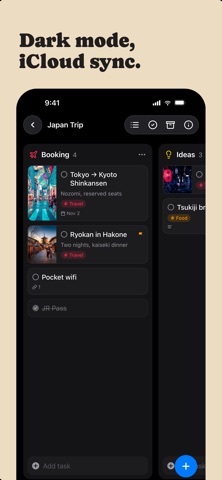
Organize your work into Spaces and Projects, then move tasks across the columns you define. Every card shows what matters at a glance: a cover image, subtitle, tags, priority, and due date. Open any task and you get a full markdown notes editor with headings, lists, checkboxes, images, and file attachments. ORGANIZE YOUR WAY • Kanban boards with drag-and-drop cards, columns, and dividers • A list view for every project, with drag to reorder • Spaces group your projects; tags cut across them • Smart lists for Inbox, Today, Upcoming, and Flagged • Archive completed work, or keep it crossed out on the board CAPTURE THE DETAILS • Rich notes on every task: headings, bold, lists, to-do checkboxes, quotes, and code • Attach images and files right in the note • Cover images, subtitles, priorities, flags, links, and due dates with reminders EVERYWHERE YOU WORK • Native on Mac, iPhone, iPad, and Apple Vision Pro • iCloud sync keeps every device up to date • Spotlight search and Shortcuts actions! • Multi-select to move, complete, or delete tasks in bulk • Light and Dark appearance, color themes, adjustable typography No accounts. No subscriptions to manage your own tasks. Your data lives in your iCloud.
What's new · 1.6.1
Subtasks - The subtasks list in a task now folds away: tap the arrow at the right end of the Add Subtask row to hide it. The Subtasks pill in the header brings it back Settings - New About tab: the app icon, version and build number, and links to kandotasks.app for questions, feedback, guides, and release notes Notes editor - Checking off a to-do on iPhone no longer brings up the keyboard (tester report) - A numbered or bulleted item whose first word is one long unbroken run (a URL, a pasted token) now wraps beside its number instead of dropping below it (tester report) - Reopening a note no longer pushes a short numbered list a digit to the right until the first edit snaps it back (tester report) - The link pencil on iPhone and iPad keeps its place beside the link after the keyboard or header moves the note (tester report)
Details