

Mr Prompter
Sebastien Raynal · Photo & Video
Independent analytics for this App Store listing. AppTracker is not affiliated with Sebastien Raynal.
Chart standing · US
What changed · US
Listing changes AppTracker has observed for this app in this storefront — new versions, price moves, rating shifts, and store copy.
Version 2.7 brings subtitles: subtitle your videos with the text you read, timed to your voice. • After a selfie take, tap the badge on the thumbnail, or open Subtitles from the menu: the app listens to the video and lays your own text on it, word by word, with your spelling and punctuation. • 8 subtitle styles, including TikTok and Karaoke, with colors, font, bold, italic, size and line spacing. Drag the subtitles on the video to place them. • Edit the blocks: move words to the next block, break a line, fix the text. Fine-tune each word on the waveform, frame by frame. • Export the video with burned-in subtitles, in the same quality, in 4K or light, or just the .srt file. • Save your projects and open them again later.
Price & rating history · US
Reconstructed from the listing changes AppTracker has observed in this storefront. A field is charted once it has changed more than once, and each line starts at the value it moved from.
Average rating · ★ 3.00 now · 4 changes on record
Ratings breakdown · US
The star breakdown behind this app's rating in this storefront.
In-app purchases · US
No in-app purchases.
Screenshots




Keywords this app targets
Search terms AppTracker associates with this app — estimates, not search volume. ❝ = in the app's title; a highlighted number is its current position for that term.
Similar apps
Competitors and close alternatives, as estimated by AppTracker.


About
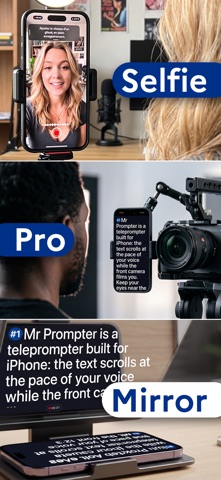
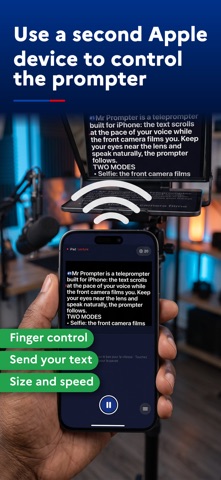
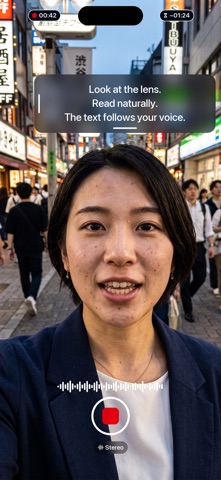
Mr Prompter (Mister Prompter) is an all-in-one teleprompter for iPhone, iPad and Mac: a selfie mode with voice tracking to film yourself alone, a pro mode with a mirror for teleprompter glass, and a remote mode to control another iPhone, iPad or Mac. And its signature: the text scrolls at exactly your pace while you speak, with no button to press and no speed to guess. Keep your eyes near the lens, talk naturally, and the prompter follows. SELFIE: ALONE IN FRONT OF THE CAMERA • The front camera films you and the text sits right next to the lens. You read, you record, it is done. • Voice tracking moves the text along with you; say "GO" to start recording, hands-free. • Cinematic mode (background blur on supported iPhones) and video stabilization. • ProRes on iPhone Pro models, in 422 or 422 HQ, with Apple Log where the iPhone offers it, and 4K at 60 fps on an external SSD. SUBTITLES FROM YOUR OWN TEXT • After a take, the app listens to the video and lays your script on it, word by word, with your spelling and punctuation. • 8 styles, TikTok and karaoke included. Edit the blocks, and fine-tune each word on the waveform. • Export the video with burned-in subtitles, or the .srt file. PRO AND TELEPROMPTER GLASS • Nothing is recorded: the camera may stay on, but its image is neither shown nor kept. The screen becomes a prompter for a real camera, a teleprompter glass or an audience, and your voice still drives the text. • Mirror effect in one tap: the text flips for a beamsplitter rig, before you even start. • On iPad, pro mode fills the screen: set the tablet under the glass and read straight through it. ANOTHER DEVICE AS A REMOTE • An iPhone, iPad or Mac running Mr Prompter controls another one, in any direction: start, stop, speed, chapters. • The remote shows your text exactly as it appears on the prompter. Position it with a finger, and set the size, line spacing, speed, mirror and presets of the controlled device from where you stand. Send it one of your scripts, or have it open one of its own. • A direct link between the two devices, no router and no server: just turn on Wi-Fi and Bluetooth. A four-digit code pairs them. CAMERA CONTROL, KEYBOARD AND PRESENTER REMOTE • On iPhone, a click on the Camera Control starts and stops the take, and a slide along it sets the speed. The volume buttons start and stop it too, on iPhone and iPad. • A presenter remote starts and stops the take, pauses in pro mode and jumps between chapters, without touching the screen. Ideal on an iPad set on a stand, out of reach. • On a keyboard, the arrow keys also set the speed, even while recording. MADE TO FIT • Manual mode: a constant speed you set, adjustable with a swipe while recording. Or by hand: the text moves only under your finger. • Auto stop at the end of the text, on by default. • Calibration: read a short passage and the app measures your natural pace. • Adjustable font, size and line spacing, white on black or black on white. • Movable, resizable text window, placed near the lens whichever edge it sits on. • Chapters to cut a long script and jump where you need, even added on the fly while you read. • Presets to recall your favorite settings in one tap. • Import and share your texts: .txt, .rtf, .pdf and Word (.docx). PRIVACY FIRST No sign-up, no account, no data collection. Your videos go to your photo library, or on Mac to a folder you choose, and they stay on your device. The remote links your devices directly: nothing goes through the internet. ON IPHONE, IPAD AND MAC The same app, the same scripts, on the three screens, and each one can control the others. Free on all of them, with no watermark and no subscription. Perfect for creators, trainers, journalists, speakers, and anyone who wants to talk to camera without losing their place, or their eye contact.
What's new · 2.7
Version 2.7 brings subtitles: subtitle your videos with the text you read, timed to your voice. • After a selfie take, tap the badge on the thumbnail, or open Subtitles from the menu: the app listens to the video and lays your own text on it, word by word, with your spelling and punctuation. • 8 subtitle styles, including TikTok and Karaoke, with colors, font, bold, italic, size and line spacing. Drag the subtitles on the video to place them. • Edit the blocks: move words to the next block, break a line, fix the text. Fine-tune each word on the waveform, frame by frame. • Export the video with burned-in subtitles, in the same quality, in 4K or light, or just the .srt file. • Save your projects and open them again later.
Details