

Shadow Planner
Christopher Fenner · Photo & Video
Independent analytics for this App Store listing. AppTracker is not affiliated with Christopher Fenner.
Chart standing · US
What changed · US
Listing changes AppTracker has observed for this app in this storefront — new versions, price moves, rating shifts, and store copy.
• Sun path. The sun's track arcs over the map — amber where your spot holds sun, blue-grey where a building blocks it. The beads are hours; the big one is the time you're scrubbed to. • Shade timeline. Tap a spot and see when it holds direct sun and when it goes into shade, read off the real buildings and terrain around it. • Sun times. Sunrise, solar noon, sunset, golden hour morning and evening, civil dusk and the length of the day. • Snapshots are now a letter-size page. Same on every device, with a header carrying the location, date, time, sun position, sunrise and sunset, your rig, and the lifts that actually reach the distance you measured. • Saved places. Name a location and come back to it with its camera angle, date, time, every frame, the measurement and the shade point still in place. Long-press a row to rename it. • Measuring and the shade view work at the same time now. • On iPad you can drag the menu panels into whatever order you work in, and it's remembered. • A tidier menu: the panels sit in a more sensible order, the map buttons are clear of the map's own controls on iPad, and the phone no longer carries a second copy of the time slider. • Feet or metres, everywhere, with one switch. Gear names stay as they are on the truck. • The app carries its map engine and fonts inside it, so it opens faster and a hiccup at someone else's server can't leave you staring at a blank screen. • Fixed: picking a date from the picker didn't move the sun. • Fixed: the locate button went to whatever you were looking at instead of where you are. • Fixed: buttons stayed lit after you tapped them.
Ratings breakdown · US
The star breakdown behind this app's rating in this storefront.
In-app purchases · US
No in-app purchases.
Screenshots
Keywords this app targets
Search terms AppTracker associates with this app — estimates, not search volume. ❝ = in the app's title; a highlighted number is its current position for that term.
Similar apps
Competitors and close alternatives, as estimated by AppTracker.
 Sunio: Sun Tracker 3D Shadow
Daniel Slave
1 shared topic · 1 shared title word
Sunio: Sun Tracker 3D Shadow
Daniel Slave
1 shared topic · 1 shared title word
 LightPlan - Golden Hour Photo
Rivolu LLC
LightPlan - Golden Hour Photo
Rivolu LLC
 Sun Tracker & Seeker: SunCast
Peter Balazs Szucs
1 shared topic
Sun Tracker & Seeker: SunCast
Peter Balazs Szucs
1 shared topic
 CINE WHITE BALANCE
KARL HENRY WEINREICH III
CINE WHITE BALANCE
KARL HENRY WEINREICH III
 ShootLight
Brady Spear
ShootLight
Brady Spear
 Shade Tracker - Sun Simulator
Sermin Demirbas
Shade Tracker - Sun Simulator
Sermin Demirbas
 Lightframer Pro
eric Hernandez
Lightframer Pro
eric Hernandez
 Sun Finder: Solar & Daylight
XIAOKUN ZHOU
Sun Finder: Solar & Daylight
XIAOKUN ZHOU
About
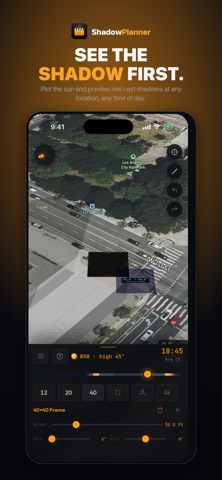
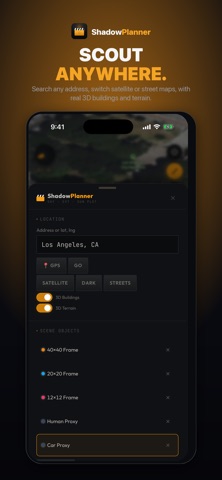
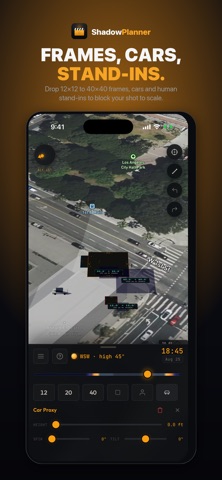
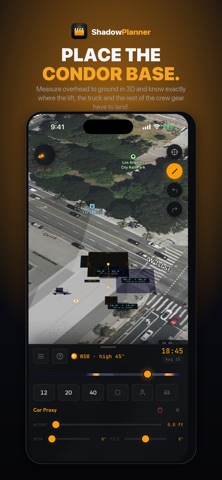
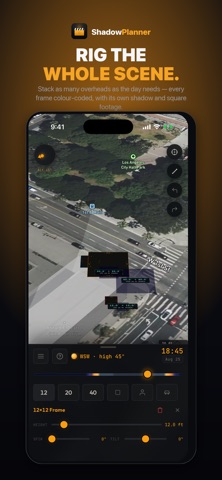
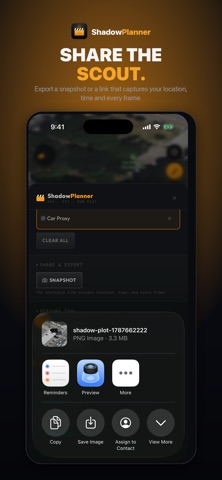
Scout the light before you get there. Shadow Planner puts a real sun on a real map. Drop your overheads on the actual location, scrub the day from sunrise to sunset, and watch true cast shadows fall across the ground in 3D — so you know what you're walking into before the truck rolls, and so does everyone you hand the page to. SCOUT ANY LOCATION • Search an address or drop straight onto your GPS position • Satellite, street and dark map styles • Real 3D buildings and terrain, so shadows fall off the geometry that's actually there • Live sun compass with azimuth and altitude KNOW WHEN YOU LOSE THE LIGHT • Sunrise, solar noon, sunset, golden hour and civil dusk for any date and any location, with the day's length • Tap any spot for a shade timeline: when it holds direct sun and when it goes into shade, across the whole day • See the sun's path arced over the map — amber where your spot has sun, blue-grey where something blocks it, so you can watch the moment the sun clears a roofline • Reads the buildings and terrain actually around it, plus your own overheads BLOCK THE SHOT TO SCALE • Drop 12x12, 20x20 and 40x40 frames, or set your own custom size • Dial height above ground, spin and tilt on every frame • Add vehicles and human stand-ins for scale • Stack as many objects as the day needs — each one colour-coded, with its own cast shadow and the area it covers SEE THE WHOLE DAY MOVE • Scrub sunrise to sunset and watch every shadow track with the sun • Pick any date and check the light for a shoot weeks out • Stand-ins and vehicles dim when they fall inside a frame's shadow MEASURE THE RIG IN 3D • Tap two points for a true diagonal distance — overhead down to ground • Know exactly where the base, the truck and the crew gear have to land • Measurements stay locked to a frame, so they update as you raise or move it • Matching gear ranges for the distance you measured, from a PeeWee dolly to a 120' Condor FEET OR METRES • One switch converts every height, span, distance and shadow area, and the gear ranges with them • Gear and frame names stay as the industry says them — a 12x12 is still a 12x12, a Condor 40' is still a Condor 40' • Your choice is remembered between sessions TAKE IT BACK TO THE OFFICE • Save a location by name with its camera angle, date, time, every frame, the measurement and the shade you picked — long-press to rename • Six stops in a day, all still there tomorrow • Export a letter-size page carrying the location, date, time, sun position, sunrise and sunset, the rig you had up, and the lift sizes that reach — so the gaffer, the AD and the office are all reading the same sheet • Same page on every device, straight to Photos, Files or Messages • On iPad, drag the menu panels into the order you work in • Full undo and redo Built by a working cinematographer for tech scouts, gaffers, grips, DPs, location managers and anyone who has ever guessed where the shadow would be. No account. No subscription. No tracking.
What's new · 1.5
• Sun path. The sun's track arcs over the map — amber where your spot holds sun, blue-grey where a building blocks it. The beads are hours; the big one is the time you're scrubbed to. • Shade timeline. Tap a spot and see when it holds direct sun and when it goes into shade, read off the real buildings and terrain around it. • Sun times. Sunrise, solar noon, sunset, golden hour morning and evening, civil dusk and the length of the day. • Snapshots are now a letter-size page. Same on every device, with a header carrying the location, date, time, sun position, sunrise and sunset, your rig, and the lifts that actually reach the distance you measured. • Saved places. Name a location and come back to it with its camera angle, date, time, every frame, the measurement and the shade point still in place. Long-press a row to rename it. • Measuring and the shade view work at the same time now. • On iPad you can drag the menu panels into whatever order you work in, and it's remembered. • A tidier menu: the panels sit in a more sensible order, the map buttons are clear of the map's own controls on iPad, and the phone no longer carries a second copy of the time slider. • Feet or metres, everywhere, with one switch. Gear names stay as they are on the truck. • The app carries its map engine and fonts inside it, so it opens faster and a hiccup at someone else's server can't leave you staring at a blank screen. • Fixed: picking a date from the picker didn't move the sun. • Fixed: the locate button went to whatever you were looking at instead of where you are. • Fixed: buttons stayed lit after you tapped them.
Details