

Clipboard Manager: Auto Paste
Yakup Arslan · Productivity
Independent analytics for this App Store listing. AppTracker is not affiliated with Yakup Arslan.
Chart standing · US
What changed · US
Listing changes AppTracker has observed for this app in this storefront — new versions, price moves, rating shifts, and store copy.
We’ve redesigned the onboarding flow for a quicker setup and improved our translations for a better global experience. Bullet Points Smoother Setup: A revamped onboarding flow to get you started faster. Better Translations: Expanded language support and improved localizations. Casual & Punchy Getting started is easier than ever! We’ve streamlined our setup screens and updated our translations so the app feels right at home, no matter where you are.
In-app purchases · US
What this app sells inside itself, grouped by kind and priced for this storefront.
Screenshots




Keywords this app targets
Search terms AppTracker associates with this app — estimates, not search volume. ❝ = in the app's title; a highlighted number is its current position for that term.
Similar apps
Competitors and close alternatives, as estimated by AppTracker.
 xScan : Document Scanner App
VPN MobApps Limited
xScan : Document Scanner App
VPN MobApps Limited
 clipboood - Auto Clipboard
MASARU MIYAKE
clipboood - Auto Clipboard
MASARU MIYAKE
 SnapOCR – Video Text Tool
Roxwin Vietnam Technologies Company Limited
SnapOCR – Video Text Tool
Roxwin Vietnam Technologies Company Limited
 AI Text Expander - SmartType
Oleksandr Momotiuk
AI Text Expander - SmartType
Oleksandr Momotiuk
 Keyb
Christian Lobach
Keyb
Christian Lobach
 Mobile Mouse
R.P.A. Tech
Mobile Mouse
R.P.A. Tech
 QR Reader for iPhone
TapMedia Ltd
QR Reader for iPhone
TapMedia Ltd
 Faster Scan - Fast PDF Scanner
IFUNPLAY CO., LTD.
Faster Scan - Fast PDF Scanner
IFUNPLAY CO., LTD.
About
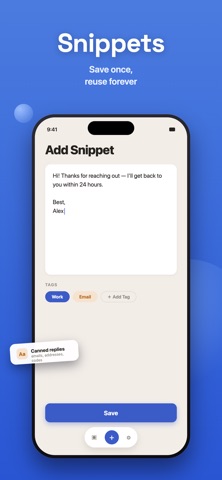
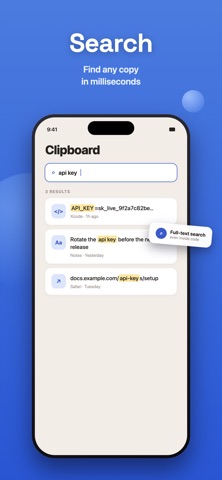
ClipFlow is the fast, secure clipboard manager built for people who copy and paste all day. Never lose a copied link, password, or snippet again — with a built-in Auto Paste Keyboard that saves you time on every repetitive task. Why Choose ClipFlow? Unlimited Clipboard History ClipFlow automatically saves everything you copy. Browse your full history and paste anything instantly with a single tap. Smart Auto Paste Keyboard Switch to the custom ClipFlow keyboard to access your saved snippets directly inside any app — no more switching back and forth. Scan Text From Photos (OCR) Turn any photo, screenshot, or document into editable text in seconds. No typing required. Templates & Custom Snippets Save frequently used replies, addresses, or hashtags as reusable snippets, and capture new notes straight to your board anytime. Smart Tags & Millisecond Search Keep your board organized with custom tags, and find exactly what you need in seconds with lightning-fast search. Face ID Lock & Secure Cloud Sync Your clipboard can hold sensitive data. Protect it with Face ID and encryption, and keep everything in sync across your devices with secure cloud backup. Key Features at a Glance: • Auto Paste Keyboard for repetitive typing • OCR — extract text from photos instantly • Cross-device Cloud Sync • Millisecond-fast search • Custom tags for organization • Face ID–protected secure notes Stop repeating yourself. Download ClipFlow and take control of your clipboard today. Terms of Use: https://www.apple.com/legal/internet-services/itunes/dev/stdeula/
What's new · 1.2
We’ve redesigned the onboarding flow for a quicker setup and improved our translations for a better global experience. Bullet Points Smoother Setup: A revamped onboarding flow to get you started faster. Better Translations: Expanded language support and improved localizations. Casual & Punchy Getting started is easier than ever! We’ve streamlined our setup screens and updated our translations so the app feels right at home, no matter where you are.
Details