

Andon for Xcode Cloud
Adrien Humiliere · Developer Tools
Independent analytics for this App Store listing. AppTracker is not affiliated with Adrien Humiliere.
Chart standing · US
What changed · US
Listing changes AppTracker has observed for this app in this storefront — new versions, price moves, rating shifts, and store copy.
Andon 1.2 polishes the everyday: find any build faster, manage your beta testers, and pin a widget to the one workflow you care about. FIND ANY BUILD The Builds tab gains a permanent filter bar — app, status, workflow, branch or PR, period — alongside search. One tap to narrow, one tap to clear. YOUR TESTERS, IN HAND See who belongs to a beta group and remove a tester without leaving the app. Feedback now carries the tester’s name, and screenshots open full screen — pinch, zoom, share. A WIDGET PER WORKFLOW Any widget can now follow a single workflow — the nightly on your Lock Screen, the release build in StandBy. A WARMER WELCOME A new three-step onboarding: what Andon is, the key walkthrough, and proof your key works before you dive in. AND MORE - Open or share a build’s App Store Connect page - “What to Test” suggestions in the Distribute flow, with Apple Intelligence at hand - A duration-drift verdict on every workflow screen - Skeleton rows on first load, sharper build rows, smoother status transitions - A preview of your log formatting choices in Settings - A quiet celebration when a build turns green — and richer haptics throughout - Many VoiceOver and Dynamic Type refinements
Screenshots





Keywords this app targets
Search terms AppTracker associates with this app — estimates, not search volume. ❝ = in the app's title; a highlighted number is its current position for that term.
Similar apps
Competitors and close alternatives, as estimated by AppTracker.
 Mobile IDE for Claude Code AI
Uladzsislau Luchkouski
Mobile IDE for Claude Code AI
Uladzsislau Luchkouski
 App Designer
Norbert Grieger
App Designer
Norbert Grieger
 Buildhorn: CI/CD Alerts
Daz Software Ltd
Buildhorn: CI/CD Alerts
Daz Software Ltd
 Mobile IDE for Antigravity AI
Uladzsislau Luchkouski
Mobile IDE for Antigravity AI
Uladzsislau Luchkouski
 Portable Dev
Volter AI
Portable Dev
Volter AI
 IDE for Сlaude Code, Ai Agent
Florian Busch
IDE for Сlaude Code, Ai Agent
Florian Busch
 Tactic Remote: AI Coding
Shanghai TacticSpace Technology Co., Ltd.
Tactic Remote: AI Coding
Shanghai TacticSpace Technology Co., Ltd.
 Tailscode
Midgar Oy
Tailscode
Midgar Oy
About
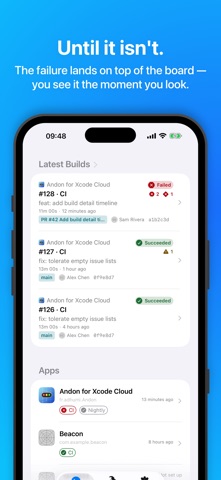
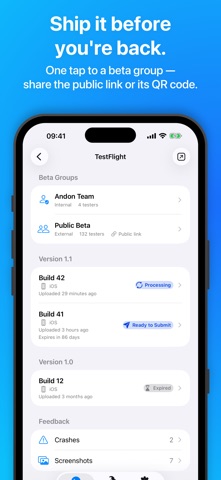
The way we build apps is changing. With AI coding agents, more and more of the development loop happens away from the Mac: you send a prompt from wherever you are, the agent pushes a branch, and Xcode Cloud picks it up. Every step works from your phone — except watching the build. For that, you had to open a laptop, or fight a web page that was never designed for mobile. Andon closes that loop. It is a native iOS and iPadOS client for Xcode Cloud: see the state of your CI at a glance, understand a failure, restart a workflow, and push a TestFlight beta — from your pocket. IS EVERYTHING GREEN? Andon takes its name from the light board of lean manufacturing: green, all is well — red, you pull the cord. The dashboard answers that one question in zero taps: running builds with live progress, recent failures, and per-app health. UNDERSTAND ANY FAILURE Action timeline, compiler issues with file and line, failing tests per destination, full logs and artifacts. Open the offending file straight in GitHub, at the right commit. ACT ON YOUR CI Start a build on any branch, tag, or pull request — the flow follows each workflow’s own start conditions. Retry a flaky run in one tap, toggle workflows on and off. SHAPE YOUR WORKFLOWS Create, edit, duplicate, and delete workflows without opening a browser: start conditions, actions, test destinations, environment variables. Secret values stay write-only — Andon never reads them back. SPOT THE DRIFT Build insights per workflow: duration trends, success rate, and your slowest tests, charted over time. Catch the build that is quietly getting slower before it costs you an afternoon. SHIP BETAS WITH TESTFLIGHT Distribute a build to a beta group, manage its testers, share the public link or its QR code, and review screenshots and crash feedback from your testers. “What to Test” notes are drafted for you from your commit messages — proposed, never sent without you — and you can submit for beta review right from the app. DEEP SYSTEM INTEGRATION Widgets for the Home Screen, Lock Screen, and StandBy — pin one to an app, or to a single workflow. Shortcuts and Spotlight through App Intents. A Control Center control to launch your favorite workflow. Paste an App Store Connect link and jump straight to the build. MADE FOR IPAD TOO Keyboard shortcuts, pointer support, layouts that use the space — including a two-column Home. A real iPad citizen, not a blown-up iPhone app. PRIVATE BY DESIGN Your App Store Connect key and your build data never leave your device. Andon talks directly to Apple’s App Store Connect API: no Andon server, no account to create, no analytics, no trackers. Your API key is stored in the device Keychain — nowhere else. REQUIREMENTS Andon needs an Apple Developer account with Xcode Cloud configured for at least one project, and an App Store Connect API key. The app walks you through creating the key on first launch — it takes about two minutes. Requires iOS 26 or iPadOS 26. Available in English and French. Andon is an independent application and is not affiliated with, endorsed, or sponsored by Apple Inc.
What's new · 1.2.0
Andon 1.2 polishes the everyday: find any build faster, manage your beta testers, and pin a widget to the one workflow you care about. FIND ANY BUILD The Builds tab gains a permanent filter bar — app, status, workflow, branch or PR, period — alongside search. One tap to narrow, one tap to clear. YOUR TESTERS, IN HAND See who belongs to a beta group and remove a tester without leaving the app. Feedback now carries the tester’s name, and screenshots open full screen — pinch, zoom, share. A WIDGET PER WORKFLOW Any widget can now follow a single workflow — the nightly on your Lock Screen, the release build in StandBy. A WARMER WELCOME A new three-step onboarding: what Andon is, the key walkthrough, and proof your key works before you dive in. AND MORE - Open or share a build’s App Store Connect page - “What to Test” suggestions in the Distribute flow, with Apple Intelligence at hand - A duration-drift verdict on every workflow screen - Skeleton rows on first load, sharper build rows, smoother status transitions - A preview of your log formatting choices in Settings - A quiet celebration when a build turns green — and richer haptics throughout - Many VoiceOver and Dynamic Type refinements
Details