

Point on Image Coordinate Tool
Masashi Kawakami · Developer Tools
Independent analytics for this App Store listing. AppTracker is not affiliated with Masashi Kawakami.
Chart standing · US
What changed · US
Listing changes AppTracker has observed for this app in this storefront — new versions, price moves, rating shifts, and store copy.
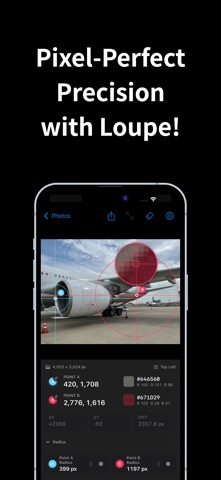
■ Core measuring is now free and unlimited We removed the image limit. Checking coordinates, colors, radius circles, and differences/distances is free, no matter how often you use it. ■ Four features for more detailed measuring • Origin position — choose which corner of the image is (0, 0) • Magnifier — line points up to the pixel while placing and fine-tuning them • Relative position — show each point as a 0–1 ratio of the image size • Share with coordinates — export the image with the coordinate panel included Watch a rewarded ad to use all four for 10 minutes, or purchase an unlimited plan to keep them.
In-app purchases · US
What this app sells inside itself, grouped by kind and priced for this storefront.
Screenshots



Keywords this app targets
Search terms AppTracker associates with this app — estimates, not search volume. ❝ = in the app's title; a highlighted number is its current position for that term.
Similar apps
Competitors and close alternatives, as estimated by AppTracker.




About
Accurately and instantly measure pixel coordinates, distances, and colors on any image. Whether you are verifying UI designs, checking diagram dimensions, or analyzing photo compositions, this professional tool strongly supports creators and engineers who need precise pixel-level data. [Key Features] Intuitive Point Placement & Precision Adjustment Simply tap the image to place "Point A" and "Point B". A circular magnifier (loupe) appears during placement, allowing you to specify the exact position down to a single pixel. Detailed Coordinates & Distance Measurement Automatically calculates the X-axis difference (ΔX), Y-axis difference (ΔY), and straight-line distance (DIST) between the two points. Display modes can be switched between exact "Pixels" or "Ratio" (0 to 1 relative to the image size). Customizable Origin Settings Freely set the origin (0, 0) to any of the 4 corners: Top Left, Top Right, Bottom Left, or Bottom Right. Easily adapt to the coordinate system of your specific workflow or development platform. Color Picker Retrieves the color data of the tapped pixel, displaying both HEX and RGB values. Long-press the panel to instantly copy the values to your clipboard for smooth integration with your design tools. Draw Radius Circles Draw circles around Point A and Point B by specifying a custom radius (px). Perfect for checking areas of effect or visualizing the size of subjects. Point Lock & Reverse Positioning Lock either Point A or Point B, and manually input specific distance, ΔX, or ΔY values. The unlocked point will automatically move to the exact calculated position. Export & Share Results Share your measurement results with your team by exporting them in two modes: "Image Only" (includes crosshairs and radius overlays) or "With Coordinates Panel". [Unlimited Access] You can open and measure up to 5 images for free right after install. After that, you can watch a rewarded ad to unlock more, or subscribe to an Unlimited Plan (Monthly, Yearly, or Lifetime one-time purchase) to remove all image limits and unlock seamless swipe navigation between photos. EULA:https://www.apple.com/legal/internet-services/itunes/dev/stdeula/ privacy policy:https://kawasuke.wixsite.com/kawasukestore/privacy-policy
What's new · 1.2
■ Core measuring is now free and unlimited We removed the image limit. Checking coordinates, colors, radius circles, and differences/distances is free, no matter how often you use it. ■ Four features for more detailed measuring • Origin position — choose which corner of the image is (0, 0) • Magnifier — line points up to the pixel while placing and fine-tuning them • Relative position — show each point as a 0–1 ratio of the image size • Share with coordinates — export the image with the coordinate panel included Watch a rewarded ad to use all four for 10 minutes, or purchase an unlimited plan to keep them.
Details