

PixelKit: Design & Dev Tools
HWY Enigma LLC · Developer Tools
Independent analytics for this App Store listing. AppTracker is not affiliated with HWY Enigma LLC.
Chart standing · US
What changed · US
Listing changes AppTracker has observed for this app in this storefront — new versions, price moves, rating shifts, and store copy.
NEW: THE COLOR SUITE • Contrast Grid — a WCAG matrix for your whole palette, every pairing graded at a glance • Tint & Shade Ramp — a 50–900 scale from one base color, with CSS, Tailwind and SwiftUI export • Scrim Solver — the minimum overlay that makes text readable on any image • Dark Mode Counterpart, Alpha Flattening, Colorblindness Check, Color Difference (ΔE2000), Gradient Repair and System Colors NEW: LAYOUT & TYPOGRAPHY • Column Grid — container, columns, gutters and margins in, column width and spans out • Spacing Scale, Baseline Grid, Tracking Converter and Text Expansion NEW: REFERENCE & HANDOFF • Device Database, Social Media Sizes, Icon Sizes and a live Dynamic Type table • Shadow & Blur Translators — Figma values to CSS to SwiftUI • Special Characters, Viewing Distance and a QR Generator ALSO IN 4.1 • The contrast checker now suggests the nearest passing color, adds APCA (draft WCAG 3) and a UI-component mode • OKLCH and Display P3 in the color space converter • A real iPad app: tools fill the screen, stacked tall in portrait and side-by-side in landscape • Find any tool from iOS search, press ⌘K on a hardware keyboard, or tap the paste chip when your clipboard holds a number
Price & rating history · US
Reconstructed from the listing changes AppTracker has observed in this storefront. A field is charted once it has changed more than once, and each line starts at the value it moved from.
Average rating · ★ 5.00 now · 2 changes on record
In-app purchases · US
What this app sells inside itself, grouped by kind and priced for this storefront.
Screenshots


Keywords this app targets
Search terms AppTracker associates with this app — estimates, not search volume. ❝ = in the app's title; a highlighted number is its current position for that term.
Similar apps
Competitors and close alternatives, as estimated by AppTracker.
 CalcKit: Tip, Convert & Utils
麟浩 冯
CalcKit: Tip, Convert & Utils
麟浩 冯
 Mila's Unit Converter PRO
Scott DeSapio
Mila's Unit Converter PRO
Scott DeSapio
 DevKit: JSON, JWT & Dev Tools
Alexander Herdt
DevKit: JSON, JWT & Dev Tools
Alexander Herdt
 PixelCalc
John Lullie
PixelCalc
John Lullie
 ScreenKit - App Icons & Widget
TWINSTAR CREATIVES PTY LTD
ScreenKit - App Icons & Widget
TWINSTAR CREATIVES PTY LTD
 Unit Converter - Convert all
oWorld Software
Unit Converter - Convert all
oWorld Software
 Pixquare - Pixel Art Studio
Son Nguyen
Pixquare - Pixel Art Studio
Son Nguyen
 ConvertDroid: Unit Converter
The Zardoz Group LLC
ConvertDroid: Unit Converter
The Zardoz Group LLC
About
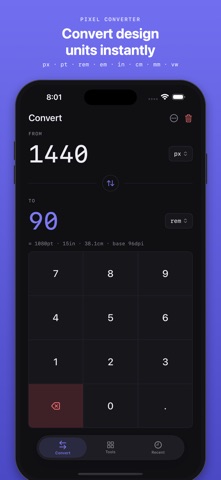
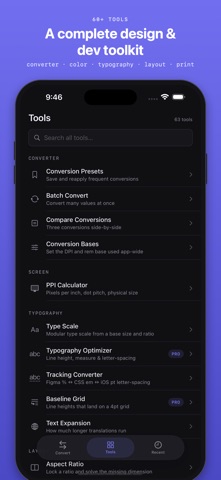
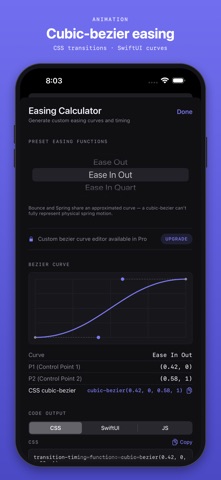
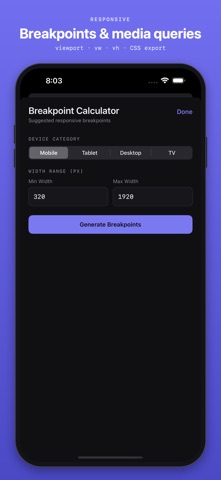
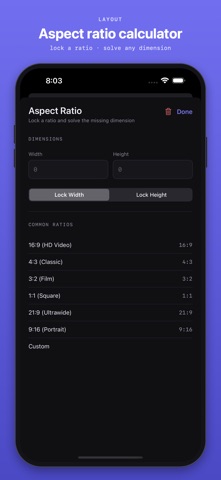
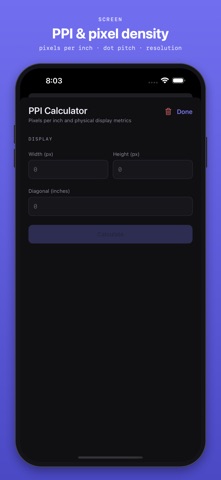
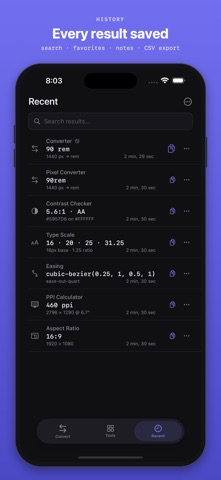
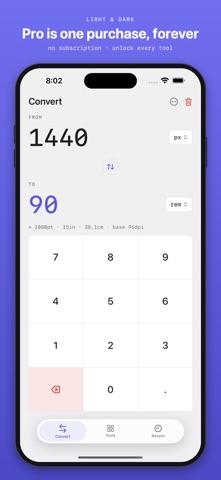
PixelKit is the all-in-one toolbox for designers and developers — a precise unit converter plus a full suite of design, print, and dev calculators in one fast, offline app. No account, no ads, no subscription. It started as the ONLY true pixel converter on the App Store — the only app that correctly converts inches to pixels at 1in = 96px. That precision is still the heart of PixelKit, now surrounded by the tools you reach for every day. THE CONVERTER: • Convert across 11 units: pixels, inches, cm, mm, picas, points, em, rem, viewport (vw), DPI, PPI • Real-time, pixel-perfect accuracy with a custom keypad • Conversion history, custom presets, batch convert, compare up to 3, CSV export • Copy all formats at once DESIGN & LAYOUT TOOLS: • Screen Calculator — PPI, retina class, megapixels, dot pitch, aspect ratio from width/height/diagonal • Aspect Ratio Calculator — lock dimensions, common and custom ratios, simplified GCD • Typography Scale Generator — modular type scale with per-step values • Coordinate tools — distance, area, golden ratio, grid alignment, center point PRO TOOLS (one-time unlock): • Print Production — bleed, paper GSM, binding, fold, stack thickness, die-cut • Image Assets — file-size estimation, print DPI, retina @1x/2x/3x, compression, color space (sRGB / Adobe RGB / CMYK) • Animation — frame rate, easing and bezier with code output, motion blur, duration, keyframes • Validation — WCAG AA/AAA contrast, pixel-perfect, platform compliance, print quality • Cross-platform — breakpoints, touch targets, viewport units, responsive typography EXPORT-READY CODE: • Most tools output ready-to-paste CSS and SwiftUI — easing to cubic-bezier(), breakpoints to @media queries, type scales, aspect ratios, and more BUILT TO KEEP: • Unified Recent — every calculation across every tool saved in one list, with favorites • Copy on every result, one tap • System, Light, and Dark mode • Fully offline — no account, no network, no ads ONE-TIME UNLOCK: • $6.99 once unlocks every Pro tool — and all future Pro tools, forever. No subscription. • Restore Purchases supported PERFECT FOR: • UI/UX designers • Web and app developers • Digital and print designers • Design students • Anyone who works in pixels, points, and ratios PixelKit turns the converter you needed into the toolbox you keep. Download it today. LICENSE AND USAGE This application is licensed, not sold, to you by HWY Enigma LLC. Your use of this application is governed by HWY Enigma's Terms of Service: https://hwyenigma.com/terms-of-service PRIVACY POLICY This application does not collect any personal data. Please review our Privacy Policy at https://hwyenigma.com/pixel-policy
What's new · 4.1
NEW: THE COLOR SUITE • Contrast Grid — a WCAG matrix for your whole palette, every pairing graded at a glance • Tint & Shade Ramp — a 50–900 scale from one base color, with CSS, Tailwind and SwiftUI export • Scrim Solver — the minimum overlay that makes text readable on any image • Dark Mode Counterpart, Alpha Flattening, Colorblindness Check, Color Difference (ΔE2000), Gradient Repair and System Colors NEW: LAYOUT & TYPOGRAPHY • Column Grid — container, columns, gutters and margins in, column width and spans out • Spacing Scale, Baseline Grid, Tracking Converter and Text Expansion NEW: REFERENCE & HANDOFF • Device Database, Social Media Sizes, Icon Sizes and a live Dynamic Type table • Shadow & Blur Translators — Figma values to CSS to SwiftUI • Special Characters, Viewing Distance and a QR Generator ALSO IN 4.1 • The contrast checker now suggests the nearest passing color, adds APCA (draft WCAG 3) and a UI-component mode • OKLCH and Display P3 in the color space converter • A real iPad app: tools fill the screen, stacked tall in portrait and side-by-side in landscape • Find any tool from iOS search, press ⌘K on a hardware keyboard, or tap the paste chip when your clipboard holds a number
Details