

捷句 - 快捷短语快速输入与动态变量输入
德旭 孟 · Productivity
Independent analytics for this App Store listing. AppTracker is not affiliated with 德旭 孟.
Chart standing · US
What changed · US
Listing changes AppTracker has observed for this app in this storefront — new versions, price moves, rating shifts, and store copy.
- Find and insert replies more easily with improved keyboard search and clearer results. - Undo now restores the original text when a snippet replaces a selection. - Enjoy clearer template panels, refined English labels, and improved dark-mode readability. - Get started with your own reply, and keep unfinished edits in local drafts. - Export and restore your own backups for free, with recovery copies before merging or replacing content. Restored content remains usable above the free limits; adding new items still follows the existing limits. Unfinished drafts are not included in complete backups.
In-app purchases · US
What this app sells inside itself, grouped by kind and priced for this storefront.
Screenshots

Keywords this app targets
Search terms AppTracker associates with this app — estimates, not search volume. ❝ = in the app's title; a highlighted number is its current position for that term.
Similar apps
Competitors and close alternatives, as estimated by AppTracker.
 PhraseRack - Text Templates
SEIRAN SOFT, LIMITED LIABILITY COMPANY
PhraseRack - Text Templates
SEIRAN SOFT, LIMITED LIABILITY COMPANY
 Keyb
Christian Lobach
Keyb
Christian Lobach
 Text Expander - Keyboard
Nikolai Rodionov
Text Expander - Keyboard
Nikolai Rodionov
 AI Text Expander - SmartType
Oleksandr Momotiuk
AI Text Expander - SmartType
Oleksandr Momotiuk
 Ditto Keyboard
Alex Kern
Ditto Keyboard
Alex Kern
 TypeIt4Me Touch
Riccardo Ettore
TypeIt4Me Touch
Riccardo Ettore
 FieldVibe: Job scheduling app
FIELDVIBE S.R.L.
FieldVibe: Job scheduling app
FIELDVIBE S.R.L.
 MsgBack: Dual Account & Backup
HONG KONG LIGHTSAIL TECHNOLOGY CO., LIMITED
MsgBack: Dual Account & Backup
HONG KONG LIGHTSAIL TECHNOLOGY CO., LIMITED
About
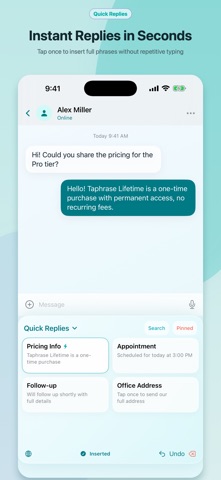
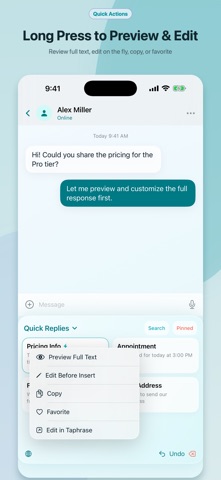
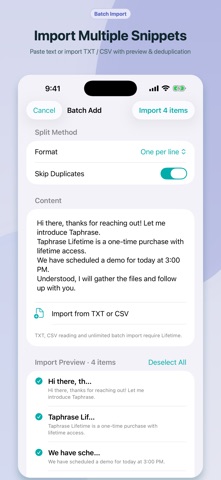
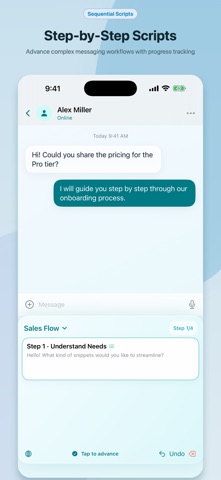
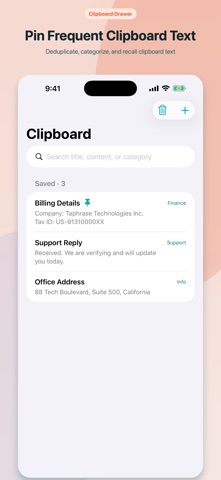
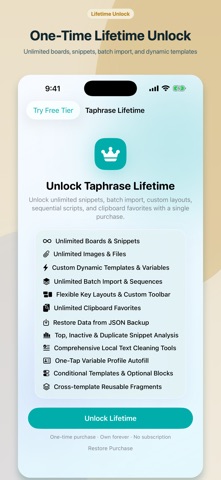
Tired of typing the same emails, answers, and messages over and over? Taphrase turns your frequent replies, customer responses, addresses, and dynamic templates into custom keyboard keys. Switch to Taphrase Keyboard in any app and insert full text blocks with a single tap. CORE FEATURES • One-Tap Insertion: Save phrases, FAQs, links, and long text as custom keyboard buttons. • Board Organization: Switch between Work, Sales, Support, and Personal boards from the keyboard. • Dynamic Templates: Fill in names, dates, amounts, or choices when inserting a message. • Bundled Templates: Start with ready-to-use greetings, meetings, appointments, follow-ups, and price quotes. • Search & Tags: Find snippets by title, content, tags, or aliases. • Sequential Scripts: Step through messaging workflows with quick next/previous navigation. • Clipboard Drawer: Pin frequent clipboard items on your device. • Rich Attachments: Organize images and documents for copy and system sharing. • Text Toolbox: Clean spaces, strip Markdown, change letter cases, reflow paragraphs, and mask phone numbers. • Variable Profiles & Fragments: Reuse profile details and modular text blocks across templates. • Usage Insights & Cleanup: See on-device usage estimates and consolidate duplicate content. PRIVACY & DATA OWNERSHIP Your snippets stay on your device. No account required. Snippets, profiles, and attachments are stored locally in the app and its App Group container. There are no ads, developer servers, or third-party tracking SDKs. Network activity is limited to Apple's StoreKit for purchases and user-initiated system sharing. PRICING The free tier includes up to 2 boards, 12 snippets, 2 attachments, bundled templates, and free export and restore of your own backups. A single Taphrase Lifetime purchase unlocks unlimited boards, snippets, attachments, custom dynamic templates, sequential scripts, and advanced organization. No subscription. Taphrase is a specialized snippet keyboard, not a replacement for your primary keyboard. Switch to Taphrase to insert snippets, then switch back using the Globe key. Restored content remains available to view, use, and export above the free limits; adding new items remains subject to the existing limits. A local recovery copy is saved before merging or replacing content. Unfinished drafts are excluded from complete backups.
What's new · 1.5.0
- Find and insert replies more easily with improved keyboard search and clearer results. - Undo now restores the original text when a snippet replaces a selection. - Enjoy clearer template panels, refined English labels, and improved dark-mode readability. - Get started with your own reply, and keep unfinished edits in local drafts. - Export and restore your own backups for free, with recovery copies before merging or replacing content. Restored content remains usable above the free limits; adding new items still follows the existing limits. Unfinished drafts are not included in complete backups.
Details