

Teezee — World Time
XenoCode Inc · Utilities
Independent analytics for this App Store listing. AppTracker is not affiliated with XenoCode Inc.
Chart standing · US
What changed · US
Listing changes AppTracker has observed for this app in this storefront — new versions, price moves, rating shifts, and store copy.
• Five new Shortcuts actions: check your city times, compare a moment, create shareable text, open your timeline at a chosen time, and get sunrise and sunset • Use your saved cities or choose cities for a shortcut, with local dates and UTC offsets in the results • Refined onboarding and a clearer lifetime-purchase screen across iPhone, iPad and Mac • Improved moment sharing and a smooth return to Now on Mac
Ratings breakdown · US
The star breakdown behind this app's rating in this storefront.
In-app purchases · US
What this app sells inside itself, grouped by kind and priced for this storefront.
Screenshots


Keywords this app targets
Search terms AppTracker associates with this app — estimates, not search volume. ❝ = in the app's title; a highlighted number is its current position for that term.
Similar apps
Competitors and close alternatives, as estimated by AppTracker.
 Timesewn
Adventure Apps, LLC
2 shared topics
Timesewn
Adventure Apps, LLC
2 shared topics
 World Clock Time Zone Widgets
Overdesigned, LLC
2 shared topics · 2 shared title words
World Clock Time Zone Widgets
Overdesigned, LLC
2 shared topics · 2 shared title words
 Alt Time: World Clock Widget
MMH Adventures LLC
Alt Time: World Clock Widget
MMH Adventures LLC
 Clocker App
Roman Romadin
Clocker App
Roman Romadin
 Flag Clock
Solid End LTD
2 shared topics
Flag Clock
Solid End LTD
2 shared topics
 Living Earth - Clock & Weather
Radiantlabs, LLC
1 shared topic
Living Earth - Clock & Weather
Radiantlabs, LLC
1 shared topic
 Weather Time Widget
LaunchSpace LLC
1 shared title word
Weather Time Widget
LaunchSpace LLC
1 shared title word
 World Time Scheduler
SpaceFrog Games, Inc.
World Time Scheduler
SpaceFrog Games, Inc.
About
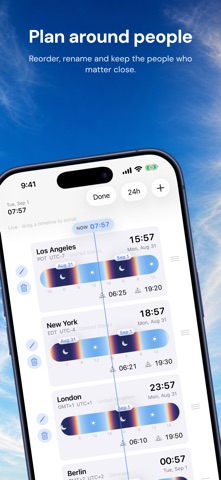
Free to download. Use one home city free; one lifetime purchase unlocks every city and platform. No subscription. Teezee shows every city you care about as a sky — a timeline painted with that city's real night, dawn, day, and dusk, computed from its actual sunrise and sunset. Line them up, and time-zone math disappears: one glance tells you it's breakfast in London, deep night in Los Angeles, and golden hour in Tokyo. Drag any timeline and every city scrubs together, so "does 9am Thursday work for Sydney?" is answered by sliding the cursor there and looking. Download Teezee free and keep using your home city. A one-time lifetime purchase unlocks unlimited cities, widgets, Apple Watch, the Mac menu bar, and every platform. Cities chosen during onboarding stay saved as locked previews until you decide. WHY TEEZEE • The sky is the interface — each bar sweeps through indigo night, violet dawn, gold sunrise, and blue noon exactly when that city does. You read the world's day at a glance, not in numbers. • Scrub time, not spreadsheets — swipe to slide the shared cursor minutes, hours, or days. Every city follows in lockstep. One tap snaps back to now. • Real sun times — sunrise and sunset for each city's actual location and date, visible right on the bar. • Home offsets — pick a home city and every other row shows its offset from home (−8h, +16h), the number you actually think in. • Menu bar clock (Mac) — every city's time one click away, without opening a window. Optionally show a chosen city's time right in the menu bar. • Keyboard-first (Mac) — arrow keys scrub, ⌘N adds a city, ⌘0 snaps back to now. • iCloud sync — your cities and preferences follow you across iPhone, iPad, Mac, and Vision Pro. • Current weather — see a small condition icon and local temperature for every city, or turn it off in Settings. • Spatial (Vision Pro) — pin the world's day to your wall in a glass window; look at a timeline and pinch-drag to scrub. • Your labels — rename "London" to "Alice (Eng)" and plan around people, not airports. • 12/24-hour time, seconds display, drag to reorder, light and dark mode. BUY ONCE, EVERYWHERE One purchase unlocks Teezee on iPhone, iPad, Mac, Apple Watch, and Apple Vision Pro. PRIVATE BY DESIGN No accounts, no ads, no personal profiles. Your city list stays on your devices and in your iCloud. Optional weather sends city coordinates only to Apple Weather; optional privacy-preserving usage counts never include city names. Both can be switched off in Settings. Made for people who live in several time zones at once — remote teams, distributed families, frequent flyers, and anyone tired of counting on their fingers.
What's new · 2.3
• Five new Shortcuts actions: check your city times, compare a moment, create shareable text, open your timeline at a chosen time, and get sunrise and sunset • Use your saved cities or choose cities for a shortcut, with local dates and UTC offsets in the results • Refined onboarding and a clearer lifetime-purchase screen across iPhone, iPad and Mac • Improved moment sharing and a smooth return to Now on Mac
Details