

Living Earth - Clock & Weather
Radiantlabs, LLC · Weather
Independent analytics for this App Store listing. AppTracker is not affiliated with Radiantlabs, LLC.
Chart standing · US
What changed · US
Listing changes AppTracker has observed for this app in this storefront — new versions, price moves, rating shifts, and store copy.
• Zoom in closer. The globe now shows far more detail in the land below. City lights come into focus on the night side, and clouds sharpen as you zoom in. • Hours under each day. The forecast's hourly list is back. Tap a day to open its hours right below it, and tap Details for the full day with its charts. • Borders and place names appear as you get closer. Tap a city's name to see the weather there. Choose how much to show in Settings > Borders & Names. • Find any place. Use Search to find any place on Earth, and the globe zooms in to show the weather there. Tap the card for the full forecast, then tap Add (+) to save it to Cities. • New controls. Search, Layers, Storms and Weather Labels are now in the More (⋯) menu on iPhone and the toolbar on iPad. • A bigger world on iPhone Duo. Unfold it and the Earth spreads out across the inner display. • Tip Jar. Every tip in Settings > Tip Jar sends up a rocket and helps keep Living Earth improving. • Also in this update: wind can show in Beaufort again. The clock, weather and menus work better with VoiceOver, Switch Control and larger text, and Living Earth opens faster. • If you have questions or issues, please reach out to us at support@radiantlabs.io.
Ratings breakdown · US
The star breakdown behind this app's rating in this storefront.
In-app purchases · US
What this app sells inside itself, grouped by kind and priced for this storefront.
Screenshots
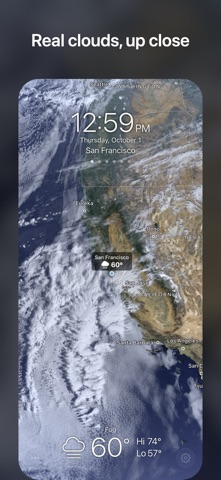


Keywords this app targets
Search terms AppTracker associates with this app — estimates, not search volume. ❝ = in the app's title; a highlighted number is its current position for that term.
Similar apps
Competitors and close alternatives, as estimated by AppTracker.
 Living Weather HD Live
Voros Innovation & Business Services Pty Ltd
1 shared topic · 2 shared title words
Living Weather HD Live
Voros Innovation & Business Services Pty Ltd
1 shared topic · 2 shared title words
 Living Weather HD Live +
Voros Innovation
1 shared topic · 2 shared title words
Living Weather HD Live +
Voros Innovation
1 shared topic · 2 shared title words
 eWeather HD - Weather & Alerts
Elecont LLC
1 shared topic · 1 shared title word
eWeather HD - Weather & Alerts
Elecont LLC
1 shared topic · 1 shared title word
 Hello Weather
Electric Dream Machine LLC
1 shared topic · 1 shared title word
Hello Weather
Electric Dream Machine LLC
1 shared topic · 1 shared title word
 Weather Gods
 Ltd
1 shared topic · 1 shared title word
Weather Gods
Weather Gods Ltd
1 shared topic · 1 shared title word
 Weather Cafe
Roger Schmidt
1 shared topic · 1 shared title word
Weather Cafe
Roger Schmidt
1 shared topic · 1 shared title word
 Weather Mate Pro - Forecast
DylogicApps Pvt Ltd
1 shared topic · 1 shared title word
Weather Mate Pro - Forecast
DylogicApps Pvt Ltd
1 shared topic · 1 shared title word
 Weather Live° - Local Forecast
Mosaic S.r.l.
1 shared topic · 1 shared title word
Weather Live° - Local Forecast
Mosaic S.r.l.
1 shared topic · 1 shared title word
About
Weather on a planetary scale: live clouds, storms and weather maps across a 3D Earth, with forecasts and a world clock for the cities you care about. “In a sea of more complicated and ambitious apps, Living Earth is beautifully simple.” - The New York Times “Living Earth is proof that a world clock and weather app can be beautiful.” - Apple, App Store “A stunning app that shows the Earth in real time, based on global weather reports.” - WIRED Insider, Must Have Apps FEATURES • Watch live clouds from near-real-time satellite data, updated every hour: global cloud patterns, hurricanes and tropical storms. • Pinch in from orbit for a closer look at clouds, mountains and coastlines. • Explore live and forecast weather maps of temperature, humidity and wind. • Check hourly and 10-day forecasts for any city on Earth. • Get notified as new tropical storms form and change strength. • See the Moon in its current phase, with the stars and the Milky Way all around. • Follow eclipses as they happen: the Moon's shadow sweeping across Earth, or the Moon turning deep red. Get notified when a total eclipse begins. • Wake up to the Earth with the Wake Alarm and its choice of gentle tones. • Keep your cities in sync through iCloud on iPhone and iPad, and in Living Earth for Mac. Private by design: no accounts, no ads, no tracking, and we never sell your data. Weather data from CustomWeather. Earth imagery from NASA, and cloud imagery from NOAA and the Japan Meteorological Agency. EMAIL US: support@radiantlabs.io FOLLOW US: x.com/livingearthapp
What's new · 4.50.1
• Zoom in closer. The globe now shows far more detail in the land below. City lights come into focus on the night side, and clouds sharpen as you zoom in. • Hours under each day. The forecast's hourly list is back. Tap a day to open its hours right below it, and tap Details for the full day with its charts. • Borders and place names appear as you get closer. Tap a city's name to see the weather there. Choose how much to show in Settings > Borders & Names. • Find any place. Use Search to find any place on Earth, and the globe zooms in to show the weather there. Tap the card for the full forecast, then tap Add (+) to save it to Cities. • New controls. Search, Layers, Storms and Weather Labels are now in the More (⋯) menu on iPhone and the toolbar on iPad. • A bigger world on iPhone Duo. Unfold it and the Earth spreads out across the inner display. • Tip Jar. Every tip in Settings > Tip Jar sends up a rocket and helps keep Living Earth improving. • Also in this update: wind can show in Beaufort again. The clock, weather and menus work better with VoiceOver, Switch Control and larger text, and Living Earth opens faster. • If you have questions or issues, please reach out to us at support@radiantlabs.io.
Details