

Spendulum
Srivatsa Kulkarni · Finance
Independent analytics for this App Store listing. AppTracker is not affiliated with Srivatsa Kulkarni.
Chart standing · US
What changed · US
Listing changes AppTracker has observed for this app in this storefront — new versions, price moves, rating shifts, and store copy.
Bug fixes and UI enhancements
In-app purchases · US
No in-app purchases.
Screenshots






Keywords this app targets
Search terms AppTracker associates with this app — estimates, not search volume. ❝ = in the app's title; a highlighted number is its current position for that term.
Similar apps
Competitors and close alternatives, as estimated by AppTracker.
 Spendy - Expense Tracker Diary
dasol kim
2 shared topics
Spendy - Expense Tracker Diary
dasol kim
2 shared topics
 Quanto: Expense Tracker
Alejandro Ausejo
2 shared topics
Quanto: Expense Tracker
Alejandro Ausejo
2 shared topics
 Fin: Budget Planner App
Thomas Brandstaetter e.U.
2 shared topics
Fin: Budget Planner App
Thomas Brandstaetter e.U.
2 shared topics
 Spendy - Spendings reimagined
Bezhan Odinaev
2 shared topics
Spendy - Spendings reimagined
Bezhan Odinaev
2 shared topics
 SyncSpend
Toh Kar Le
2 shared topics
SyncSpend
Toh Kar Le
2 shared topics
 Expenses: Spending Tracker
BLUE COMET LABS LLC
1 shared topic
Expenses: Spending Tracker
BLUE COMET LABS LLC
1 shared topic
 CoreSpend: Budget Tracker
Dimitar Germanov
1 shared topic
CoreSpend: Budget Tracker
Dimitar Germanov
1 shared topic
 Expense Tracker: Budget AI
Aleksandr Gostiuzhev
1 shared topic
Expense Tracker: Budget AI
Aleksandr Gostiuzhev
1 shared topic
About
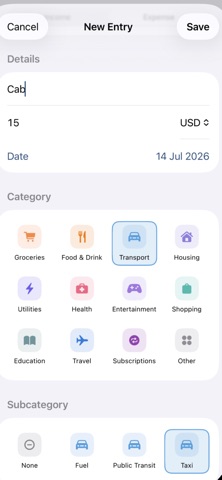
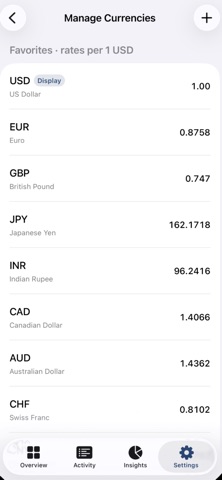
Spendulum is a simple, private income and expense tracker for iPhone. Built with SwiftUI and SwiftData, everything stays on your device — with optional iCloud sync across your own devices. OVERVIEW • Monthly net balance at a glance • Income and expense flows for the selected month • “Where it went” category breakdown • Recent activity and month-to-month navigation ACTIVITY • Every entry grouped by day • Search by title, category, or subcategory • Filter by income, expense, month or year • Swipe to delete, tap to edit INSIGHTS • 6-month income vs expense bar chart • Per-category spending donut for any month • Drill into subcategories and individual transactions • Use AI assistant to get insights from your data ADD & EDIT • Type, amount, date, category (icon grid), subcategory (icon grid), and note • Attach receipt photos, screenshots, or files • Multi-currency: enter in any favorite currency; summaries convert using live rates • Lock in the exchange rate when you add a transaction so history stays accurate AI QUICK ADD (on-device) • Type or dictate a sentence and get a structured transaction draft • Scan a receipt or payment screenshot — OCR + on-device AI extract title, amount, type, and category • Photo is attached to the new entry • Uses Apple’s on-device models where available; no account or subscription required for AI features SIRI & SHORTCUTS • “Add an expense in Spendulum” • “Scan a receipt in Spendulum” • Share a screenshot or photo into a Shortcut that runs Spendulum’s Add from Photo intent CATEGORIES & SETTINGS • Full category and subcategory management (icons and colors) • Choose display currency and manage your shortlist of favorites • Theme color and light / dark / system appearance • Load sample data to explore, or wipe transactions when you want a clean slate PRIVACY • Local SwiftData store • Optional private CloudKit sync (your iCloud account only) • Camera, microphone, and speech recognition only when you use those features • No third-party analytics or accounts required Requirements: iOS 17 or later. On-device AI Quick Add needs an Apple Intelligence–eligible device running a supported OS version.
What's new · 1.3.5
Bug fixes and UI enhancements
Details