

Pencil Notes: Handwriting
Kliv Spahiu · Productivity
Independent analytics for this App Store listing. AppTracker is not affiliated with Kliv Spahiu.
Chart standing · US
What changed · US
Listing changes AppTracker has observed for this app in this storefront — new versions, price moves, rating shifts, and store copy.
### What's New • Write directly on imported PDFs and images with Apple Pencil • Improved writing and annotation experience • Fixed bugs and improved overall stability Thanks for using Pencil Notes!
Price & rating history · US
Reconstructed from the listing changes AppTracker has observed in this storefront. A field is charted once it has changed more than once, and each line starts at the value it moved from.
Price · 1.99 USD now · 5 changes on record
In-app purchases · US
No in-app purchases.
Screenshots


Similar apps
Competitors and close alternatives, as estimated by AppTracker.
 Simple Sketchbook
Duncan Pollock
Simple Sketchbook
Duncan Pollock
 Simple Sketch
Manicgrin Media Ltd
Simple Sketch
Manicgrin Media Ltd
 Freenotes®: AI Notes Taking
FREENOTES AI PTE. LTD.
Freenotes®: AI Notes Taking
FREENOTES AI PTE. LTD.
 Notes+ : Notes for Pencil
SINGFISH PTE. LTD.(SG)
Notes+ : Notes for Pencil
SINGFISH PTE. LTD.(SG)
 Notability: AI Notes & Planner
Ginger Labs
Notability: AI Notes & Planner
Ginger Labs
 Handwritten Quick Notes
Digital Hole Pvt. Ltd.
Handwritten Quick Notes
Digital Hole Pvt. Ltd.
 Goodnotes: AI Notes, Docs, PDF
Goodnotes Limited
Goodnotes: AI Notes, Docs, PDF
Goodnotes Limited
 Notes Writer Pro: Beyond PDFs
Kairoos Solutions SL
Notes Writer Pro: Beyond PDFs
Kairoos Solutions SL
About
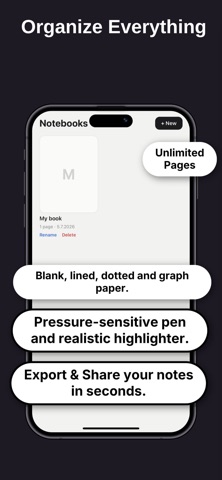
# Pencil Notes — Your Simple Apple Pencil Notebook Turn your iPad into a simple, distraction-free notebook designed for Apple Pencil. Write naturally, organize your ideas, annotate documents, and export your work — all without subscriptions or complicated setup. ## WRITE NATURALLY Pencil Notes is built around the feeling of writing on real paper. • Write with Apple Pencil • Create unlimited notebooks and pages • Choose blank, lined, dotted, or grid paper • Use a pressure-sensitive pen • Highlight important ideas • Undo and redo with ease • Zoom and pan while writing Whether you're taking notes, planning your day, journaling, brainstorming, or simply sketching, Pencil Notes keeps things simple. ## WRITE ON PDFs Import a PDF and write directly on it with Apple Pencil. Highlight text, add handwritten notes, draw, underline, circle important information, and mark up documents naturally. Perfect for: • Study materials • Lecture notes • Work documents • Forms and worksheets • Research papers • Presentations • Personal documents ## ANNOTATE IMAGES Import an image and use your Apple Pencil to write, draw, mark up, or add notes directly on it. ## EXPORT YOUR WORK When you're finished, export your handwritten pages, PDF annotations, or marked-up images and share them wherever you need. ## PRIVATE BY DESIGN Your notes stay on your iPad. No account required. No subscription. No cloud storage. No ads. Just open the app and start writing. ## MADE FOR EVERYDAY USE Use Pencil Notes for: • Class and lecture notes • Meetings • To-do lists • Journaling • Planning • Brainstorming • Sketching • PDF annotation • Document markup • Personal notes ## SIMPLE BY CHOICE Pencil Notes isn't trying to replace every app on your iPad. It's a simple place to write. Open it. Pick a page. Grab your Apple Pencil. Start writing. **Pencil Notes is available for a one-time purchase — no recurring subscription.**
What's new · 1.0.2
### What's New • Write directly on imported PDFs and images with Apple Pencil • Improved writing and annotation experience • Fixed bugs and improved overall stability Thanks for using Pencil Notes!
Details