

Simple Sketch
Manicgrin Media Ltd · Graphics & Design
Independent analytics for this App Store listing. AppTracker is not affiliated with Manicgrin Media Ltd.
Chart standing · US
Ratings breakdown · US
The star breakdown behind this app's rating in this storefront.
In-app purchases · US
No in-app purchases.
Screenshots


Keywords this app targets
Search terms AppTracker associates with this app — estimates, not search volume. ❝ = in the app's title; a highlighted number is its current position for that term.
Similar apps
Competitors and close alternatives, as estimated by AppTracker.
 Simple Sketchbook
Duncan Pollock
Simple Sketchbook
Duncan Pollock
 Tayasui Sketches
SKETCHES SRL
1 shared topic
Tayasui Sketches
SKETCHES SRL
1 shared topic
 Procreate
Savage Interactive Pty Ltd
1 shared topic
Procreate
Savage Interactive Pty Ltd
1 shared topic
 Sketch Clean
Robert Katona
1 shared title word
Sketch Clean
Robert Katona
1 shared title word
 Sketchbook®
Sketchbook, Inc
1 shared topic
Sketchbook®
Sketchbook, Inc
1 shared topic
 Asketch
Andrew Kern
2 shared topics
Asketch
Andrew Kern
2 shared topics
 Sketch Club
blackpawn.com
1 shared title word
Sketch Club
blackpawn.com
1 shared title word
 Drawing Desk: Sketch Paint Art
Farida Afrose
1 shared title word
Drawing Desk: Sketch Paint Art
Farida Afrose
1 shared title word
About
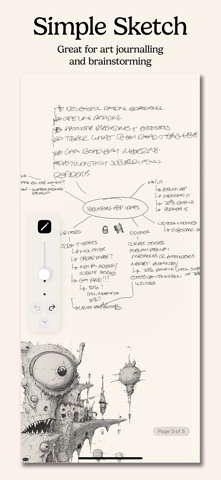
Transform your iPad, iPhone, or Mac into a powerful digital sketchbook with Simple Sketch, the intuitive drawing app designed for artists, designers, students, and anyone who loves to create. Pure Drawing Experience Simple Sketch offers a distraction-free drawing environment with a large canvas that lets your creativity flow without boundaries. Whether you're sketching quick ideas, creating detailed illustrations, brainstorming new ideas, or taking visual notes, our clean interface keeps you focused on what matters most - your art. Professional Drawing Tools - Pencil Tool: Range of pencil types from 6H to 6B for sketching and shading - Pen Tool: Precise fine-liner for clean lines and detailed work - Smart Eraser: Vector-based erasing for smooth corrections - Adjustable Tool Sizes: From fine details to bold strokes Precision Drawing Guides Take your sketches to the next level with built-in drawing guides: - Grid Guide: Perfect dots for proportional drawing - Graph Paper: Major and minor grid lines for technical sketches - Line Guide: Horizontal guides for writing and sketching - Isometric Guide: 3D perspective drawing made simple Multi-Page Sketchbook Organize your ideas across unlimited pages with intuitive navigation. Add new pages instantly, jump between sketches with the table of contents, and never lose track of your creative process. Intelligent Input Modes - Apple Pencil Mode: Dedicated pencil-only input for iPad artists - Universal Mode: Works with any input method on all devices - Auto-detection: Optimizes for your device automatically Effortless Organization - Auto-save: Never lose your work again - Unlimited Undo/Redo: Experiment fearlessly - Page Management: Add, delete, and rearrange pages with ease - Zoom & Pan: Infinite canvas with smooth navigation Cross-Platform Creativity Whether you're using an iPad with Apple Pencil for detailed artwork, an iPhone for quick sketches on the go, or a Mac for precise digital illustration, Simple Sketch adapts to your workflow seamlessly. Perfect For: - Artists & Illustrators: Professional-grade tools in a simple package - Students: Note-taking with visual elements and diagrams - Designers: Quick mockups and wireframes - Engineers: Technical drawings with precision guides - Anyone: Who loves to draw, doodle, or visualize ideas Get Simple Sketch today and rediscover the joy of drawing digitally. Your next masterpiece is just a tap away. No ads, no subscription!
What's new · 1.2
Bug fixes, pencil tool improvements – added a grade selector (6H, 4H, 2H, HB, 2B, 4B, 6B), improved performance & code quality, UX improvements, including: * Zoom reset – Tapping the zoom percentage label resets to 100%. * Pencil-only mode indicator – A small "Pencil only" badge now appears near the page indicator on iPad when that mode is active. * Input mode persisted – The pencil-only / any-input preference is now saved and restored between sessions. * Accessibility labels – Added VoiceOver labels to all interactive controls (tools, undo/redo, sliders, page indicator, export, minimise/expand, guide, input mode). * Rebuilt grid system to properly zoom in and out and maintain alignment with drawings.
Details