

Matchabook - Matcha Journal
ChienHsiang Yin · Food & Drink
Independent analytics for this App Store listing. AppTracker is not affiliated with ChienHsiang Yin.
Chart standing · US
What changed · US
Listing changes AppTracker has observed for this app in this storefront — new versions, price moves, rating shifts, and store copy.
This update helps you understand your own taste — and explore it with fellow lovers: ■ Rate every label Capture what you think with a star rating and whether you'd buy it again, then go deeper with a five-axis taste radar: umami, sweetness, bitterness, aroma and texture. ■ See everyone's matcha The most-enjoyed and highest-rated labels at a glance, with your own rating and taste radar set against the community average. Community stats are anonymous and off by default — joining in is entirely your choice. (Full rankings and comparison are Pro.) ■ Keep a memory when a tin is done Finish a tin and write a farewell note, add a keepsake photo, and archive it to the new Memories tab to revisit anytime. ■ Record water temperature Note the brewing temperature for every bowl, in °C or °F. Plus many interface refinements for smoother logging.
In-app purchases · US
What this app sells inside itself, grouped by kind and priced for this storefront.
Screenshots






Similar apps
Competitors and close alternatives, as estimated by AppTracker.


About
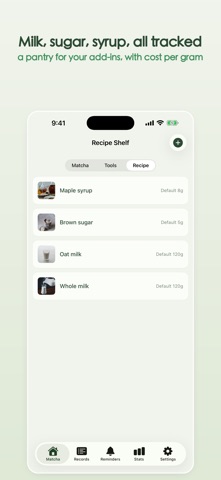
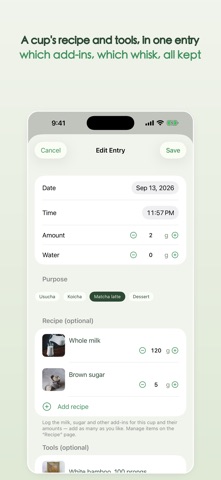
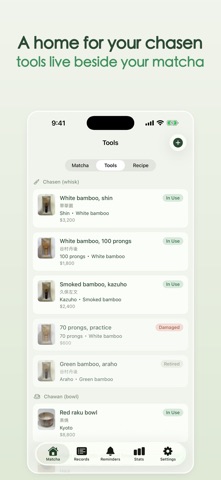
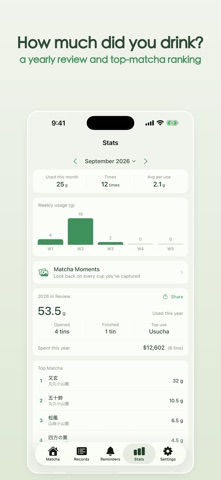
A gentle journal for the matcha you love. Matchabook is a journal for matcha lovers. From the day you open a tin, it records every gram, note, and best-by date — and reminds you to "drink this one first" before it's past its prime. ■ A file for every tin Snap a photo, pick the label, and note the date acquired, net weight, and opening date. A built-in catalog of 120+ meisho from 11 Japanese makers (Marukyu Koyamaen, Ippodo, Nakamura Tokichi and more), plus your own. Organize labels by category and brand, and optionally share custom labels anonymously or download others' (off anytime). Shoot a label once; new tins reuse the photo. Add custom categories beyond matcha, record purchase and list prices in their own currencies, and duplicate a tin in a tap. ■ Log every bowl in one tap Usucha, koicha, matcha latte, or dessert — record the grams you used and the brewing temperature (°C or °F) in a tap, and add photos and videos with a cover in a tap. See what's left and how many days since opening, and filter My Shelf to available tins. ■ Rate every label Capture your taste with a star rating and repurchase intent, then go deeper with a five-axis radar: umami, sweetness, bitterness, aroma and texture. ■ See everyone's matcha (some Pro) The most-enjoyed and highest-rated labels at a glance, with your rating and taste radar set against the community average. Community stats are anonymous and off by default — joining in is your choice (rankings and comparison are Pro). ■ Keep a memory when a tin is done Finish a tin, write a farewell note, add a keepsake photo, and archive it to the Memories tab. ■ Calendar and shareable snapshots Switch Records to a calendar for each day's matcha and photos. Tap a record for a clean snapshot, zoom photos full screen, and make a share card in a tap. ■ Recipes and cost per cup Save recipes you make often (milk, sugar, cocoa…) with a default amount. Each entry can pair recipes and tools, and Matchabook estimates the cost per cup from tin and recipe unit prices. ■ Never miss a date Matchabook computes the best-enjoyed window after opening and the best-before date while sealed, then reminds you by the days — and time — you choose. ■ Home Screen widgets Freshness Countdown shows the most urgent tin's days left; Matcha Shelf lists tins — tap for details or log usage; Matcha Memories resurfaces past photos. ■ A tool shelf for your chasen and chawan Catalog your chasen, chawan, chashaku and more — with a photo, the maker or kiln, the date and the price. Record a chasen by its real name, browse built-in Takayama makers and kilns, and mark pieces In Use, Collected, Damaged, Lost or Retired. Five tools free, unlimited with Pro. ■ Dark appearance · themes · CSV (Pro) Follow the system or lock light or dark. Seven themes, plus CSV export of your usage log — both Pro. ■ See your matcha year (Pro) Monthly totals and weekly trends are free. Upgrade to Pro for a yearly review and a top-matcha ranking. ■ Privacy first No sign-up, no login — just open and go. The matcha you record lives on your device and syncs through your own iCloud account: the data stays in your private iCloud database, we can't reach it, and you can turn syncing off anytime. To keep the app stable, Matchabook uses Google Firebase for anonymous crash diagnostics and aggregate usage info — nothing that identifies you, never used for ad tracking, never sold. "Help improve the label database" and community stats are both off by default and opt-in: when on, only anonymous label text or aggregate consumption and ratings are shared, never your photos or personal records. Available in English, 繁體中文, and 日本語. Matchabook Pro is a one-time purchase that unlocks unlimited tins and tools, video, custom categories, all themes, CSV export, advanced stats, and community rankings. Privacy Policy: https://seanseanyin.github.io/matchabook-site/privacy-en.html Terms of Use (EULA): https://www.apple.com/legal/internet-services/itunes/dev/stdeula/
What's new · 1.10.0
This update helps you understand your own taste — and explore it with fellow lovers: ■ Rate every label Capture what you think with a star rating and whether you'd buy it again, then go deeper with a five-axis taste radar: umami, sweetness, bitterness, aroma and texture. ■ See everyone's matcha The most-enjoyed and highest-rated labels at a glance, with your own rating and taste radar set against the community average. Community stats are anonymous and off by default — joining in is entirely your choice. (Full rankings and comparison are Pro.) ■ Keep a memory when a tin is done Finish a tin and write a farewell note, add a keepsake photo, and archive it to the new Memories tab to revisit anytime. ■ Record water temperature Note the brewing temperature for every bowl, in °C or °F. Plus many interface refinements for smoother logging.
Details