

BeanBook: Coffee Tracker
Bitlever, LLC · Food & Drink
Independent analytics for this App Store listing. AppTracker is not affiliated with Bitlever, LLC.
Chart standing · US
What changed · US
Listing changes AppTracker has observed for this app in this storefront — new versions, price moves, rating shifts, and store copy.
New - Café Map: See every café you've checked in at on one map, with your brew count for each. - Precise Dosing: Dial in your dose to a tenth of a gram, with the same step switch as grind settings. - Duplicate Brew Setup: Repeat a favorite brew without re-entering its settings (Pro). - Duplicate Recipe: Copy a recipe to tweak your own version (Pro). - Cards show the roaster logo, bean and brewer in one picture strip. - Note Titles: Write your own note in place of the generated title, right on the create sheet. Updated - Smarter Brew Log: New brews start from your last setup with the same brewer, so there's less to fill in. - My Beans remembers your filter after you close the app. - Bean, Gear and Recipe pages gather their actions under one ⋯ More menu. - Brew Log cards lead with your own note when you wrote one. - Cards show the roaster logo, bean and brewer in one picture strip. - Delete a sample bean, gear, recipe or brew log in one tap from its badge. - Duplicate bean is now a Pro feature. Fixes -New brews no longer pick two default brewers, and water follows the dose you start with. -Remaining Coffee explains an overrun and offers one-tap Auto Adjust to fix it. -A My Beans label filter no longer disappears after you relaunch the app. -My Beans and Brews no longer drop down on open; the spinner shows only when you pull to refresh. -Deleting a recipe closes its page once and reports a failed delete. -The Brew Log create sheet's In Use Beans refresh every time you open it. -Bean, Gear and Recipe Pro attribute sheets show the Pro badge, not a lock, for Pro users. -The overall score and Remaining Coffee accept a decimal you start typing, like ".5". -Your yearly summary counts each tasting note once per bag.
Price & rating history · US
Reconstructed from the listing changes AppTracker has observed in this storefront. A field is charted once it has changed more than once, and each line starts at the value it moved from.
Average rating · ★ 4.86 now · 6 changes on record
Ratings breakdown · US
The star breakdown behind this app's rating in this storefront.
In-app purchases · US
What this app sells inside itself, grouped by kind and priced for this storefront.
Screenshots




Keywords this app targets
Search terms AppTracker associates with this app — estimates, not search volume. ❝ = in the app's title; a highlighted number is its current position for that term.
Similar apps
Competitors and close alternatives, as estimated by AppTracker.
 Coffee Bean Tracker - Vault
Julian Beck
2 shared title words
Coffee Bean Tracker - Vault
Julian Beck
2 shared title words
 Beanstats - Coffee Tracker
Marcel Blijleven
3 shared title words
Beanstats - Coffee Tracker
Marcel Blijleven
3 shared title words
 Brewio: Coffee Journal & Timer
Emrah Anil
Brewio: Coffee Journal & Timer
Emrah Anil
 iBrewCoffee - Coffee Journal
Stanislav Novacek
1 shared title word
iBrewCoffee - Coffee Journal
Stanislav Novacek
1 shared title word
 Coffee Buff
Taito Iikura
1 shared title word
Coffee Buff
Taito Iikura
1 shared title word
 Coffi - Coffee Tracker
Coffi, LLC
Coffi - Coffee Tracker
Coffi, LLC
 Coffee Profile
Keiichi Ota
1 shared topic · 1 shared title word
Coffee Profile
Keiichi Ota
1 shared topic · 1 shared title word
 Coffee Brew Log: Barista
MD Shahariar Nazim Joy
1 shared title word
Coffee Brew Log: Barista
MD Shahariar Nazim Joy
1 shared title word
About
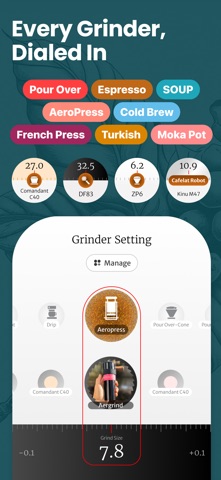
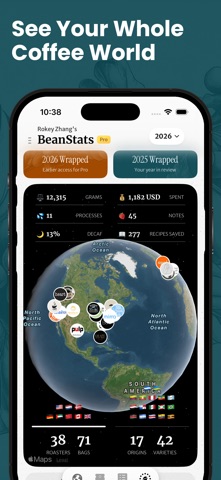
BeanBook is a free coffee app for specialty coffee lovers. Keep a coffee journal, organize your beans with a coffee tracker, explore coffee recipes, and discover coffee deals from specialty roasters. Remember what made each cup great. Save your photos, tasting notes, grind settings and brewing details together, from your morning pour-over to a memorable café visit. YOUR COFFEE JOURNAL - Record home brews and café visits with photos, notes and ratings. - Track dose, ratio, grind, water temperature and brew time. - Attach beans, Gear and recipes to each Brew Log. - Customize sections and backgrounds to make the journal your own. - Changes save as you edit. - Revisit your cups in list or grid view and track your week in coffee. YOUR COFFEE TRACKER - Scan coffee bags with AI to fill in the roaster, origin, process and tasting notes. - Track roast dates, resting time and how each bag is aging. - Pause the roast clock while a bag is frozen. - Match your beans to jars with numbered or custom container labels. - Remember your favorite coffees and keep a history of finished bags. EXPLORE COFFEE RECIPES - Discover brewing methods and save your own coffee recipes. - Keep dose, ratio, grind settings and temperature ready for your next brew. - Start a Brew Log from a saved recipe. - Calculate water amounts for two to five pours with Brew Calculator. - Follow your brew with the built-in timer. Find recipes for Hario V60, AeroPress, Hario Switch, OXO Rapid Brewer, V60 NEO, NextLevel Pulsar, Deep27, Origami, Orea, Chemex, French Press and Cezve. Explore recipes from coffee professionals including James Hoffmann, Tetsu Kasuya, Lance Hedrick, Scott Rao, The Coffee Chronicler, April Coffee Roasters and World Brewers Cup champions. EXPLORE COFFEE DEALS AND NEW DROPS - Discover coffee deals and new releases from specialty roasters. - Browse beans by origin, process and flavor. - Find new roasters and revisit your favorites. YOUR COFFEE GEAR - Organize grinders, brewers, kettles and scales with photos, notes and ratings. - Save grinder settings for the coffees you brew. - Find related Brew Logs on bean and Gear pages. - Keep a wish list for your next setup. BEANBOOK AI - Scan bags to spend less time entering coffee details. - Ask about origins, processing, flavor notes and brewing techniques. - Get suggestions for grind size, temperature, resting time and extraction. TRY IT WITH SAMPLE BEANS - Get started with sample beans and explore Pro features before adding your own coffee. FREE TO START BeanBook is a free coffee app with optional Pro features. Keep up to 10 fully unlocked Brew Logs on the free plan, plus unlimited basic logs with photos, notes, beans, locations and overall ratings. BeanBook Pro unlocks unlimited beans, recipes and Gear, plus advanced Brew Log features beyond the free allowance. Brew, taste, remember. Keep your coffee journey in BeanBook. Terms of Service: https://beanbook.app/terms-of-service Privacy Policy: https://beanbook.app/policy
What's new · 1.9.9
New - Café Map: See every café you've checked in at on one map, with your brew count for each. - Precise Dosing: Dial in your dose to a tenth of a gram, with the same step switch as grind settings. - Duplicate Brew Setup: Repeat a favorite brew without re-entering its settings (Pro). - Duplicate Recipe: Copy a recipe to tweak your own version (Pro). - Cards show the roaster logo, bean and brewer in one picture strip. - Note Titles: Write your own note in place of the generated title, right on the create sheet. Updated - Smarter Brew Log: New brews start from your last setup with the same brewer, so there's less to fill in. - My Beans remembers your filter after you close the app. - Bean, Gear and Recipe pages gather their actions under one ⋯ More menu. - Brew Log cards lead with your own note when you wrote one. - Cards show the roaster logo, bean and brewer in one picture strip. - Delete a sample bean, gear, recipe or brew log in one tap from its badge. - Duplicate bean is now a Pro feature. Fixes -New brews no longer pick two default brewers, and water follows the dose you start with. -Remaining Coffee explains an overrun and offers one-tap Auto Adjust to fix it. -A My Beans label filter no longer disappears after you relaunch the app. -My Beans and Brews no longer drop down on open; the spinner shows only when you pull to refresh. -Deleting a recipe closes its page once and reports a failed delete. -The Brew Log create sheet's In Use Beans refresh every time you open it. -Bean, Gear and Recipe Pro attribute sheets show the Pro badge, not a lock, for Pro users. -The overall score and Remaining Coffee accept a decimal you start typing, like ".5". -Your yearly summary counts each tasting note once per bag.
Details