

VanReceipts
Turnstile Lab · Finance
Independent analytics for this App Store listing. AppTracker is not affiliated with Turnstile Lab.
Chart standing · US
What changed · US
Listing changes AppTracker has observed for this app in this storefront — new versions, price moves, rating shifts, and store copy.
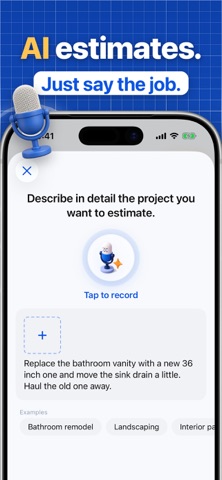
New in this update: AI estimate from Home. Tap AI estimate at the top of Home to price a job straight away. Job pictures on estimates and invoices. Add your finished job pictures to an estimate or invoice. The client sees the before and the after. See your words as you talk. Talk to describe an estimate or a logo. Your words appear as you speak, and nothing is sent until you are ready. A new AI logo designer. Describe your mark, flip through the designs, and crop the one you like. Find it in Settings, under Business information. Also: the app opens without waiting for the network, works better with a weak signal, and keeps your work when you go offline. Plus many small fixes.
In-app purchases · US
What this app sells inside itself, grouped by kind and priced for this storefront.
Screenshots





Similar apps
Competitors and close alternatives, as estimated by AppTracker.
 Receipt Scanner: Money Tracker
Suzait Ali
Receipt Scanner: Money Tracker
Suzait Ali
 Receeto: AI Receipt Scanner
Mohit Gaddam
Receeto: AI Receipt Scanner
Mohit Gaddam
 PocketReceipt: UK Tax Receipts
REMUS-DAN PANTEA
PocketReceipt: UK Tax Receipts
REMUS-DAN PANTEA
 Receipt Scanner: Expenses
Artiom Gaureac
Receipt Scanner: Expenses
Artiom Gaureac
 Shoeboxed: Receipt Scanner
Shoeboxed.com
Shoeboxed: Receipt Scanner
Shoeboxed.com
 Receiptive
Adityo Rancaka
Receiptive
Adityo Rancaka
 Smart Receipt Scan: Receiptly
Karmjit Singh
Smart Receipt Scan: Receiptly
Karmjit Singh
 Receipt Vault: Expense Scanner
Rafal Zbikowski
Receipt Vault: Expense Scanner
Rafal Zbikowski
About
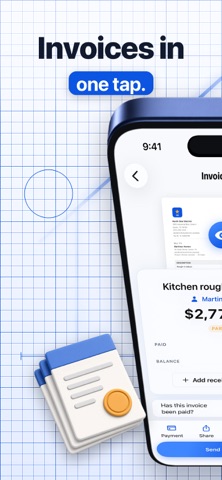
Know what every job actually made you. VanReceipts turns a receipt into job profit. Snap it from the front seat. AI reads the vendor, date, and total on your phone. For a faded or crumpled receipt, cloud AI pulls out every line item. You confirm, and the cost files to the right job. No typing. No shoebox. No spreadsheet. LOOK AROUND FIRST After setup, browse Home, jobs, invoices, and accounting with sample jobs. Subscribe when you are ready. Sample jobs leave the phone the moment Pro starts, so they never mix with your real clients or iCloud books. HOW IT WORKS - Add a job in ten seconds: client, dates, and what you are billing. - Scan every receipt. You confirm before anything saves. - Materials, fuel, labour, and mileage come off the job's billed amount, live. Every job shows net profit and margin. INVOICES AND ESTIMATES - Build from the labour and materials you already tracked. - Instant estimates with AI: say the job or add photos. You check every price before you send. - Send a professional PDF. Request payment on the invoice. The client pays you. No VanReceipts cut. - Mark payments and keep balances clear. - Share an online quote. The client accepts it on their phone, with an optional deposit. - One pay link and QR code per invoice. It always shows what is owed now. - Export every job to Excel or CSV, or send your accountant a monthly pack. MILEAGE - Log From and To, or type the distance yourself. - Trips land on the job and roll into accounting. BUILT FOR THE TRADES - Per-job profit and margin, not just a year-end total. - Track your crew and their real hourly labour cost per job. - Made for the van: fast, one-handed, and it works offline. - English, Spanish, French, German, and Dutch. Money uses your region's separators. PRIVATE BY DEFAULT VanReceipts reads receipts on your phone. For Pro, a receipt image, or an estimate description and photos, may be sent over a secure connection to our cloud AI service. You confirm before save. Location is used only when you ask to fill a job address or the start of a trip. Never in the background. Never on scan. VANRECEIPTS PRO A 3-day free trial on yearly, then the full toolkit: - Receipt scans and cloud AI itemization - Instant estimates with AI - Invoice payment links. The client pays you. No VanReceipts cut - Crew and real labour cost per job - Full profit history - iCloud sync across your devices Pricing: 14.99 USD per month, or 99.99 USD per year (best value). 3-day free trial on yearly. Monthly starts when you subscribe. Cancel anytime. Payment is charged to your Apple Account. Subscriptions renew automatically unless cancelled at least 24 hours before the end of the current period. Manage or cancel in your App Store account settings after purchase. Terms of Use: https://vanreceipts.app/terms Privacy Policy: https://vanreceipts.app/privacy Know your profit before you have packed the van.
What's new · 1.2.13
New in this update: AI estimate from Home. Tap AI estimate at the top of Home to price a job straight away. Job pictures on estimates and invoices. Add your finished job pictures to an estimate or invoice. The client sees the before and the after. See your words as you talk. Talk to describe an estimate or a logo. Your words appear as you speak, and nothing is sent until you are ready. A new AI logo designer. Describe your mark, flip through the designs, and crop the one you like. Find it in Settings, under Business information. Also: the app opens without waiting for the network, works better with a weak signal, and keeps your work when you go offline. Plus many small fixes.
Details