

ReceiTracker: Receipt Scanner
HIROKI MURAI · Finance
Independent analytics for this App Store listing. AppTracker is not affiliated with HIROKI MURAI.
Chart standing · US
What changed · US
Listing changes AppTracker has observed for this app in this storefront — new versions, price moves, rating shifts, and store copy.
Make everyday tracking feel more like you. • New Themes & Companions: choose backgrounds, colors, and a companion for your progress path • Original floral patterns, scenic backgrounds, and your own photos, with adjustable accent colors and companion sizes • Improved background visibility in Dark Mode • A larger Scan label and camera icon • Import & scan next to keep recording receipts • Review possible duplicates in History; the button appears only when candidates exist • Support for Traditional Chinese (Taiwan)
Price & rating history · US
Reconstructed from the listing changes AppTracker has observed in this storefront. A field is charted once it has changed more than once, and each line starts at the value it moved from.
Price · 1.99 USD now · 4 changes on record
In-app purchases · US
What this app sells inside itself, grouped by kind and priced for this storefront.
Screenshots





Similar apps
Competitors and close alternatives, as estimated by AppTracker.
 Receeto: AI Receipt Scanner
Mohit Gaddam
Receeto: AI Receipt Scanner
Mohit Gaddam
 Smart Receipt: Scan & Track
Glayzer LLC
Smart Receipt: Scan & Track
Glayzer LLC
 ReceiptPocket: Receipt Scan
Naoki Takahashi
ReceiptPocket: Receipt Scan
Naoki Takahashi
 Receiptive
Adityo Rancaka
Receiptive
Adityo Rancaka
 Receipt Organizer・ReceiptGenie
Botisan AI Pte. Ltd.
Receipt Organizer・ReceiptGenie
Botisan AI Pte. Ltd.
 Smart Receipts: Scan & Track
Ramkumar Vellaisamy
Smart Receipts: Scan & Track
Ramkumar Vellaisamy
 Receipt Scanner: Expenses
Artiom Gaureac
Receipt Scanner: Expenses
Artiom Gaureac
 Grocery Tracker: Receipt Scan
Nemanja Pecanin
Grocery Tracker: Receipt Scan
Nemanja Pecanin
About
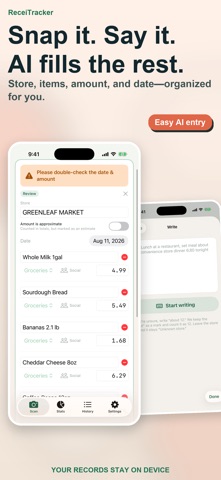
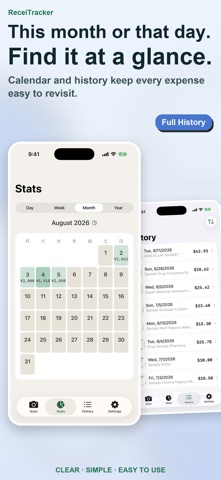
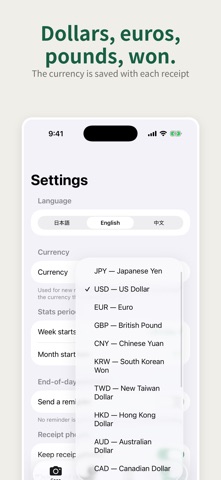
Your everyday expenses. Your favorite view. ReceiTracker is a receipt and expense tracker with no bank linking. Enter an expense by hand, or use photos, voice, and text with ReceiTracker Pro. Build a recording habit at your own pace. MAKE IT YOURS Choose soft colors, original floral patterns, scenic photos, or bold color combinations. Use your own photo as a background, too. Pick a person, a hand-drawn car, or a dog for your progress path. Adjust the accent color and companion size to make it your own. Find your combination in Settings → Themes & Companions. MANUAL ENTRY, PLUS OPTIONAL AI Manual entry has no entry-count limit. ReceiTracker Pro turns receipt photos, transcribed speech, and typed text into expense records. Check the scan result, then choose “Import & scan next” to keep recording receipts. REVIEW POSSIBLE DUPLICATES When records share the same date, total, and currency, History shows a button to review possible duplicates. Compare their details and choose whether to delete an entry. Candidates are suggestions, not confirmed duplicates. SEE YOUR RECORDS CLEARLY Review spending in charts and the calendar, and build progress through days recorded. The base app includes history for your current accounting month. Adjust the month's starting day to suit your routine. CHOOSE YOUR EXTRAS Full History is a one-time, non-consumable In-App Purchase that unlocks all history and past navigation in the calendar and charts. AI entry and CSV export are not included. ReceiTracker Pro is an auto-renewing monthly or yearly subscription. It includes AI entry, CSV export, all history, and past calendar and chart navigation. View pricing, duration, and conditions in the app. KEEP RECORDS ON YOUR DEVICE No ReceiTracker account or bank/card connection is needed. Expense records and saved receipt photos are managed on your device. AI entry sends the required image or text through our server to Google Gemini for processing. Export and restore backups to manage your records. Available in Japanese, English, Simplified Chinese, and Traditional Chinese (Taiwan). Terms of Use: https://www.apple.com/legal/internet-services/itunes/dev/stdeula/ Privacy Policy: https://bokchoyworks-stack.github.io/receitracker-legal/
What's new · 8
Make everyday tracking feel more like you. • New Themes & Companions: choose backgrounds, colors, and a companion for your progress path • Original floral patterns, scenic backgrounds, and your own photos, with adjustable accent colors and companion sizes • Improved background visibility in Dark Mode • A larger Scan label and camera icon • Import & scan next to keep recording receipts • Review possible duplicates in History; the button appears only when candidates exist • Support for Traditional Chinese (Taiwan)
Details