

Distancive - Walk & Run Stats
Tomasz Korolko · Health & Fitness
Independent analytics for this App Store listing. AppTracker is not affiliated with Tomasz Korolko.
Chart standing · US
What changed · US
Listing changes AppTracker has observed for this app in this storefront — new versions, price moves, rating shifts, and store copy.
• Added custom configurations for widgets and complications - set up each custom complication and Home Screen or Lock Screen widget separately. • Added a suggested daily goal based on your recent activity. Weekly Summary also suggests a goal for the week ahead. • Reorganized settings make everything easier to find. • The Earth and Moon journey now shows how much today, this week, this month and this year have added. • Introduced a live daily goal forecast on iPhone, with tips on the extra walk needed to reach your goal. • You can now choose whether the week starts on Monday or Sunday. • Added small and medium Insights widgets. • Added a new indicator on iPhone that shows when data is loading from Apple Health. • Bug fixes and visual improvements.
In-app purchases · US
No in-app purchases.
Screenshots





Keywords this app targets
Search terms AppTracker associates with this app — estimates, not search volume. ❝ = in the app's title; a highlighted number is its current position for that term.
Similar apps
Competitors and close alternatives, as estimated by AppTracker.
 RunFit: Running Complications
Mathieu Savaria
2 shared topics
RunFit: Running Complications
Mathieu Savaria
2 shared topics
 Runalyzer
Chad Johnson
1 shared topic
Runalyzer
Chad Johnson
1 shared topic
 Tread App
Seth Todd
Tread App
Seth Todd
 Health Data Widgets
Daniel Buehner
Health Data Widgets
Daniel Buehner
 Running Walking Tracker Goals
AK Apptuitive GmbH
2 shared topics
Running Walking Tracker Goals
AK Apptuitive GmbH
2 shared topics
 Klick - Fitness Odometer
Dan Coppock
1 shared topic
Klick - Fitness Odometer
Dan Coppock
1 shared topic
 RunTrace: Run Tracker
Yongliang Wang
RunTrace: Run Tracker
Yongliang Wang
 RunReady - Running Readiness
Marvin Blome
1 shared topic
RunReady - Running Readiness
Marvin Blome
1 shared topic
About
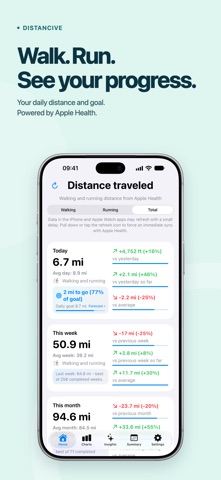
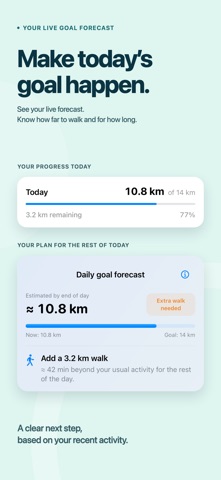
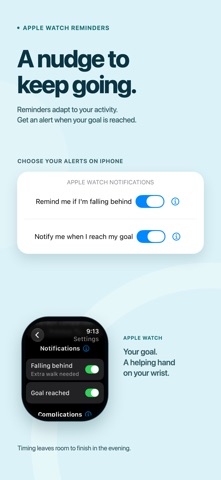
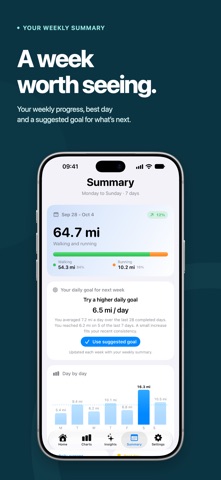
See how far you walk and run - and how it compares with yesterday, last week, last month or your average. Distancive turns the distance already in Apple Health into clear, motivating progress in kilometers or miles, on iPhone, Apple Watch, your Home Screen and Lock Screen. • More than a number See your distance for today, this week, this month, this year and all time - walking, running or total. Compare with the previous period or your average, or see how this morning stacks up against yesterday morning and this week so far against the same point last week. Progress bars show the difference at a glance, and short insights highlight what stands out. • Find your rhythm Explore daily, weekly, monthly and yearly charts, swipe back through your history and spot long-term trends with a moving average. For each current period, a projection shows where you’re on track to finish, based on your pace and recent history. • Make today’s goal happen Set a daily distance goal or start with one suggested from your recent activity. A live forecast estimates where you’ll finish the day and shows whether you’re on track. Falling behind? Distancive tells you how much farther to walk - and roughly how long it will take. One goal across iPhone and Apple Watch, adjustable on either. On Apple Watch, adaptive reminders learn your weekday and weekend routine and nudge you while there’s still time. An optional notification lets you know when you’ve made it. • See how far you’ve come Insights highlights trends, streaks and consistency in your walking, running and total distance - across days, weeks, months and years. Records gathers your best day, week, month and year, with the distance and when you set each one. Your all-time distance becomes a journey around the Earth and to the Moon, with how much today, this week, this month and this year have added. • A week worth seeing Weekly Summary turns your week into one recap: daily distances, average, best day, running frequency, running share and more - plus a suggested daily goal for the week ahead. Get notified when a new one is ready. • Your distance, always visible Add Home Screen widgets for one period or several at once, plus Insights widgets in small, medium and large sizes. Lock Screen widgets show your distance at a glance; circular ones can add a progress ring and show percentage changes or distance units. Make them your own: save configurations with a chosen period, comparison and progress ring, then pick one for each custom widget or complication. Today widgets and complications can track your daily goal too. • Built for Apple Watch Distancive works independently on Apple Watch, even without your iPhone nearby. Check walking, running or total distance for every period, with comparisons, progress bars and your daily goal. Add complications for any period - circular ones can show a progress ring that keeps going past 100%. Fine-tune them on iPhone or Apple Watch, and your settings stay in sync. • Private by design No account, no ads, no tracking: your data stays on your iPhone and Apple Watch. Distancive doesn’t record routes, workouts or GPS - it shows the distance already in Apple Health. Apple Health access is required. One purchase. No subscriptions, no in-app purchases. Features • Walking, running and total distance in kilometers or miles • Previous-period, same-point and average comparisons • Charts with history, projections and moving average • Daily goal with a live forecast and tips to reach it • Goal suggestions based on your recent activity • Adaptive reminders and goal notifications on Apple Watch • Insights, streaks, personal records and Weekly Summary • Journey around the Earth and to the Moon • Home Screen, Lock Screen and Insights widgets • Individually configurable widgets and complications • Standalone Apple Watch app with complications • Week starting on Monday or Sunday • Light, Dark and System appearance
What's new · 1.7
• Added custom configurations for widgets and complications - set up each custom complication and Home Screen or Lock Screen widget separately. • Added a suggested daily goal based on your recent activity. Weekly Summary also suggests a goal for the week ahead. • Reorganized settings make everything easier to find. • The Earth and Moon journey now shows how much today, this week, this month and this year have added. • Introduced a live daily goal forecast on iPhone, with tips on the extra walk needed to reach your goal. • You can now choose whether the week starts on Monday or Sunday. • Added small and medium Insights widgets. • Added a new indicator on iPhone that shows when data is loading from Apple Health. • Bug fixes and visual improvements.
Details