

GitKittie Folder
Sil van Diepen · Developer Tools
Independent analytics for this App Store listing. AppTracker is not affiliated with Sil van Diepen.
Chart standing · US
What changed · US
Listing changes AppTracker has observed for this app in this storefront — new versions, price moves, rating shifts, and store copy.
In-app purchases · US
No in-app purchases.
Screenshots

Keywords this app targets
Search terms AppTracker associates with this app — estimates, not search volume. ❝ = in the app's title; a highlighted number is its current position for that term.
Similar apps
Competitors and close alternatives, as estimated by AppTracker.
 GitSync.md
Cody Russell Bontecou
2 shared topics
GitSync.md
Cody Russell Bontecou
2 shared topics
 Git client - Working Copy
Anders Borum
2 shared topics
Git client - Working Copy
Anders Borum
2 shared topics
 GLab — Client for GitLab
Emil Karimov
2 shared topics
GLab — Client for GitLab
Emil Karimov
2 shared topics
 Quick Issues: Fast Git Capture
Balthasar Siekiera
2 shared topics
Quick Issues: Fast Git Capture
Balthasar Siekiera
2 shared topics
 Source Files: Git Storage
Anders Borum ApS
2 shared topics
Source Files: Git Storage
Anders Borum ApS
2 shared topics
 Combine - Code Editor & Git
Margins Technologies LLC
Combine - Code Editor & Git
Margins Technologies LLC
 Code - Editor Git and Terminal
Morella Folesani
2 shared topics
Code - Editor Git and Terminal
Morella Folesani
2 shared topics
 PocketLab for GitLab
Michael Toscano
2 shared topics
PocketLab for GitLab
Michael Toscano
2 shared topics
About
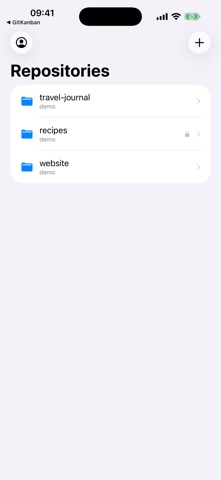
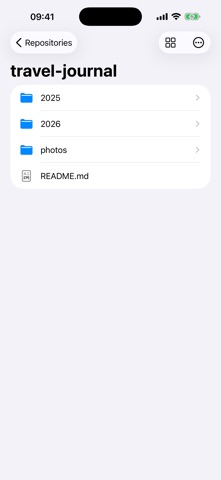
Your Git repositories, as folders in your pocket. GitFolder for iPhone and iPad turns your Git repositories into simple, browsable folders. Connect GitHub or GitLab, add the repositories you care about, and browse, read, and edit their files from anywhere — no clone, no command line, no cloud service in between. HOW IT WORKS 1. Connect — sign in to GitHub in seconds, or paste a personal access token for GitHub, GitLab.com, or your self-hosted GitLab. 2. Add repositories — pick the repos you want; they appear on your home screen like folders. 3. Browse and edit — open folders, read files, view images, and make quick edits. Every save is a clean commit, pushed immediately. EVERYTHING IT DOES • Repos as folders: your repositories on a simple home screen, one tap from their files. • Fast browsing: folders first, files A→Z, exactly like a file manager should. • Read anything: source, Markdown, configuration, and images with a built-in viewer. • Edit and commit: change a file and save — GitFolder commits and pushes it in one step. • Works with your providers: GitHub (OAuth sign-in), GitLab.com, and self-hosted GitLab via personal access token. • Private by design: your token stays in the iOS keychain, and your files move directly between your device and your Git host. No GitFolder account, no telemetry. WHO IT IS FOR Developers and writers who keep things in Git and want to check a file, fix a typo, or read notes from anywhere — without carrying a laptop or cloning anything. GitFolder is a one-time purchase. No subscription.
Details