

GitSync.md
Cody Russell Bontecou · Developer Tools
Independent analytics for this App Store listing. AppTracker is not affiliated with Cody Russell Bontecou.
Chart standing · US
What changed · US
Listing changes AppTracker has observed for this app in this storefront — new versions, price moves, rating shifts, and store copy.
• Choose a public or private GitHub repository when publishing a local folder after reviewing the files. Private is selected by default. • Remove Git tracking from a local folder while keeping your notes and files, with an optional verified backup of Git history. • Improved local folder handling and saved file-review choices.
Price & rating history · US
Reconstructed from the listing changes AppTracker has observed in this storefront. A field is charted once it has changed more than once, and each line starts at the value it moved from.
Average rating · ★ 4.88 now · 3 changes on record
Ratings breakdown · US
The star breakdown behind this app's rating in this storefront.
In-app purchases · US
No in-app purchases.
Screenshots





Keywords this app targets
Search terms AppTracker associates with this app — estimates, not search volume. ❝ = in the app's title; a highlighted number is its current position for that term.
Similar apps
Competitors and close alternatives, as estimated by AppTracker.
 Git client - Working Copy
Anders Borum
3 shared topics
Git client - Working Copy
Anders Borum
3 shared topics
 GitKittie Folder
Sil van Diepen
2 shared topics
GitKittie Folder
Sil van Diepen
2 shared topics
 Quick Issues: Fast Git Capture
Balthasar Siekiera
2 shared topics
Quick Issues: Fast Git Capture
Balthasar Siekiera
2 shared topics
 GLab — Client for GitLab
Emil Karimov
2 shared topics
GLab — Client for GitLab
Emil Karimov
2 shared topics
 MarkGit
淑敏 孙
3 shared topics
MarkGit
淑敏 孙
3 shared topics
 Code - Editor Git and Terminal
Morella Folesani
2 shared topics
Code - Editor Git and Terminal
Morella Folesani
2 shared topics
 GitHub
2 shared topics
GitHub
GitHub
2 shared topics
 Combine - Code Editor & Git
Margins Technologies LLC
Combine - Code Editor & Git
Margins Technologies LLC
About
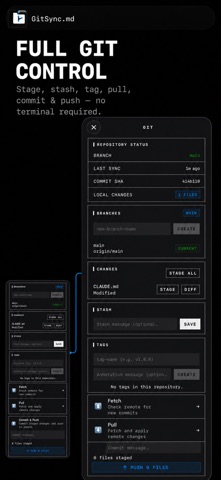
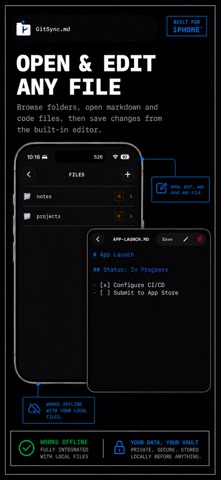
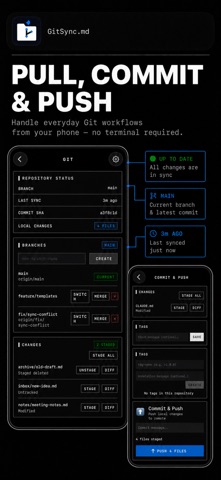
GitSync.md brings real Git to your iPhone. Clone any GitHub repository, pull the latest changes, edit your notes and markdown files, then commit and push — all without a terminal. Real Git, Not a Workaround GitSync.md uses libgit2 to perform actual Git operations on your device. Your repos have a real .git directory. Commit history, branches, diffs — it's all there. No proprietary sync layer, no lock-in. Works With Your Favorite Editor Cloned repositories appear directly in the iOS Files app. Open them in Obsidian, iA Writer, 1Writer, Taio, or any app that supports the Files provider. Edit however you like, then come back to GitSync.md to commit and push. GitHub Native Sign in with GitHub OAuth or paste a Personal Access Token. Browse your repositories and clone with one tap. Author name, email, and branch are configured per-repo. Full Git Workflow • Clone any GitHub repository to your iPhone • Pull to fetch the latest remote changes • Stage all changes, write a commit message, and push • See uncommitted change counts at a glance • View branch, commit SHA, and last sync time per repo Obsidian Integration GitSync.md supports x-callback-url so other apps can trigger Git operations programmatically. Tap a syncmd://x-callback-url/sync link in any note, or run it from an iOS Shortcut, to pull and push without leaving Obsidian. Multiple Repositories Manage as many repos as you need. Each one gets its own branch, author, and storage location. Clone your blog, your Zettelkasten, your dotfiles — all in one app. Your Data Stays Yours Your files and Git credentials stay on your device and communicate directly with your Git provider. If you separately enable Push Sync, its relay stores repository names, verified GitHub App installation/account identifiers, and APNs registration data to route alerts. It never receives local file contents, paths, or Git credentials. Terms of Use (EULA): https://gitsyncmd.app/terms
What's new · 2.7.0
• Choose a public or private GitHub repository when publishing a local folder after reviewing the files. Private is selected by default. • Remove Git tracking from a local folder while keeping your notes and files, with an optional verified backup of Git history. • Improved local folder handling and saved file-review choices.
Details