

PDF Editor ™
APPIOS BILISIM TEKNOLOJILERI SANAYI TICARET LIMITED SIRKETI · Business
Independent analytics for this App Store listing. AppTracker is not affiliated with APPIOS BILISIM TEKNOLOJILERI SANAYI TICARET LIMITED SIRKETI.
Chart standing · US
What changed · US
Listing changes AppTracker has observed for this app in this storefront — new versions, price moves, rating shifts, and store copy.
-some improvements -some bugs fixed
Price & rating history · US
Reconstructed from the listing changes AppTracker has observed in this storefront. A field is charted once it has changed more than once, and each line starts at the value it moved from.
Average rating · ★ 4.00 now · 24 changes on record
Ratings breakdown · US
The star breakdown behind this app's rating in this storefront.
In-app purchases · US
What this app sells inside itself, grouped by kind and priced for this storefront.
Screenshots


Keywords this app targets
Search terms AppTracker associates with this app — estimates, not search volume. ❝ = in the app's title; a highlighted number is its current position for that term.
Similar apps
Competitors and close alternatives, as estimated by AppTracker.
 PDF Editor App | Edit Document
Allied Clicks LLC
PDF Editor App | Edit Document
Allied Clicks LLC
 PDF Editor - Convert File
Wellresion Limited
PDF Editor - Convert File
Wellresion Limited
 PDF Editor & Files Converter.
Sofiya Pliskun
PDF Editor & Files Converter.
Sofiya Pliskun
 PDF Editor: Read Scan Convert
Rhophi Analytics LLP
PDF Editor: Read Scan Convert
Rhophi Analytics LLP
 PDF Converter - PDF Editor・
Techgear Inc
PDF Converter - PDF Editor・
Techgear Inc
 PDF Fill & Sign. Editor Filler
7270356 Canada Inc
PDF Fill & Sign. Editor Filler
7270356 Canada Inc
 PDF Reader: Edit & OCR Scan
Duc Duong Tran
PDF Reader: Edit & OCR Scan
Duc Duong Tran
 iLovePDF - PDF Editor & Scan
ILOVEPDF S.L.
iLovePDF - PDF Editor & Scan
ILOVEPDF S.L.
About
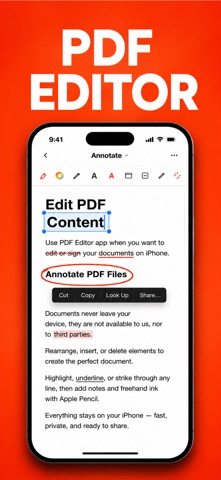
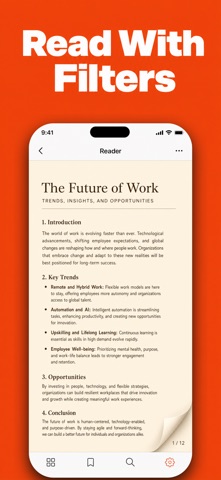
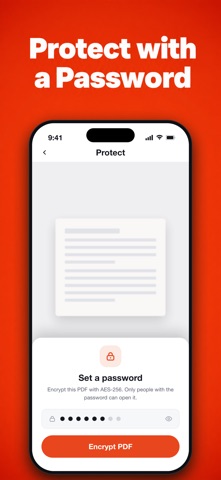
PDF Editor – Edit, Convert, Sign & Scan PDF Take full control of your PDF documents with an easy-to-use editor designed for work, school, and everyday tasks. Edit text, organize pages, fill forms, sign documents, convert files, and annotate PDFs—all from your iPhone or iPad. Whether you're reviewing contracts, completing forms, studying, or managing business documents, PDF Editor provides the essential tools you need in one place. Edit PDFs • Edit PDF text • Add or remove text • Insert images • Highlight, underline, and strike through • Add comments and notes • Draw with Apple Pencil or finger Read & Manage Documents • Open PDF files instantly • Bookmark important pages • Search inside documents • Dark mode support • Organize files with folders • Rename, duplicate, and share documents Convert Files • Image to PDF • JPG to PDF • PNG to PDF • Word to PDF • Excel to PDF • PowerPoint to PDF • PDF to Image Scan Documents • Scan paper documents • Auto edge detection • Smart cropping • High-quality PDF output • Multi-page scanning Fill & Sign • Fill PDF forms • Create handwritten signatures • Sign contracts and agreements • Save reusable signatures Organize PDFs • Merge PDF files • Split PDF documents • Rearrange pages • Rotate pages • Delete pages • Extract pages Compress & Protect • Compress large PDFs • Password protect files • Unlock supported PDFs • Secure document sharing Perfect for: • Students • Business professionals • Remote workers • Teachers • Freelancers • Anyone who works with PDF documents Download PDF Editor today and simplify the way you read, edit, convert, sign, and manage PDF files. Information About Subscription You can cancel your subscription or free trial anytime by cancelling your subscription through your iTunes account settings, or it will automatically renew. This must be done 24 hours before the end of the free trial or any subscription period to avoid being charged. Subscription with a free trial period will automatically renew to a paid subscription. Please note: any unused portion of a free trial period (if offered) will be forfeited when you purchase a premium subscription during the free trial period. Subscription payments will be charged to your iTunes account at confirmation of your purchase and upon commencement of each renewal term. For more information, please see our Privacy Policy and Terms of Use. Privacy Policy & Terms Privacy Policy: https://appios.com.tr/privacy.html Terms Of Use: https://appios.com.tr/terms.html EULA : https://www.apple.com/legal/internet-services/itunes/dev/stdeula/
What's new · 1.4
-some improvements -some bugs fixed
Details