

VE-Display
Marco Frigerio · Navigation
Independent analytics for this App Store listing. AppTracker is not affiliated with Marco Frigerio.
Chart standing · US
What changed · US
Listing changes AppTracker has observed for this app in this storefront — new versions, price moves, rating shifts, and store copy.
• New: optional background Bluetooth connection to the SmartShunt — CarPlay, widgets and Live Activities keep updating even with the iPhone screen locked (menu → Victron keys) • New: CarPlay rows now roll through a device's values two at a time, the same idea as VictronConnect's own CarPlay list, with a green/red dot for live vs. cached data • New: in-app Help (searchable) and a What's New screen with the full version history • New: Lynx Smart BMS support • New: turn CarPlay's voice readout off in one tap — device values still show on screen, and Siri still answers when asked • Changed: CarPlay and Apple Watch now each include their own free trial, instead of one shared between them • Fixed: background reliability issues that could silently drop the CarPlay voice language menu or a background connection after the iPhone screen locked
In-app purchases · US
What this app sells inside itself, grouped by kind and priced for this storefront.
Screenshots



Keywords this app targets
Search terms AppTracker associates with this app — estimates, not search volume. ❝ = in the app's title; a highlighted number is its current position for that term.
Similar apps
Competitors and close alternatives, as estimated by AppTracker.


About
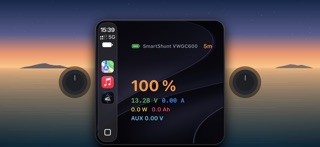
VE-Display shows your Victron Energy system's live status — SmartShunt battery monitor, SmartSolar charge controller, Orion XS DC-DC converter, Lynx Smart BMS, AC chargers and more — right on your iPhone, in CarPlay, and on Apple Watch. No VictronConnect account, no cloud, no internet connection required: everything is decoded locally from the Bluetooth broadcast your Victron devices already send out. HOW IT WORKS Victron's "Instant Readout" devices broadcast their status over Bluetooth Low Energy. VE-Display listens for these broadcasts and decodes them locally using the Advertisement Key from each device's VictronConnect app — the same key VictronConnect itself uses, read once and stored on your phone. ON YOUR IPHONE See every discovered device at a glance: state of charge, battery voltage and current, PV power and yield, input/output voltage and current, charger state, alarms, and more — only the fields each device actually reports, no clutter. • Live Activities for your SmartShunt and your SmartSolar on the Lock Screen and in the Dynamic Island: start them from the menu and keep an eye on your system without unlocking your phone • SmartSolar widget for the Home Screen, in small and medium sizes: PV power, charge state, today's yield, battery voltage and current • A searchable in-app Help, and a What's New screen with the full version history ON CARPLAY • Tap a device to hear its values read aloud and see them on screen • Each row rolls through that device's values two at a time, the same idea as VictronConnect's own CarPlay list, with a green/red dot showing a live reading vs. a cached fallback • Ask Siri for a device's status or how many devices are reporting, hands-free • Prefer silence? Turn CarPlay's voice readout off in one tap and still see every value on screen • Two glanceable widgets for the numbers that matter on the road, on your CarPlay dashboard, Home Screen or in iPhone StandBy: – SmartShunt: state of charge, voltage, current, power, consumed Ah, time to go and the auxiliary reading – Orion XS: charging state, input and output values, and why it's off • Widgets highlight alarms and warn you when a reading is getting old • For the SmartShunt, an optional background Bluetooth connection keeps CarPlay, widgets and Live Activities updating even with the iPhone screen locked ON APPLE WATCH • A dedicated Watch app shows your SmartShunt's state of charge on a glanceable gauge, plus every other discovered device in a scrollable list with full detail • Add the VE-Display complication to your watch face for state of charge and voltage without opening the app GETTING STARTED 1. Open VictronConnect once and copy the Advertisement Key from Product Info 2. Add that key in VE-Display — one key per Victron device 3. Open VE-Display on iPhone or in CarPlay and select your device once it's discovered SUPPORTED DEVICES SmartSolar MPPT charge controllers, SmartShunt battery monitors, Smart Battery Sense, Orion XS DC-DC converters, Lynx Smart BMS, and Smart IP43 / Smart Charger AC chargers — any Victron product broadcasting Instant Readout data. PRIVACY FIRST VE-Display does not collect personal data, does not use analytics, and never sends your Victron data anywhere. BLE decoding, advertisement keys and device history all stay on your device. VE-DISPLAY PRO CarPlay (voice readouts, Siri, widgets, Live Activities) and Apple Watch each include their own one-time free trial, so you can try both before deciding. VE-Display Pro is a single one-time purchase that unlocks unlimited use of everything — no subscription.
What's new · 2.1
• New: optional background Bluetooth connection to the SmartShunt — CarPlay, widgets and Live Activities keep updating even with the iPhone screen locked (menu → Victron keys) • New: CarPlay rows now roll through a device's values two at a time, the same idea as VictronConnect's own CarPlay list, with a green/red dot for live vs. cached data • New: in-app Help (searchable) and a What's New screen with the full version history • New: Lynx Smart BMS support • New: turn CarPlay's voice readout off in one tap — device values still show on screen, and Siri still answers when asked • Changed: CarPlay and Apple Watch now each include their own free trial, instead of one shared between them • Fixed: background reliability issues that could silently drop the CarPlay voice language menu or a background connection after the iPhone screen locked
Details