

Painto Bitmap Editor
Yuya Suzuki · Graphics & Design
Independent analytics for this App Store listing. AppTracker is not affiliated with Yuya Suzuki.
Chart standing · US
What changed · US
Listing changes AppTracker has observed for this app in this storefront — new versions, price moves, rating shifts, and store copy.
Version 1.5: Ready for the latest iPhone and iPad - Toolbar updated for the new Liquid Glass design on iOS 26 / iPadOS 26 - Verified on iPhone 17 series, iPhone Air, and the latest iPad Pro / iPad Air - Apple Pencil: hover preview shows brush position and size before you draw (supported iPads) - Apple Pencil: double-tap to switch between pen and eraser; squeeze (Pencil Pro) to toggle the size panel - Rebuilt with the latest SDK with stability improvements
In-app purchases · US
No in-app purchases.
Screenshots



Similar apps
Competitors and close alternatives, as estimated by AppTracker.






About
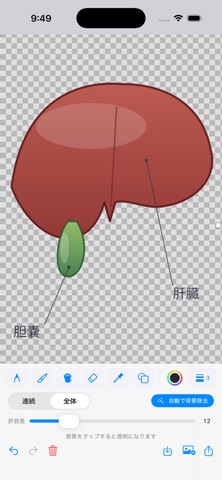
Painto is a simple, classic-style bitmap paint app for iPhone and iPad. With an easy, familiar interface, anyone can start drawing in seconds - from quick sketches and doodles to annotating photos and making simple diagrams. Key features: - Pencil plus 9 brush types (marker, crayon, oil, watercolor, calligraphy, and more) - Eraser, fill bucket, and color picker (eyedropper) - One-tap background removal with the magic wand - make backgrounds transparent - Zoom in for pixel-level editing, with a handy minimap - Text tool with full Japanese input support - Rectangular and free-form (lasso) selection - move, resize, and transparent selection - 23 shapes: line, curve, ellipse, rectangle, rounded rectangle, polygon, triangle, diamond, star, arrow, callout, heart, lightning, and more - 20-color palette plus custom colors - Resize, rotate, flip, and color invert - Copy and paste, undo/redo - Save to Photos, open images - Works on iPhone and iPad Simple enough for your very first drawing, and handy for everyday quick edits.
What's new · 1.5
Version 1.5: Ready for the latest iPhone and iPad - Toolbar updated for the new Liquid Glass design on iOS 26 / iPadOS 26 - Verified on iPhone 17 series, iPhone Air, and the latest iPad Pro / iPad Air - Apple Pencil: hover preview shows brush position and size before you draw (supported iPads) - Apple Pencil: double-tap to switch between pen and eraser; squeeze (Pencil Pro) to toggle the size panel - Rebuilt with the latest SDK with stability improvements
Details