

DashNote - Quick Notes
Jiri Kluciar · Productivity
Independent analytics for this App Store listing. AppTracker is not affiliated with Jiri Kluciar.
Chart standing · US
What changed · US
Listing changes AppTracker has observed for this app in this storefront — new versions, price moves, rating shifts, and store copy.
1.5 • Formatting bar above the keyboard in Markdown notes: bold, italic, code and headings. Code turns a single line into inline code and several lines into a code block. • Code editor keyboard bar: indent, outdent and frequently used characters such as brackets, braces, $ and #. On iPad with a keyboard, ⌘] / ⌘[ indent selected lines. • Developer mode in Settings: Code and Markdown come first when you create a note, and a Code note shortcut appears in the ⋯ menu. Off by default; otherwise Code and developer templates wait under More. • New templates: Project notes and Technical decision. Bug report is highlighted in developer mode. • Code editor: Swift support with syntax highlighting and a manual language choice next to Automatic. Your choice syncs across your devices via iCloud. • Fixes: the cursor keeps its position in text with emoji; line count and new encrypted note names now appear in your language.
Ratings breakdown · US
The star breakdown behind this app's rating in this storefront.
In-app purchases · US
No in-app purchases.
Screenshots




Similar apps
Competitors and close alternatives, as estimated by AppTracker.


About
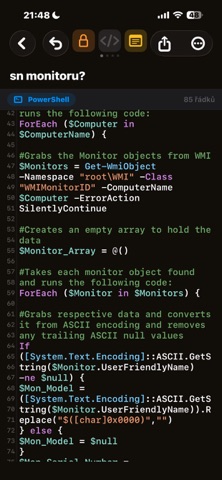
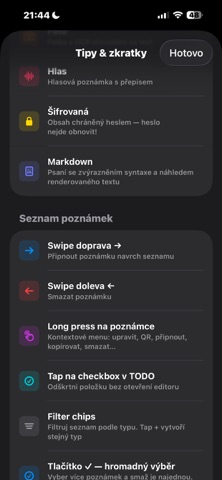
Capture a thought before it slips away. Open DashNote and start typing instantly — no accounts, no loading, no distractions. Everything you jot down stays in your pocket and syncs to your iPad and Mac. No subscription, no tracking. Works offline and syncs through your own iCloud. FAST FROM THE FIRST SECOND • Tap + and write - long-press to pick a type • Shake your phone to snap a Photo note • Pull down to search everything • Slash commands: /date, /time, /todo, /code, /hr • Undo from the ⋯ menu 7 NOTE TYPES • Text - automatic title from the first words • To-dos (TODO) - checklist with check-off and X/Y progress • Code - syntax highlighting, JSON formatting, link & IP detection • Photo - snap or import an image and pull text from it (OCR) • Voice - recording with speech-to-text • Markdown - full editor with live preview • Encrypted - AES-GCM, protected by your password ORGANIZE & FIND • Color categories incl. custom ones and unlimited #tags • 5 templates: meeting, shopping, expense, daily log, bug report • Full-text search, sorting, bulk actions, pinning CALENDAR & REMINDERS • Notes and to-dos on a calendar, recurrence (daily/weekly/monthly) • Local notifications, even auto-detected from a note's text SHARE & EXPORT • Share any note as plain text to Mail, Messages, or any app • Export to JSON/CSV, copy, QR code • Link & IP detection, statistics PRIVACY FIRST • No server, no analytics, no ads • Encrypted notes never leave the device readable • Voice is recognized on-device when possible iCLOUD SYNC • Start on iPhone, continue on iPad or Mac • Sync status shown right in the app DashNote is also available for Mac.
What's new · 1.5
1.5 • Formatting bar above the keyboard in Markdown notes: bold, italic, code and headings. Code turns a single line into inline code and several lines into a code block. • Code editor keyboard bar: indent, outdent and frequently used characters such as brackets, braces, $ and #. On iPad with a keyboard, ⌘] / ⌘[ indent selected lines. • Developer mode in Settings: Code and Markdown come first when you create a note, and a Code note shortcut appears in the ⋯ menu. Off by default; otherwise Code and developer templates wait under More. • New templates: Project notes and Technical decision. Bug report is highlighted in developer mode. • Code editor: Swift support with syntax highlighting and a manual language choice next to Automatic. Your choice syncs across your devices via iCloud. • Fixes: the cursor keeps its position in text with emoji; line count and new encrypted note names now appear in your language.
Details