

ADVCT
JASON ROBERT O'DONNELL · Productivity
Independent analytics for this App Store listing. AppTracker is not affiliated with JASON ROBERT O'DONNELL.
Chart standing · US
What changed · US
Listing changes AppTracker has observed for this app in this storefront — new versions, price moves, rating shifts, and store copy.
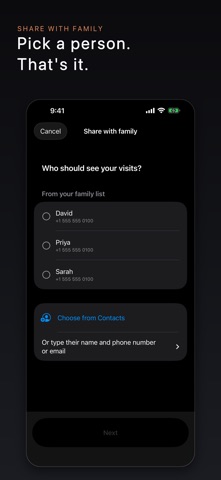
Sharing with family is now one button. Tap Share with family, choose people from your Contacts, and ADVCT writes each person a message with an invite link. They tap the link, accept, and they're in. Family with an iPhone, iPad or Mac get your visits through iCloud. Also in this version: • Who sees your visits: one list of everyone, and what each person can do. Change it, remove someone, or stop sharing at any time. • Each person can help with to-dos or only read. • Just this visit sends a readable copy of one visit by message or email. They don't need the app. • When sharing ends, family choose to keep their copy or remove it. • Shared records keep themselves up to date, usually within a few hours. Tap Refresh to update now. • Your Mac can now create records and share them, and visits you record on your Mac reach your family. • Every sharing problem comes with a plain sentence saying what to do next. • Better support for the largest text sizes and VoiceOver. If you share with family, ask them to update too, so everyone has the new sharing. Our privacy policy is updated with this version. It sets out everything that can leave your device when you share with family, including a small ADVCT invite service that makes some invite links work only once. That service never gets your visits or anything that can open them. As always, your recordings never leave your iPhone, and we never see your conversations. Thank you for trusting ADVCT with what matters most.
Ratings breakdown · US
The star breakdown behind this app's rating in this storefront.
In-app purchases · US
No in-app purchases.
Screenshots


Keywords this app targets
Search terms AppTracker associates with this app — estimates, not search volume. ❝ = in the app's title; a highlighted number is its current position for that term.
Similar apps
Competitors and close alternatives, as estimated by AppTracker.
 Recordus - AI Voice Recorder
Ricardo Dantas Goncalves
2 shared topics
Recordus - AI Voice Recorder
Ricardo Dantas Goncalves
2 shared topics
 Minutary: AI Meeting Notes
NURUDDIN AHMED
2 shared topics
Minutary: AI Meeting Notes
NURUDDIN AHMED
2 shared topics
 Synopsule
Sunny Nagra
2 shared topics
Synopsule
Sunny Nagra
2 shared topics
 Call Recorder for iPhone Calls
MWM
2 shared topics
Call Recorder for iPhone Calls
MWM
2 shared topics
 Capture It
adam rogan
1 shared topic
Capture It
adam rogan
1 shared topic
 Just Press Record
Open Planet Software
1 shared topic
Just Press Record
Open Planet Software
1 shared topic
 Audio Recorder Pro & Playback
LiveBird Technologies Private Limited
1 shared topic
Audio Recorder Pro & Playback
LiveBird Technologies Private Limited
1 shared topic
 Recorder Pro: Voice Recorder
Perception System
1 shared topic
Recorder Pro: Voice Recorder
Perception System
1 shared topic
About
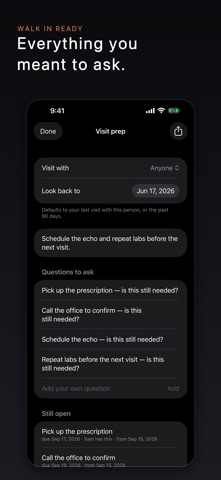
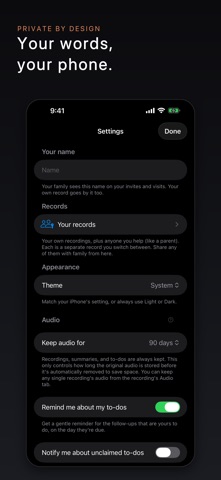
ADVCT helps you capture the conversations that matter most — with a doctor, a lawyer, a banker — and turn them into a clear, plain-language summary you and your family can actually use. You press one big button to record. ADVCT writes down what was said, then gives you a short summary, the key points, and a to-do list of the follow-ups — who needs to do what, and by when. No typing. No setup. No account. PRIVATE BY DESIGN Recording, transcription, and summaries all happen on your iPhone — no account, no setup. Your audio stays on your device. Your transcripts and summaries are kept in your own private iCloud, synced across your devices and visible only to you and the family you invite — never on a server we operate. Your conversations are never uploaded to us, and we never see them. The privacy label is simple: Data Not Collected. ONE BUTTON TO RECORD Open the app and tap the big red button. ADVCT keeps recording even if a call comes in or the screen locks, so you can set the phone down and focus on the conversation. Tap Stop when you're done — that's the whole job. CLEAR SUMMARIES, NOT JUST A WALL OF TEXT A few seconds after you stop, you get three things: • Summary — a short, plain-language recap and the key points • Transcript — the full written version of what was said • Audio — play the recording back any time A SHARED TO-DO LIST FOR THE WHOLE FAMILY Every recording surfaces its follow-ups automatically — "Schedule the MRI," "Pick up the prescription," "Call the office Monday" — with dates and a suggestion of who should handle each one. Family members can claim an item with one tap so everyone knows it's covered, and send it straight to their own Calendar or Reminders. No more tasks lost in a group text. SHARING IS A CHOICE, NEVER A DEFAULT Keep a visit private, or tap Share with family. Choose people from your Contacts, and ADVCT writes each one a message with an invite link. They accept once and see every visit in the record, including new ones. Each person can help with to-dos or only read, and Who sees your visits lists everyone and what they can do. Remove someone or stop sharing at any time. Or choose Just this visit: they get a readable copy by Messages or email, with no app needed. Audio stays on the device that recorded it and is never shared. MORE THAN A RECORDER • Visit prep — one page before the next visit: what's open, what changed, what to ask • The week's update — what happened and what got done, in one message • Separate records — your own, your mother's, your father's • Face ID lock — ask for Face ID every time ADVCT opens • ADVCT for Mac — included in the same purchase BUILT FOR REAL LIFE • Large text and buttons, full Dynamic Type and VoiceOver support • Works offline — record and transcribe with no signal • Nothing is ever lost: recordings are saved as you go, so a dead battery or a dropped call won't cost you the appointment • Audio is removed automatically after 90 days to save space (your summary and transcript are always kept) — and you can change this any time, or keep any recording forever WHO IT'S FOR Anyone who walks out of an appointment trying to remember half of what was said — and the families who help them. Built first for aging parents and the adult children coordinating their care, but useful for anyone juggling important medical, legal, or financial conversations. Helping a parent who won't set up an app themselves? Create and manage their record from your own iPhone, and share it with the rest of the family. A NOTE ON DEVICES Every supported iPhone records, transcribes, and summarizes entirely on-device. On iPhone 15 Pro and newer, Apple Intelligence writes richer plain-language summaries; other iPhones get a simpler summary and the full transcript — and nothing leaves your phone either way. ADVCT doesn't replace your memory of a conversation — it makes sure your whole family can stand behind you in the room, even when they can't be there.
What's new · 1.5.0
Sharing with family is now one button. Tap Share with family, choose people from your Contacts, and ADVCT writes each person a message with an invite link. They tap the link, accept, and they're in. Family with an iPhone, iPad or Mac get your visits through iCloud. Also in this version: • Who sees your visits: one list of everyone, and what each person can do. Change it, remove someone, or stop sharing at any time. • Each person can help with to-dos or only read. • Just this visit sends a readable copy of one visit by message or email. They don't need the app. • When sharing ends, family choose to keep their copy or remove it. • Shared records keep themselves up to date, usually within a few hours. Tap Refresh to update now. • Your Mac can now create records and share them, and visits you record on your Mac reach your family. • Every sharing problem comes with a plain sentence saying what to do next. • Better support for the largest text sizes and VoiceOver. If you share with family, ask them to update too, so everyone has the new sharing. Our privacy policy is updated with this version. It sets out everything that can leave your device when you share with family, including a small ADVCT invite service that makes some invite links work only once. That service never gets your visits or anything that can open them. As always, your recordings never leave your iPhone, and we never see your conversations. Thank you for trusting ADVCT with what matters most.
Details