

SpeedZip Pro - Archive Manager
耀 陈 · Utilities
Independent analytics for this App Store listing. AppTracker is not affiliated with 耀 陈.
Chart standing · US
What changed · US
Listing changes AppTracker has observed for this app in this storefront — new versions, price moves, rating shifts, and store copy.
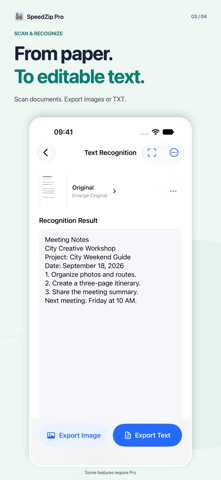
• A redesigned workspace with file categories, search and clearer navigation. • Scan documents and recognize text, with proofreading and image or TXT export. • PDF, image, video and audio tools in one place. • Improved file-list loading, task-result access and adaptive layouts.
Price & rating history · US
Reconstructed from the listing changes AppTracker has observed in this storefront. A field is charted once it has changed more than once, and each line starts at the value it moved from.
Price · Free now · 2 changes on record
Average rating · ★ 5.00 now · 3 changes on record
In-app purchases · US
No in-app purchases.
Screenshots



Keywords this app targets
Search terms AppTracker associates with this app — estimates, not search volume. ❝ = in the app's title; a highlighted number is its current position for that term.
Similar apps
Competitors and close alternatives, as estimated by AppTracker.
 ZipApp Pro: The Unarchiver
兰桂 吴
ZipApp Pro: The Unarchiver
兰桂 吴
 Zip, RAR, 7z File Extractor
Fangzhou Interactive Technology Co., Limited
Zip, RAR, 7z File Extractor
Fangzhou Interactive Technology Co., Limited
 Unzipped zip/rar/tar/gz/7z/xz
jinhe zou
Unzipped zip/rar/tar/gz/7z/xz
jinhe zou
 iZip Pro -Zip Unzip Unrar Tool
ComcSoft Corporation
iZip Pro -Zip Unzip Unrar Tool
ComcSoft Corporation
 Zip Unzip - Unrar Tool PRO
Grzegorz Rakoca
Zip Unzip - Unrar Tool PRO
Grzegorz Rakoca
 Secure Zip & Unzip
ALPER KAPLAN
Secure Zip & Unzip
ALPER KAPLAN
 Unzip - zip,rar,7z file opener
俐 马
Unzip - zip,rar,7z file opener
俐 马
 VaultZip: Unzip RAR 7Z
润强 何
VaultZip: Unzip RAR 7Z
润强 何
About
SpeedZip Pro brings archives, file management, scanning and media tools together on iPhone and iPad. Find your files, work with their contents and share the results from one app. EVERYDAY FILE TOOLS Browse by category, search and organize files. Scan documents to PDF, recognize text from scans and export images or editable TXT. Merge and compress PDFs, convert images or TXT to PDF, and export PDF pages. Compress images and videos with adjustable settings while keeping the originals. Text recognition supports Simplified Chinese, Traditional Chinese, Japanese, Korean and English. OPEN COMMON ARCHIVE FORMATS Read and extract DZIP (.dz), ZIP, ZIPX, 7Z, RAR, TAR, TAR.GZ, TAR.BZ2, TAR.XZ, GZ, BZ2, XZ, LZMA and ZLIB. Open compatible password-protected archives and complete multipart sets. CREATE, ENCRYPT AND SPLIT Create DZIP, ZIP, 7Z, TAR and TAR.GZ from files, folders, photos and videos. Choose compression settings and whether to preserve folder structure. ZIP and 7Z support AES-256 encryption and split volumes, including custom volume sizes. 7Z can also encrypt filenames and offers Copy, Deflate, BZip2, LZMA, LZMA2 and PPMd methods. LOOK INSIDE BEFORE EXTRACTING Browse folders, search filenames and sort by name, size or date. Preview supported files, extract an entire archive or select just the items you need. Choose a destination and how to handle existing files. WORK IN BATCHES Extract multiple archives into separate folders, or create a separate archive for each selected item. Track progress and results in the task center, cancel running work and retry eligible failed or interrupted tasks. Live Activities show progress where supported and enabled. PRIVATE BY DESIGN Archive processing does not upload file contents or passwords. No account is required, and archive passwords are not saved or recoverable. Compatibility depends on the format, compression method and encryption used. RAR and ZIPX support browsing and extraction, not creation. Archive checks assess structure and data integrity; they are not antivirus scans. File management, common archive formats and scanning to PDF are free. OCR, PDF tools, image compression, video and audio tools, and certain advanced archive formats require Pro access. EULA: https://www.apple.com/legal/internet-services/itunes/dev/stdeula/
What's new · 1.5.4
• A redesigned workspace with file categories, search and clearer navigation. • Scan documents and recognize text, with proofreading and image or TXT export. • PDF, image, video and audio tools in one place. • Improved file-list loading, task-result access and adaptive layouts.
Details