

Overflight: Sky Radar
DGR Labs · Travel
Independent analytics for this App Store listing. AppTracker is not affiliated with DGR Labs.
Chart standing · US
What changed · US
Listing changes AppTracker has observed for this app in this storefront — new versions, price moves, rating shifts, and store copy.
IPHONE DUO SUPPORT * Fold your iPhone Duo like a book and the scope fills the right side. * Fold it like a laptop and the aircraft info moves to the top half, leaving the bottom half to the scope. * Open it all the way and the layout grows to fill the display. * Close it and the outer display shows a compact version, in both portrait and landscape.
Price & rating history · US
Reconstructed from the listing changes AppTracker has observed in this storefront. A field is charted once it has changed more than once, and each line starts at the value it moved from.
Average rating · ★ 4.71 now · 14 changes on record
Ratings breakdown · US
The star breakdown behind this app's rating in this storefront.
In-app purchases · US
What this app sells inside itself, grouped by kind and priced for this storefront.
Screenshots



Keywords this app targets
Search terms AppTracker associates with this app — estimates, not search volume. ❝ = in the app's title; a highlighted number is its current position for that term.
Similar apps
Competitors and close alternatives, as estimated by AppTracker.
 Airspace Live: Flight Radar
Adventure On, Inc.
2 shared topics · 1 shared title word
Airspace Live: Flight Radar
Adventure On, Inc.
2 shared topics · 1 shared title word
 Flight Radar Pro Plane Tracker
Flight Tracker Apps Studio
2 shared topics · 1 shared title word
Flight Radar Pro Plane Tracker
Flight Tracker Apps Studio
2 shared topics · 1 shared title word
 FlightSky: Live Plane Radar
Ocean Float Mobile
1 shared topic · 1 shared title word
FlightSky: Live Plane Radar
Ocean Float Mobile
1 shared topic · 1 shared title word
 Sky Radar: Live Flights
Hoang Vixtor
2 shared topics · 3 shared title words
Sky Radar: Live Flights
Hoang Vixtor
2 shared topics · 3 shared title words
 Flight Tracker & Radar
ISLAND STORM LABS LIMITED
2 shared topics · 1 shared title word
Flight Tracker & Radar
ISLAND STORM LABS LIMITED
2 shared topics · 1 shared title word
 mi Flight Radar: Plane Tracker
Appeclectic Ltd
2 shared topics · 1 shared title word
mi Flight Radar: Plane Tracker
Appeclectic Ltd
2 shared topics · 1 shared title word
 FlightAware Flight Tracker
FlightAware
3 shared topics
FlightAware Flight Tracker
FlightAware
3 shared topics
 What Plane?
David Wilkinson
1 shared topic
What Plane?
David Wilkinson
1 shared topic
About
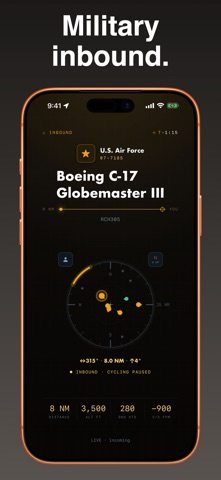
Look up! Overflight names the aircraft flying over you right now: airline, flight number, and type, with a live readout of altitude, speed, and track, and a radar scope of everything else in your sky. Around it, a radar-style scope plots the whole visible sky. Swipe to bring any other aircraft into focus, or just watch the one overhead. When the sky is quiet, a calm idle state waits for the next arrival. FREE • One aircraft always in focus, chosen from what you can actually see rather than a flat radius • Airline, flight number, and aircraft type, with altitude, vertical speed, ground speed, track, bearing, and distance • A live radar scope of the whole visible sky, north-up or heading-up • Military and special-interest traffic highlighted the moment it enters your sky • An aircraft declaring an emergency jumps straight into focus, flagged EMERGENCY • Helicopters and general aviation name their operator when it's one worth naming: police, fire, medevac, NASA • Tap the aircraft type to read about the airframe on Wikipedia, without leaving the app • Overhead, Near, Normal, and Far reach presets to tune how much sky you see • A universal app for iPhone, iPad, and Apple TV OVERFLIGHT PRO • Live routes, origin to destination, for every aircraft: airports spelled out by name • Spoken traffic: each aircraft called out aloud as it comes into focus, hands-free ("Traffic, two o'clock, twelve miles, southbound, a heavy Boeing 777, United flight 12, Denver to Tokyo"). • Notable inbound alerts: a pre-warning and a "look northwest" cue when interesting traffic is approaching • Indefinite always-on for an unattended ambient display when connected to a charger Your first aircraft's route and your first notable-inbound alert are free, so you can see what Pro does before deciding. The yearly plan starts with a 7-day free trial. There's a monthly plan too, or unlock everything once with a lifetime purchase. Powered by worldwide, community-run ADS-B data. No account, no sign-up. Your location is used only to find the aircraft above you. Not every aircraft broadcasts its position (some military flights fly dark), so the sky you see is the sky that's broadcasting. Overflight Pro is a monthly or annual auto-renewing subscription, or a one-time lifetime purchase; the price is shown in the app before you buy. A subscription renews automatically unless canceled at least 24 hours before the period ends, and you can manage or cancel it in your App Store account settings. Privacy Policy: https://dgrlabs.co/privacy.html Terms of Use: https://www.apple.com/legal/internet-services/itunes/dev/stdeula/
What's new · 1.7.1
IPHONE DUO SUPPORT * Fold your iPhone Duo like a book and the scope fills the right side. * Fold it like a laptop and the aircraft info moves to the top half, leaving the bottom half to the scope. * Open it all the way and the layout grows to fill the display. * Close it and the outer display shows a compact version, in both portrait and landscape.
Details