

What Plane?
David Wilkinson · Utilities
Independent analytics for this App Store listing. AppTracker is not affiliated with David Wilkinson.
Chart standing · US
What changed · US
Listing changes AppTracker has observed for this app in this storefront — new versions, price moves, rating shifts, and store copy.
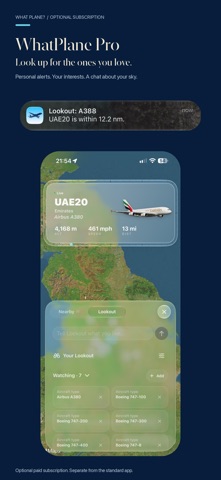
Introducing WhatPlane Pro: choose the aircraft you want to spot, receive optional alerts when they are nearby, and chat about aircraft recorded in your area while you were away. Pro is an optional monthly subscription. Track the nearest aircraft with Dynamic Island and Live Activities. Pro subscribers can prioritise their Lookout matches. Updated aircraft artwork and refined map, chat and settings interfaces.
Ratings breakdown · US
The star breakdown behind this app's rating in this storefront.
In-app purchases · US
What this app sells inside itself, grouped by kind and priced for this storefront.
Screenshots


Keywords this app targets
Search terms AppTracker associates with this app — estimates, not search volume. ❝ = in the app's title; a highlighted number is its current position for that term.
Similar apps
Competitors and close alternatives, as estimated by AppTracker.
 Overflight: Sky Radar
DGR Labs
1 shared topic
Overflight: Sky Radar
DGR Labs
1 shared topic
 Plane Finder ⁃ Flight Tracker
pinkfroot limited
1 shared topic · 1 shared title word
Plane Finder ⁃ Flight Tracker
pinkfroot limited
1 shared topic · 1 shared title word
 PlaneWatcher
Ground Effect GmbH
1 shared topic
PlaneWatcher
Ground Effect GmbH
1 shared topic
 Squawk: Live Flight Tracker
Hunter Cochran
Squawk: Live Flight Tracker
Hunter Cochran
 Flight Radar Pro Plane Tracker
Flight Tracker Apps Studio
1 shared topic · 1 shared title word
Flight Radar Pro Plane Tracker
Flight Tracker Apps Studio
1 shared topic · 1 shared title word
 Airspace Live: Flight Radar
Adventure On, Inc.
1 shared topic
Airspace Live: Flight Radar
Adventure On, Inc.
1 shared topic
 mi Flight Radar: Plane Tracker
Appeclectic Ltd
1 shared topic · 1 shared title word
mi Flight Radar: Plane Tracker
Appeclectic Ltd
1 shared topic · 1 shared title word
 Air Navigation Pro
Air Navigation SA
1 shared topic
Air Navigation Pro
Air Navigation SA
1 shared topic
About
What Plane? was built to answer one question—fast: what’s that aircraft overhead? Everything is designed for instant glanceability, so you can get the answer without “using an app”. Add the widget to your Home Screen and tap to refresh. Tap the custom aircraft icon to jump straight into the live map. Inside the app, controls stay just as simple. Want different units? Tap any stat (altitude, speed, distance) to cycle through options. The default view lets you explore nearby air traffic, and with a single tap on any aircraft—or the menu button—you can browse rich details for every plane within 30 nautical miles. To keep the interface minimal while adding real information density, What Plane? uses the Compass Ring: the panel border doubles as a bearing indicator, showing the aircraft’s direction relative to you at a glance. And when an aircraft is overhead, the widget brings it to life with airline-specific liveries and aircraft models—so your Home Screen matches what’s in the sky. WHATPLANE PRO (OPTIONAL SUBSCRIPTION) Choose the aircraft you want to spot and get an alert when a match is nearby. Chat with Lookout to ask about aircraft recorded in your area while you were away, and prioritise your matches in Dynamic Island. Pro is a monthly auto-renewable subscription, purchased separately in the app, with a one-week free trial for eligible new subscribers. After the trial, the subscription renews at the displayed monthly price unless cancelled. The local price is shown before purchase. Payment is charged to your Apple Account. Your subscription renews automatically unless cancelled at least 24 hours before the current period ends. Manage or cancel in your App Store account settings. Privacy: https://whatplane.org/privacy Terms of Use: https://www.apple.com/legal/internet-services/itunes/dev/stdeula/
What's new · 1.3.0
Introducing WhatPlane Pro: choose the aircraft you want to spot, receive optional alerts when they are nearby, and chat about aircraft recorded in your area while you were away. Pro is an optional monthly subscription. Track the nearest aircraft with Dynamic Island and Live Activities. Pro subscribers can prioritise their Lookout matches. Updated aircraft artwork and refined map, chat and settings interfaces.
Details