

Controller for HomeKit
acasa Software GmbH · Lifestyle
Independent analytics for this App Store listing. AppTracker is not affiliated with acasa Software GmbH.
Chart standing · US
What changed · US
Listing changes AppTracker has observed for this app in this storefront — new versions, price moves, rating shifts, and store copy.
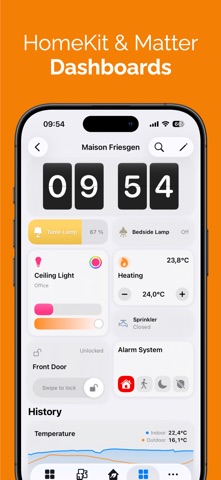
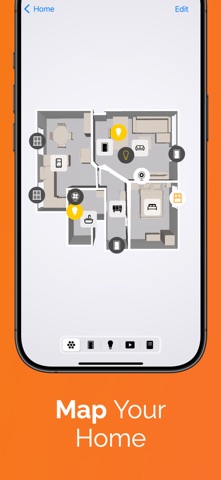
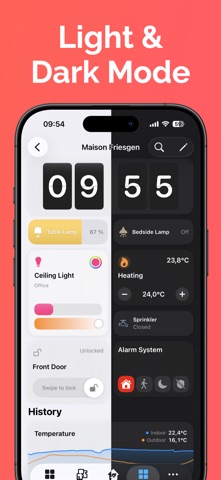
Controller 10 brings dashboards: views you build yourself, and Home Sharing, which passes your whole setup to the people you live with. - Dashboards: Build your own view from tiles, one per home, per person, and even per device. - More than 25 tile variants: Devices, scenes, workflows, time, weather, calendar, charts, battery warnings. In five standard sizes or freely resizable on the grid. - Start with AI: Describe the dashboard you want in one sentence, and Controller AI creates the sections and tiles. The result stays fully editable. - Visibility conditions: A tile or a whole section appears only when it is needed, based on time, weekday, weather, calendar, sun position or device states. - Home Sharing: Share your setup with your household. For each person you choose between the whole app or only the dashboards you share with them. - New search: Find devices, rooms, scenes, workflows, floor plans and settings, not only by name but also by the devices and actions they contain. - Floor plans from a picture: Use your own image as a floor plan and place your devices on it, no LiDAR sensor needed. - 3D floor plan: Now in Dark Mode too, with new gestures for rotating, zooming and tilting. - "Open Dashboard" widget: Open any dashboard straight from your Home Screen. - States, Zones and Service Groups: Sort your states, the rooms in a zone and the devices in a service group the way you need. - Faster loading: Large homes with a Controller Hub in particular load faster. - Plus many smaller improvements and bug fixes. Enjoy building your own view of your home.
Ratings breakdown · US
The star breakdown behind this app's rating in this storefront.
In-app purchases · US
What this app sells inside itself, grouped by kind and priced for this storefront.
Screenshots





Keywords this app targets
Search terms AppTracker associates with this app — estimates, not search volume. ❝ = in the app's title; a highlighted number is its current position for that term.
Similar apps
Competitors and close alternatives, as estimated by AppTracker.
 HAA Home for HomeKit & Matter
Jose Antonio Jimenez Campos
2 shared topics · 1 shared title word
HAA Home for HomeKit & Matter
Jose Antonio Jimenez Campos
2 shared topics · 1 shared title word
 HomePad - Smart Home Dashboard
Quentin Van Eylen
1 shared topic
HomePad - Smart Home Dashboard
Quentin Van Eylen
1 shared topic
 HomeDash
inbrillio UG (haftungsbeschrankt)
2 shared topics
HomeDash
inbrillio UG (haftungsbeschrankt)
2 shared topics
 Flux HA Dashboard
Brandon Halterman
2 shared topics
Flux HA Dashboard
Brandon Halterman
2 shared topics
 Smart Home - Remote Control
LeoStudio Global
2 shared topics
Smart Home - Remote Control
LeoStudio Global
2 shared topics
 SmartHome Dashboard - HomeView
Remco Uitdenboogaart
SmartHome Dashboard - HomeView
Remco Uitdenboogaart
 HomeBot for Shortcuts
Pedro Jose Pereira Vieito
2 shared topics
HomeBot for Shortcuts
Pedro Jose Pereira Vieito
2 shared topics
 HomeCare for HomeKit
Anthonin Cocagne
1 shared topic · 1 shared title word
HomeCare for HomeKit
Anthonin Cocagne
1 shared topic · 1 shared title word
About
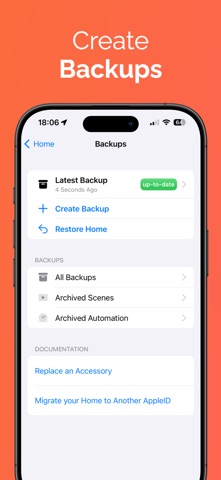
Get more out of your smart home. Your HomeKit and Matter devices can do more than on and off: Controller for HomeKit gives you dashboards you build yourself, workflows that run over several steps, months of history, and a floor plan you control directly. YOUR OWN DASHBOARD Your devices sit where you need them, instead of in a list. - Views you compose yourself from tiles: per home, per person, and if you want, per device. One for the iPad on the wall, one for the iPhone in your pocket. - More than 25 tile variants: devices, scenes, workflows, time, weather, calendar, charts, battery warnings. - Five standard sizes, or drag your own size on the grid. - Visibility conditions: a tile or a whole section appears only when you need it. - Plus widgets for your Home Screen and a view of your own on Apple Watch. CONTROLLER AI Describe what you need in plain language: a dashboard, a scene, an automation or a workflow. Controller builds it, and you adjust it however you like afterwards. MORE THAN A SCHEDULE Two devices become a sequence that thinks along. - Workflows: multiple steps, conditions and branches for sequences a single automation cannot express. - Automations with advanced triggers and conditions. - States: virtual switches that capture how your home currently stands and drive your workflows accordingly. - Custom notifications for anything you want to know about. - NFC tags: one tap and the workflow runs. YOUR SENSORS ARE ALREADY MEASURING Controller remembers the values and makes them readable. - Charts: see how temperature, humidity or battery level develop over weeks and months, across every device and brand. - Maintenance: which battery is empty, which device is unreachable, which automation is broken. - Logs: every activity and every change, traceable. - Smart folders: devices and automations grouped by filters you define. - Floor Plan: scan your home with the LiDAR sensor of your iPhone or iPad and control your devices right on the plan. - Controller Hub: a dedicated iPhone, iPad, Apple TV or Mac runs your workflows automatically. Charts and States require Controller Hub. SHARE THE WORK, NOT JUST THE SWITCHES - Home Sharing: pass your entire setup to the people you live with. For each person you choose between the whole app or only the dashboards you share with them. - Setup codes: your HomeKit and Matter codes stay safe in the app and never get lost. - Backups: save your setup and restore it whenever you need to. Controller for HomeKit runs on iPhone, iPad, Mac, Apple Watch and Apple TV. You already own the devices. Controller for HomeKit brings out what is in them. More on our website: https://www.controllerforhomekit.com Privacy Policy: https://controllerforhomekit.com/privacy/ Terms of Use: https://www.apple.com/legal/internet-services/itunes/dev/stdeula/
What's new · 10.0.2
Controller 10 brings dashboards: views you build yourself, and Home Sharing, which passes your whole setup to the people you live with. - Dashboards: Build your own view from tiles, one per home, per person, and even per device. - More than 25 tile variants: Devices, scenes, workflows, time, weather, calendar, charts, battery warnings. In five standard sizes or freely resizable on the grid. - Start with AI: Describe the dashboard you want in one sentence, and Controller AI creates the sections and tiles. The result stays fully editable. - Visibility conditions: A tile or a whole section appears only when it is needed, based on time, weekday, weather, calendar, sun position or device states. - Home Sharing: Share your setup with your household. For each person you choose between the whole app or only the dashboards you share with them. - New search: Find devices, rooms, scenes, workflows, floor plans and settings, not only by name but also by the devices and actions they contain. - Floor plans from a picture: Use your own image as a floor plan and place your devices on it, no LiDAR sensor needed. - 3D floor plan: Now in Dark Mode too, with new gestures for rotating, zooming and tilting. - "Open Dashboard" widget: Open any dashboard straight from your Home Screen. - States, Zones and Service Groups: Sort your states, the rooms in a zone and the devices in a service group the way you need. - Faster loading: Large homes with a Controller Hub in particular load faster. - Plus many smaller improvements and bug fixes. Enjoy building your own view of your home.
Details