

PageFeed
Brad Moss · News
Independent analytics for this App Store listing. AppTracker is not affiliated with Brad Moss.
Chart standing · US
What changed · US
Listing changes AppTracker has observed for this app in this storefront — new versions, price moves, rating shifts, and store copy.
PageFeed 2.0 is a new edition, rebuilt from cover to cover. Pages now curl from the corner you hold and follow your finger, and everything feels quicker, smoother and more like a book. - A true page curl in articles, the article list and Manage. - Pages are set more evenly and filled to the last line. - Reading controls fade away while you read. Tap to bring them back. - On iPad in landscape, the list, articles and settings open as a two-page spread. - Calmer titles and headings that step down clearly at every text size. Long headlines now leave room for the story. - Optional list thumbnails, uniform and neatly cropped. - The E-Ink theme shows pictures in black and white. - A cleaner reading experience on every site. - Rename any feed. Your names sync across your devices. - Keyboard shortcuts on iPad and Mac. - PageFeed now runs on Apple silicon Macs. - A short, hands-on welcome tour to get you started.
Ratings breakdown · US
The star breakdown behind this app's rating in this storefront.
In-app purchases · US
What this app sells inside itself, grouped by kind and priced for this storefront.
Screenshots



Similar apps
Competitors and close alternatives, as estimated by AppTracker.
 content — RSS feed reader
Keith Norman
content — RSS feed reader
Keith Norman
 FeedFlow - RSS Feed Reader
Marco Gomiero
FeedFlow - RSS Feed Reader
Marco Gomiero
 Unlimited News
The Virtually Unlimited Corp
Unlimited News
The Virtually Unlimited Corp
 Slice News & Podcasts
OrangeMac LLC
Slice News & Podcasts
OrangeMac LLC
 Minimal RSS Reader
Michiel Devliegere
Minimal RSS Reader
Michiel Devliegere
 Pagina.
Etienne Schraven
Pagina.
Etienne Schraven
 Current - RSS Feed Reader
Jupiter Interactive Group LLC
Current - RSS Feed Reader
Jupiter Interactive Group LLC
 Feedibus — RSS Feed Reader
Nicolas Neubauer
Feedibus — RSS Feed Reader
Nicolas Neubauer
About
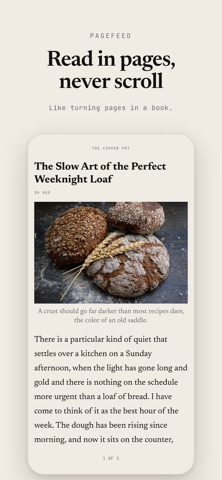
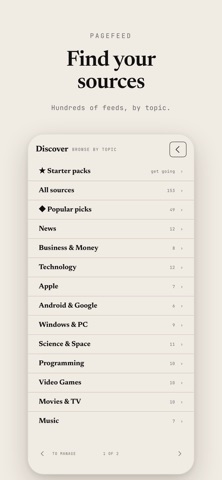
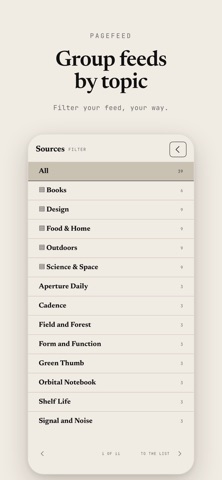
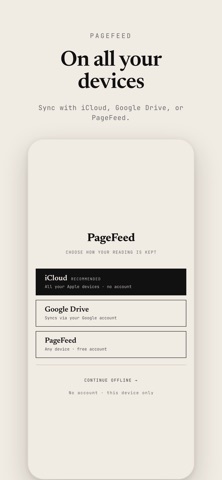
PageFeed is a different kind of news reader, built for reading, not scrolling. Featured by Six Colors, iPhoneBlog.de and iphone-ticker.de: the news reader you page through like a book. The sites, blogs, and writers you follow, laid out in clean, full pages. You tap forward and back, like turning pages in a book. Nothing scrolls. Every page is set to fit, so you always know exactly where you are. WHY PAGEFEED • Read in pages, never scroll. A calm, book-like way through every story, and on iPad, a two-page spread like an open book. • Your sources in order, not by algorithm. Newest or oldest first, your choice. Nothing is promoted, hidden, or reordered for you. • Group your sources. Organize the sites you follow into your own categories and read one topic at a time. • Private sync, your way. Sync through your own iCloud account to keep your iPhone and iPad in step, or through your own Google Drive to sync cross-platform, including the web. Either way, we never see your reading. Prefer simple? A free PageFeed sync account also works everywhere. • Summaries on device. On an iPhone or iPad with Apple Intelligence, get the gist of any article in a few private, on-device bullet points. • Tags, on your terms. Every story is tagged, so you can follow a topic or mute one and never see it in your feed again. • Save anything. Share a web page to PageFeed to keep it, and star the stories you want to come back to. • Works offline. Once loaded, your reading is there on the subway, on a plane, anywhere. It catches up when you're back online. • Find your sources. Browse hundreds of publications by topic in Discover, and follow the ones you like. • Adjustable type and a high-contrast theme. Set the text size and switch to an easy-on-the-eyes look. PageFeed is deliberately minimal: no noise, no infinite scroll, no clutter. Just the news you choose, in order, one page at a time.
What's new · 2.0.0
PageFeed 2.0 is a new edition, rebuilt from cover to cover. Pages now curl from the corner you hold and follow your finger, and everything feels quicker, smoother and more like a book. - A true page curl in articles, the article list and Manage. - Pages are set more evenly and filled to the last line. - Reading controls fade away while you read. Tap to bring them back. - On iPad in landscape, the list, articles and settings open as a two-page spread. - Calmer titles and headings that step down clearly at every text size. Long headlines now leave room for the story. - Optional list thumbnails, uniform and neatly cropped. - The E-Ink theme shows pictures in black and white. - A cleaner reading experience on every site. - Rename any feed. Your names sync across your devices. - Keyboard shortcuts on iPad and Mac. - PageFeed now runs on Apple silicon Macs. - A short, hands-on welcome tour to get you started.
Details