

content — RSS feed reader
Keith Norman · News
Independent analytics for this App Store listing. AppTracker is not affiliated with Keith Norman.
Chart standing · US
What changed · US
Listing changes AppTracker has observed for this app in this storefront — new versions, price moves, rating shifts, and store copy.
Mute a phrase you'd rather not read. Swipe any article to mute a word or phrase from its headline — a daily horoscope, a weekly sale post, a subject you're tired of. It applies to that feed by default, or to everything if you'd rather. You see how many articles it hides before you commit, every rule is listed in Settings, and deleting one brings its articles straight back. Nothing is guessed and nothing is thrown away. You write the rule, you can see exactly what it does, and you can undo it. Swiping an article also saves it now. Reading view: set the text size directly from the article, alongside the font. It applies on top of your system text size rather than instead of it. The navigation bar is translucent, so the article passes underneath as you scroll, and the scroll indicator appears briefly when an article opens to show how long it is.
Ratings breakdown · US
The star breakdown behind this app's rating in this storefront.
In-app purchases · US
No in-app purchases.
Screenshots

Keywords this app targets
Search terms AppTracker associates with this app — estimates, not search volume. ❝ = in the app's title; a highlighted number is its current position for that term.
Similar apps
Competitors and close alternatives, as estimated by AppTracker.
 Current - RSS Feed Reader
Jupiter Interactive Group LLC
2 shared topics · 6 shared title words
Current - RSS Feed Reader
Jupiter Interactive Group LLC
2 shared topics · 6 shared title words
 Minimal RSS Reader
Michiel Devliegere
2 shared topics · 2 shared title words
Minimal RSS Reader
Michiel Devliegere
2 shared topics · 2 shared title words
 Feedibus — RSS Feed Reader
Nicolas Neubauer
2 shared topics · 6 shared title words
Feedibus — RSS Feed Reader
Nicolas Neubauer
2 shared topics · 6 shared title words
 RSS Reader for Safari
Pierre Stanislas
1 shared topic · 2 shared title words
RSS Reader for Safari
Pierre Stanislas
1 shared topic · 2 shared title words
 Ember Feed
Lawrence Gimenez
2 shared topics · 1 shared title word
Ember Feed
Lawrence Gimenez
2 shared topics · 1 shared title word
 Slice News & Podcasts
OrangeMac LLC
1 shared topic
Slice News & Podcasts
OrangeMac LLC
1 shared topic
 4RSS
Robert Poetzsch
2 shared topics
4RSS
Robert Poetzsch
2 shared topics
 Corvus RSS Reader for Safari
Alejandro Estol
1 shared topic · 2 shared title words
Corvus RSS Reader for Safari
Alejandro Estol
1 shared topic · 2 shared title words
About
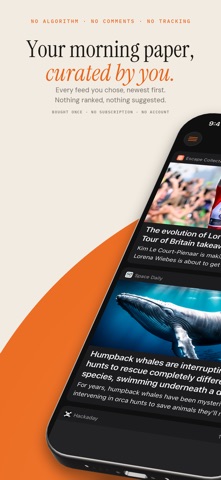
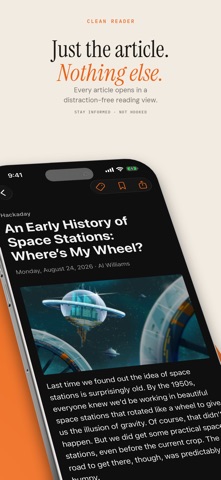
The internet used to feel different. You picked the sites you loved, and you read them. content brings that back. content is a calm, beautiful RSS reader for people who want to read articles — not scroll comments, fight algorithms, or chase engagement metrics. NO ALGORITHM. NO COMMENTS. NO NOISE. Your feeds appear in one place, in the order they were published. Chronological, always. No ranking, no "trending," no recommendations, nothing deciding for you what matters. FOLLOW ANYTHING WITH A FEED News sites, personal blogs, magazines, newsletters, YouTube channels, subreddits — if it publishes an RSS or Atom feed, you can follow it. Found something good in Safari? Add it straight from the share sheet. Import your existing subscriptions via OPML in seconds. A READER THAT RESPECTS THE ARTICLE Articles open in a clean, distraction-free reader view: no pop-ups, no interstitials, no comment sections. Typography-first design in dark or light mode. Even sites that only publish headlines get the full article extracted for you. ORGANIZED YOUR WAY Group feeds into categories and read them as one chronological stream. Save articles for later. Tag anything. Your library, your structure. ON IPHONE AND IPAD On iPad, your list sits beside the article you're reading, so finishing one and starting the next never changes the screen. Your library opens as a sidebar. Attach a keyboard and the arrow keys move through the list. SYNCS ACROSS YOUR DEVICES Your feeds, categories, tags, arrangement, and everything you've read or saved follow you between your iPhone and iPad over iCloud. Nothing to turn on, no account to create. PICKS UP EXACTLY WHERE YOU LEFT OFF content remembers your place in every list and every article. Close the app mid-paragraph, come back tomorrow, keep reading. READS OFFLINE Articles and their images prefetch quietly in the background on Wi-Fi. Open the app on the subway, on a flight, in a dead zone — everything's already there. PRIVATE BY DESIGN No account. No sign-up. No analytics, no tracking, nothing promoted — ever. Your articles are stored on your device, and syncing runs through your own private iCloud storage. Nothing is sent to our servers, because there are no servers. PAY ONCE, KEEP EVERYTHING No subscription. No premium tier. No locked features, no in-app purchases, no upsell. You buy the app, you own the app. Stay informed. Not hooked.
What's new · 1.3.2
Mute a phrase you'd rather not read. Swipe any article to mute a word or phrase from its headline — a daily horoscope, a weekly sale post, a subject you're tired of. It applies to that feed by default, or to everything if you'd rather. You see how many articles it hides before you commit, every rule is listed in Settings, and deleting one brings its articles straight back. Nothing is guessed and nothing is thrown away. You write the rule, you can see exactly what it does, and you can undo it. Swiping an article also saves it now. Reading view: set the text size directly from the article, alongside the font. It applies on top of your system text size rather than instead of it. The navigation bar is translucent, so the article passes underneath as you scroll, and the scroll indicator appears briefly when an article opens to show how long it is.
Details