

Lumen — DICOM viewer
Marco Tini · Medical
Independent analytics for this App Store listing. AppTracker is not affiliated with Marco Tini.
Chart standing · US
What changed · US
Listing changes AppTracker has observed for this app in this storefront — new versions, price moves, rating shifts, and store copy.
New: demo images. Five sample scans now come with Lumen, ready to explore in 2D and 3D.
In-app purchases · US
No in-app purchases.
Screenshots



Keywords this app targets
Search terms AppTracker associates with this app — estimates, not search volume. ❝ = in the app's title; a highlighted number is its current position for that term.
Similar apps
Competitors and close alternatives, as estimated by AppTracker.
 DICOM Viewer : MRI CT XRAY & +
Abdullah Aguiouaz
3 shared topics · 3 shared title words
DICOM Viewer : MRI CT XRAY & +
Abdullah Aguiouaz
3 shared topics · 3 shared title words
 MedScan: DICOM CT & MRI Viewer
DECLAN JOHN NANTON
3 shared topics · 2 shared title words
MedScan: DICOM CT & MRI Viewer
DECLAN JOHN NANTON
3 shared topics · 2 shared title words
 DICOM Viewer: MRI CT Studio
Murat Sait Dogan
3 shared topics · 3 shared title words
DICOM Viewer: MRI CT Studio
Murat Sait Dogan
3 shared topics · 3 shared title words
 Falcon MD
iCat Solutions Ltd
3 shared topics
Falcon MD
iCat Solutions Ltd
3 shared topics
 Falcon Mx
iCat Solutions Ltd
3 shared topics
Falcon Mx
iCat Solutions Ltd
3 shared topics
 DICOM File Viewer - MesDICOM
ONNEX YAZILIM ANONIM SIRKETI
DICOM File Viewer - MesDICOM
ONNEX YAZILIM ANONIM SIRKETI
 DICOMpocket
Young Ho Seo
DICOMpocket
Young Ho Seo
 DICOM Viewer: Slicora
Oran Dynamics Ltd
DICOM Viewer: Slicora
Oran Dynamics Ltd
About
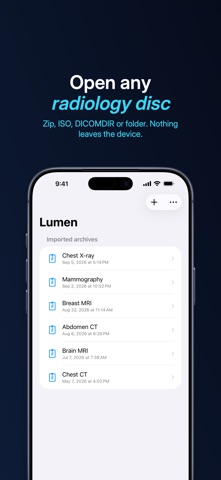
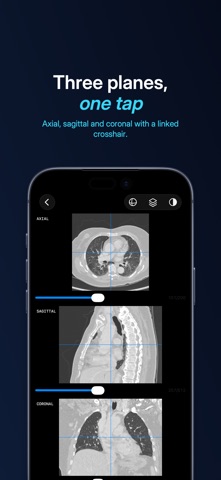
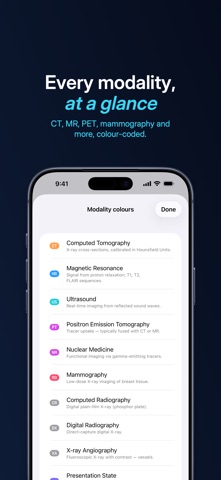
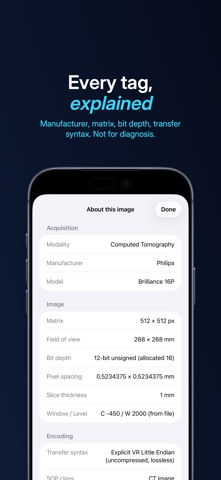
Lumen opens the radiology zip your patient brought in. No upload, no cloud, no signup — just pixels, at native resolution, on every Apple device you own. Designed for healthcare professionals reviewing studies they already have authority to access. Lumen is positioned for education, case review, and second-read scenarios. It is NOT a medical device and is not intended for primary clinical diagnosis. WHAT YOU CAN OPEN • DICOM / IHE-PDI zip archives — the format most patient CDs ship as • ISO 9660 disk images directly, no manual mount or repackage needed • Folders of DICOM files • Open via Files.app, share sheet, or in-app picker • No file at hand? Five sample scans come with the app: real, de-identified CT, MRI and X-ray studies PERSISTENT LIBRARY • Every imported archive lives in your device's Lumen folder, visible in the Files app • Every scan shows a preview of its images, its modality and number of series • Re-open with one tap from the home screen; no re-importing • Delete an archive from its menu — along with all the videos exported from it VIEWING • Full native bit-depth display, with pinch zoom, drag pan, and double-tap toggle • Window/level by drag: vertical for brightness, horizontal for contrast — sensitivity scales with the active window so wide CT and narrow brain windows feel equally responsive • One-tap modality presets (CT: soft tissue, bone, lung, brain, abdomen, liver) • Per-instance metadata sheet with manufacturer, matrix, bit depth, transfer syntax, SOP class, and a built-in radiology acronym glossary VOLUMETRIC TOOLS • Automatic detection of stackable volumes from the slice geometry tags, with a 3D / 4D badge in the browser so you can see at a glance which series are reconstructable • Multi-planar reconstruction (MPR): axial, sagittal, and coronal reformats side by side, with crosshair-linked navigation — tap one plane to jump the other two • Slab projection: maximum-intensity (MIP), minimum-intensity (MinIP), or average over 3 to 50 slices — great for vessels, lungs, and noise reduction • True 3D volume rendering: a Metal-powered raycaster with four rendering modes — Surface (solid skin/bone shell with gradient lighting and per-volume tone presets), Anatomy (coloured tissue transfer function), Volume composite (grayscale translucent depth), and MIP • Tissue isolation presets per modality (bone, skin, soft tissue, lung, liver) — hide everything else from the volume with one tap, no per-slice masking • Two-finger pan, drag-rotate, pinch-zoom, auto-rotate cine, and an axis-aligned clipping plane (sagittal / coronal / axial) for cutting away half the volume to see inside • Save the current 3D view as a PNG snapshot at 2× the on-screen resolution, sharable via Photos, AirDrop, Files, or Mail DYNAMIC 4D ACQUISITIONS • Native support for dynamic contrast-enhanced series (e.g. dyn_eTHRIVE liver MR, perfusion MR, dynamic angio): every timepoint becomes its own 3D volume • Timepoint slider in MPR and 3D with cine playback — watch contrast wash through over time • All timepoints prefetched in the background and persisted to an on-device cache, so scrubbing across timepoints stays instant across launches SHARING • Export any series as an H.264 MP4 at 10, 15, or 30 fps • Saved next to its source archive in the Lumen folder of Files.app • Share via the standard share sheet, or copy to iCloud Drive • PNG snapshots of the 3D view share PRIVACY BY DEFAULT • Everything stays on this device • No analytics on file contents, no account, no tracking SDKs • Patient data leaves the device only when YOU choose to share an export • Lumen never connects to the internet: even the sample scans come with the app • A file that won't open? Lumen explains why and, if you want, emails us the technical details — never names, dates or images Lumen is intentionally positioned as an educational and second-read tool. It is not a regulated medical device in any jurisdiction. See the in-app disclaimer for the full statement.
What's new · 1.0.3
New: demo images. Five sample scans now come with Lumen, ready to explore in 2D and 3D.
Details