

Signal & Frequency Generator
milkmonkey GmbH · Utilities
Independent analytics for this App Store listing. AppTracker is not affiliated with milkmonkey GmbH.
Chart standing · US
Screenshots




Similar apps
Competitors and close alternatives, as estimated by AppTracker.




About
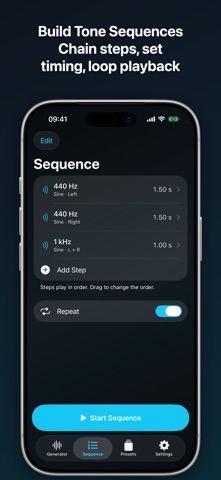
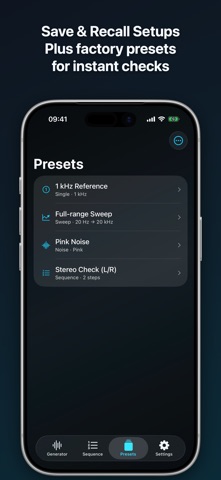
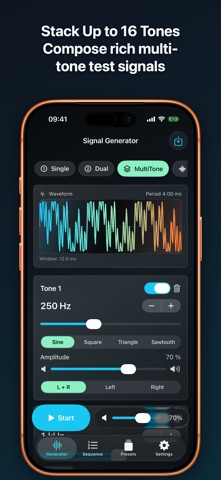
Signal & Frequency Generator is a precise tool for generating audio signals on iPhone and iPad. The app supports single tones, dual tones, MultiTone signals, noise, sweeps, and sequences. Frequencies can be set from 20 Hz to 20 kHz, entered manually, or selected from quick frequency presets. For testing speakers, headphones, stereo setups, or audio chains, the app includes channel routing, phase offset, adjustable amplitude, burst mode, and a waveform preview. Custom configurations can be saved as presets and restored later. High levels and high frequencies can damage hearing. Start with low volume and be especially careful with headphones. Features - Signal generator with multiple modes: single tone, dual tone, MultiTone, noise, and sweep. - Frequency range from 20 Hz to 20 kHz. - Manual frequency entry with Hz/kHz display. - Logarithmic frequency slider for fast adjustments across the full frequency range. - Fine frequency adjustment in steps of 0.1 Hz, 1 Hz, 10 Hz, and 100 Hz. - Quick selection for fixed frequencies: 20 Hz, 31.5 Hz, 63 Hz, 125 Hz, 250 Hz, 500 Hz, 1 kHz, 2 kHz, 4 kHz, 8 kHz, 10 kHz, 16 kHz, and 20 kHz. - Four waveforms: sine, square, triangle, and sawtooth. - Adjustable amplitude per tone. - Stereo output with channel selection: left, right, or left and right. - Phase offset between left and right channel from 0 to 360 degrees. - Dual tone mode for two simultaneously generated frequencies. - MultiTone mode with up to 16 configurable tones at once. - Individual MultiTone tones can be enabled, disabled, added, and deleted. - Noise generator with white, pink, and brown noise. - Sweep generator with start frequency, end frequency, and duration. - Sweep scales: linear and logarithmic. - Sweep repeat modes: once, loop, or back and forth. - Sequence mode with multiple tone steps. - Sequence steps can be added, deleted, edited, and reordered. - Adjustable duration per sequence step. - Sequences can be played once or repeated. - Burst mode for gated signals with adjustable on and off duration. - Waveform preview with time window and period display. - Transport bar with start/pause and master volume. - Maximum output amplitude can be limited as a safety setting. - Optional screen awake mode during playback. - Preset system for saving and restoring custom configurations. - Factory presets for 1 kHz reference, full-range sweep, pink noise, and stereo check. - Presets are stored locally. - Audio output at 48 kHz sample rate, stereo, and 32-bit float. - Smooth master gain smoothing and output limiting against clipping. Generator: choose a mode (Single, Dual, MultiTone, Noise, Sweep). Set frequency by typing a value, by the logarithmic slider, by the +/- fine steps (0.1 / 1 / 10 / 100 Hz), or by tapping a preset frequency (20 Hz … 20 kHz). Choose a waveform (sine, square, triangle, sawtooth), amplitude, output channel (left, right, both) and stereo phase offset (0–360°). Dual mode adds a second independent tone; MultiTone allows up to 16 simultaneous tones that can each be added, enabled, disabled or deleted; Noise offers white, pink and brown noise; Sweep takes a start frequency, end frequency, duration, linear or logarithmic scale, and once / loop / ping-pong repeat. Burst mode gates the signal with adjustable on and off times. Sequence: build a list of tone steps, each with its own settings and duration; add, edit, reorder and delete steps, then play the sequence once or looped. Presets: four factory presets (1 kHz reference, full-range sweep, pink noise, stereo check) plus any configuration the user saves. Presets are stored locally on the device only. Settings: default waveform, a maximum-amplitude safety limit, and an option to keep the screen awake during playback. Note for the reviewer: the app deliberately produces continuous full-level test tones, including very low and very high frequencies. Please start at a low system volume and avoid headphones at high levels.
Details