

Tone Gen Studio
Scott Manley · Music
Independent analytics for this App Store listing. AppTracker is not affiliated with Scott Manley.
Chart standing · US
What changed · US
Listing changes AppTracker has observed for this app in this storefront — new versions, price moves, rating shifts, and store copy.
Smoother sweeps and tones, accurate burst timing, and fixes for metronome timing and random mute. Better handling of headphones and audio interruptions, plus accessibility improvements.
Ratings breakdown · US
The star breakdown behind this app's rating in this storefront.
In-app purchases · US
No in-app purchases.
Screenshots


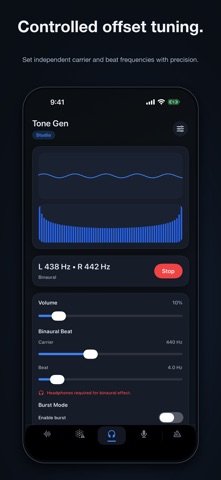

Keywords this app targets
Search terms AppTracker associates with this app — estimates, not search volume. ❝ = in the app's title; a highlighted number is its current position for that term.
Similar apps
Competitors and close alternatives, as estimated by AppTracker.



About
Test speakers, find frequencies, tune instruments, and keep time during practice with Tone Gen Studio. Generate tones, sweeps, and noise, explore your microphone input with the tuner and spectrum analyzer, or practice with the built-in metronome. Tone generation and speaker testing - Set a custom frequency or choose a preset tone pad. - Select sine, square, sawtooth, or triangle waveforms. - Run linear, exponential, or stepped frequency sweeps. - Generate white, pink, and brown noise. - Set burst on and off durations for pulsed tones. - Adjust binaural carrier and beat frequencies for headphone playback. Tuning and audio analysis - View the detected note, frequency, and cents with the microphone tuner. - Explore input levels with a real-time spectrum analyzer and 1/3-octave RTA bands. Metronome and practice - Set a tempo from 20 to 300 BPM or use tap tempo. - Choose time signatures, subdivisions, accents, and five click sounds. - Practice with swing, polyrhythms, gradual tempo ramps, and random mute. - Use a count-in and practice timer. Start at a low volume and adjust gradually. Binaural playback requires headphones. Speaker response and microphone measurements depend on your device and connected audio equipment. For musicians, audio engineers, educators, and anyone working with sound on iPhone and iPad.
What's new · 1.0.3
Smoother sweeps and tones, accurate burst timing, and fixes for metronome timing and random mute. Better handling of headphones and audio interruptions, plus accessibility improvements.
Details