

Freezer & Pantry Inventory
CHRISTOPHER CLARKE · Food & Drink
Independent analytics for this App Store listing. AppTracker is not affiliated with CHRISTOPHER CLARKE.
Chart standing · US
What changed · US
Listing changes AppTracker has observed for this app in this storefront — new versions, price moves, rating shifts, and store copy.
The Meal Planner, rethought: • Tap the sparkle next to anything that's expiring for meal ideas that use it — or type an ingredient under Use up • Shopping lists built from your plan are now things you can buy — "2 cloves garlic, minced" becomes Garlic — and items you bought last week come back instead of doubling up • Search your Recipe Box, reorder ingredients and steps, and choose which inventory items Mark as Cooked subtracts — for your own recipes too, which now get a photo automatically • "Use these first" includes anything past its date — tap an item to plan a meal for that day • The first tab is now Ideas, and the planner remembers your tab, serving size, and meal type • Deleting a recipe that's on your plan, or clearing your shopping list, asks first • Fixed: AI suggestions and Plan My Week failed with an error on a full freezer — and when something does go wrong, the message now says what to do Thanks for using Freezer+! Got a question? Settings → Help → Contact support.
Ratings breakdown · US
The star breakdown behind this app's rating in this storefront.
In-app purchases · US
What this app sells inside itself, grouped by kind and priced for this storefront.
Screenshots



Keywords this app targets
Search terms AppTracker associates with this app — estimates, not search volume. ❝ = in the app's title; a highlighted number is its current position for that term.
Similar apps
Competitors and close alternatives, as estimated by AppTracker.
 Pantry Inventory: Food Tracker
Alexander Zakharin
2 shared topics · 3 shared title words
Pantry Inventory: Food Tracker
Alexander Zakharin
2 shared topics · 3 shared title words
 Pantry & Fridge: FridgeBuddy
Charles-Adrien Fournier
1 shared topic · 1 shared title word
Pantry & Fridge: FridgeBuddy
Charles-Adrien Fournier
1 shared topic · 1 shared title word
 Shopping List + Pantry
PC-Future GmbH
1 shared title word
Shopping List + Pantry
PC-Future GmbH
1 shared title word
 Fridge Inventory & AI Scan
KOTARO OMORI
1 shared topic · 1 shared title word
Fridge Inventory & AI Scan
KOTARO OMORI
1 shared topic · 1 shared title word
 SeePantry: Meals Recipes Lists
Allpath Enterprises LLC
1 shared topic
SeePantry: Meals Recipes Lists
Allpath Enterprises LLC
1 shared topic
 Pantry Inventory: Check Waste
GRADOID DOO NOVI SAD
3 shared title words
Pantry Inventory: Check Waste
GRADOID DOO NOVI SAD
3 shared title words
 Grocery AI
Pocket Labs
Grocery AI
Pocket Labs
 Freshli: Fridge Pantry Tracker
Pablo Grau
1 shared topic · 1 shared title word
Freshli: Fridge Pantry Tracker
Pablo Grau
1 shared topic · 1 shared title word
About
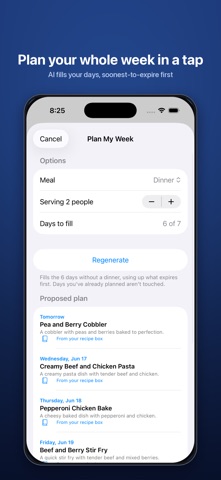
Know exactly what's in your kitchen — freezer, fridge, pantry, and beyond. Scan a barcode, search by name, or add an item by hand, pick a location and quantity, then tap to remove it when you cook. Freezer & Pantry Inventory fills in product info and photos automatically from Open Food Facts, USDA FoodData Central, and Unsplash. Organize every storage spot — freezer, fridge, pantry, cupboard, the garage chest freezer — with quantities, weights, and expiration dates, so nothing gets lost in the back or thrown out too late. Build a Recipe Box and plan your week. Save the AI's suggestions or add your own recipes, lay them out on a 7-day planner that highlights what's expiring first, and mark meals as cooked to subtract the ingredients straight from your inventory. • Barcode scanner with auto-filled product info and photos • Won't scan? Type the number in or search by name — the details fill in either way • Things you buy often come back with one tap, photo and category included — even after you've used them up • Siri & Shortcuts — "Add an item in Freezer+," "What's expiring in Freezer+" — hands-free, zero setup • Home Screen & Lock Screen widget — see what's expiring without opening the app • Per-item weights, expiration dates, and custom photos • Track multiple storage locations • Recipe box — save, edit, and add your own recipes with notes • 7-day meal planner that surfaces what to use first • Mark as Cooked — ingredients come right out of your inventory • AI Meal Planner — recipes built from what you actually have on hand • Plan My Week with AI — one tap fills your empty days, expiring food first • Sync across iPhone, iPad, and Mac via iCloud • Family Sharing — one Premium subscription covers up to six family members On iPhone 15 Pro or later and Apple Silicon Macs with Apple Intelligence, the AI Meal Planner runs entirely on-device — nothing leaves your device. On other devices, Premium members get the same AI meal planning over a private, secure connection (only item names are sent, never used to train AI). Your Recipe Box and weekly plan work on every device. Free: one location, full inventory tracking, your Recipe Box, and weekly meal planning. Premium ($0.99/wk, $2.49/mo, $19.99/yr) unlocks the AI Meal Planner, unlimited locations (add your fridge, pantry, and more), expiration alerts, and iCloud sync — and the yearly plan starts with a 7-day free trial. Premium supports Family Sharing, so one subscription covers your whole household. Auto-renews; manage in Settings. Built natively. No ads, no tracking. Terms of Use (EULA): https://www.apple.com/legal/internet-services/itunes/dev/stdeula/ Privacy Policy: https://tech.clarke.rocks/privacy.html
What's new · 1.14
The Meal Planner, rethought: • Tap the sparkle next to anything that's expiring for meal ideas that use it — or type an ingredient under Use up • Shopping lists built from your plan are now things you can buy — "2 cloves garlic, minced" becomes Garlic — and items you bought last week come back instead of doubling up • Search your Recipe Box, reorder ingredients and steps, and choose which inventory items Mark as Cooked subtracts — for your own recipes too, which now get a photo automatically • "Use these first" includes anything past its date — tap an item to plan a meal for that day • The first tab is now Ideas, and the planner remembers your tab, serving size, and meal type • Deleting a recipe that's on your plan, or clearing your shopping list, asks first • Fixed: AI suggestions and Plan My Week failed with an error on a full freezer — and when something does go wrong, the message now says what to do Thanks for using Freezer+! Got a question? Settings → Help → Contact support.
Details