

Avionics Buddy
Sharif El Fatatry · Utilities
Independent analytics for this App Store listing. AppTracker is not affiliated with Sharif El Fatatry.
Chart standing · US
What changed · US
Listing changes AppTracker has observed for this app in this storefront — new versions, price moves, rating shifts, and store copy.
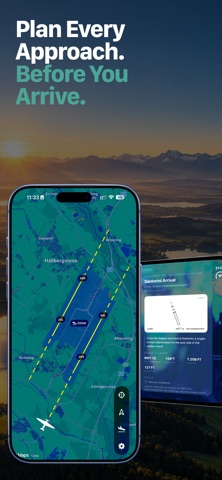
Avionics Buddy 1.4 is here! This update introduces Missions & Challenges — a new way to discover the world without overthinking where to fly next. Download mission packs, explore new destinations and take on aviation challenges around the world. Avionics Buddy automatically recognizes your landings at challenge airports, tracks your progress and awards medals when you complete a mission. Also new and improved: • Download and import additional .avmission mission packs • Mission briefings with airport, runway and approach information • Challenge progress tracking and medals • Improved runway and approach visualization • Refined adaptive layouts across iPhone, iPad and Mac • Additional interface improvements, fixes and polish throughout the app Three challenges are included to get you started, with more downloadable missions available from the Avionics Buddy website – https://www.avionicsbuddy.com/missions/ Pick a challenge, connect to Microsoft Flight Simulator and start exploring.
Price & rating history · US
Reconstructed from the listing changes AppTracker has observed in this storefront. A field is charted once it has changed more than once, and each line starts at the value it moved from.
Average rating · ★ 0.00 now · 2 changes on record
In-app purchases · US
No in-app purchases.
Screenshots





Keywords this app targets
Search terms AppTracker associates with this app — estimates, not search volume. ❝ = in the app's title; a highlighted number is its current position for that term.
Similar apps
Competitors and close alternatives, as estimated by AppTracker.
 MSFS Companion
Marc Embrechts
MSFS Companion
Marc Embrechts
 iFMS
Michael Feyter
2 shared topics
iFMS
Michael Feyter
2 shared topics
 AirTrack Classic
Joao Cabral
1 shared topic
AirTrack Classic
Joao Cabral
1 shared topic
 A320 Checklist Pro Assistant
Wojciech Olszewski
2 shared topics
A320 Checklist Pro Assistant
Wojciech Olszewski
2 shared topics
 Simulator Station
Osama Nabel
Simulator Station
Osama Nabel
 Flyskyhy
Renevision
1 shared topic
Flyskyhy
Renevision
1 shared topic
 Cobalt: Flight Sim Companion
Noah Livingston
Cobalt: Flight Sim Companion
Noah Livingston
 Airmate
Myriel Aviation SA
Airmate
Myriel Aviation SA
About
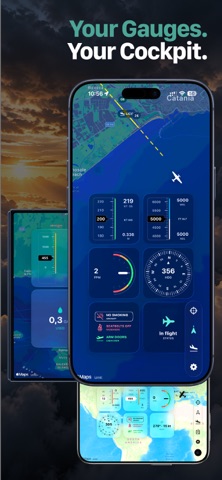
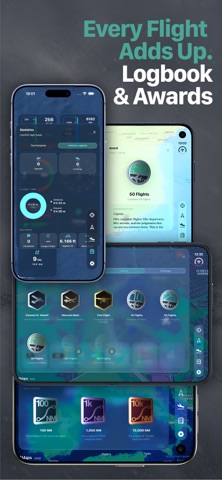
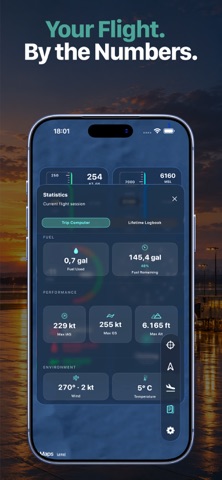
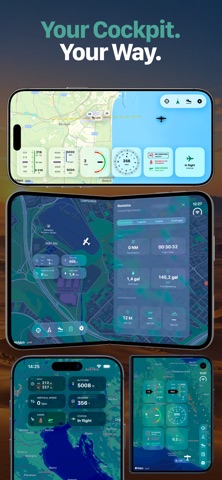
Turn your iPhone, iPad or Mac into a live companion display for Microsoft Flight Simulator with live telemetry, maps, customizable gauges, airport information, weather, flight statistics, approach helpers, missions and challenges—all without leaving the simulator window. See your aircraft position on the map, monitor altitude, heading, airspeed, ground speed and vertical speed, browse airports, inspect runways, check live airport weather and use visual approach helpers while you fly. Take on Missions & Challenges and give your flights a destination. Choose from included challenges or download additional mission packs, explore airports around the world and complete each objective by flying there in Microsoft Flight Simulator. Avionics Buddy automatically recognizes your landings, tracks your challenge progress and awards medals as you complete them. Avionics Buddy is built for sim pilots who want to extend their Microsoft Flight Simulator setup beyond the main screen. Use it as a beautifully designed cockpit display on your desk or as an additional avionics screen in a larger multi-monitor simulator setup. Its adaptive interface makes use of the available screen space across iPhone, iPad and Mac, letting you build your own flight deck using the Apple devices you already own. Track your current flight with the Trip Computer, including distance, fuel, speed, altitude, wind and temperature. Continue building your Lifetime Logbook with accumulated flight time, takeoffs, landings, distance flown and personal records across all your simulator sessions. Search more than 80,000 airports, save your favorites, display selected airports on the map, inspect runways and review live weather before departure. Export and import your Airport Library to back up your saved airports or transfer them between your iPhone, iPad and Mac. Stay connected to your flight, even when Microsoft Flight Simulator is running on another screen. Key Features • Missions & Challenges with automatic landing detection, progress tracking and medals • Downloadable mission packs with detailed mission briefings – https://www.avionicsbuddy.com/missions/ • Live aircraft telemetry from Microsoft Flight Simulator • Follow-mode map with aircraft position, heading and selectable aircraft icons • Customizable cockpit gauges with multiple layouts, styles and live Session Gauge metrics • Trip Computer with live flight statistics for every session • Lifetime Logbook with cumulative flight time, takeoffs, landings, distance and records • Awards and medals earned through your flying • Search over 80,000 airports with favorites and map integration • Export and import your Airport Library between Apple devices • Runway approach helpers for visual alignment during simulator arrivals • Live airport weather with wind, pressure, clouds and current conditions • Optional cabin sound effects, including seatbelt announcements and other immersive details • Adaptive layouts across iPhone, iPad and Apple Silicon Mac • Local network connection through the free Avionics Buddy Bridge for Windows • No account required • No cloud telemetry How it works 1. Start Microsoft Flight Simulator on your Windows PC. 2. Download and run the free Avionics Buddy Bridge for Windows – https://www.avionicsbuddy.com/#bridge 3. Scan the QR code with Avionics Buddy on your iPhone, iPad or Mac. 4. Fly with live telemetry on your second screen. Avionics Buddy is intended for Microsoft Flight Simulator entertainment use only. It is not designed for real-world navigation, flight training, flight planning or operational aviation use. Avionics Buddy is not affiliated with Microsoft, Asobo Studio, Working Title, OurAirports or any aircraft manufacturer.
What's new · 1.4
Avionics Buddy 1.4 is here! This update introduces Missions & Challenges — a new way to discover the world without overthinking where to fly next. Download mission packs, explore new destinations and take on aviation challenges around the world. Avionics Buddy automatically recognizes your landings at challenge airports, tracks your progress and awards medals when you complete a mission. Also new and improved: • Download and import additional .avmission mission packs • Mission briefings with airport, runway and approach information • Challenge progress tracking and medals • Improved runway and approach visualization • Refined adaptive layouts across iPhone, iPad and Mac • Additional interface improvements, fixes and polish throughout the app Three challenges are included to get you started, with more downloadable missions available from the Avionics Buddy website – https://www.avionicsbuddy.com/missions/ Pick a challenge, connect to Microsoft Flight Simulator and start exploring.
Details