

Trimly - Memories within Reach
思涵 朱 · Photo & Video
Independent analytics for this App Store listing. AppTracker is not affiliated with 思涵 朱.
Chart standing · US
What changed · US
Listing changes AppTracker has observed for this app in this storefront — new versions, price moves, rating shifts, and store copy.
What’s New • Fully optimized for iPhone Duo for a better overall experience • Added support for highlights (HiLight) recorded by DJI and GoPro devices • Added support for Spatial Audio • Added support for adjusting the original capture date and time of videos • Added intelligent text search to quickly find specific text in videos Bug Fixes • Fixed inaccurate HDR LUT color rendering in some cases • UI improvements, bug fixes, and overall stability improvements
In-app purchases · US
No in-app purchases.
Screenshots



Keywords this app targets
Search terms AppTracker associates with this app — estimates, not search volume. ❝ = in the app's title; a highlighted number is its current position for that term.
Similar apps
Competitors and close alternatives, as estimated by AppTracker.
 LiveCut: Video to Live Photos
润杰 潘
LiveCut: Video to Live Photos
润杰 潘
 TrimCut - Video Editor
CLIPCUT TECHNOLOGY LIMITED
TrimCut - Video Editor
CLIPCUT TECHNOLOGY LIMITED
 Video Cutter - VidTrim
Suresh Verma
1 shared topic
Video Cutter - VidTrim
Suresh Verma
1 shared topic
 VideoTrim: No Quality Loss
冰 韩
1 shared topic
VideoTrim: No Quality Loss
冰 韩
1 shared topic
 Motion Track: Video Stabilizer
Morning Avocado LLC
1 shared topic
Motion Track: Video Stabilizer
Morning Avocado LLC
1 shared topic
 PureClip Photo
Francis Bonnin
1 shared topic
PureClip Photo
Francis Bonnin
1 shared topic
 Perfect Video
Beijing Perfect Frame Technology Co., Ltd.
1 shared topic
Perfect Video
Beijing Perfect Frame Technology Co., Ltd.
1 shared topic
 VN: Photo & Video Editor
Ubiquiti Labs, LLC
1 shared topic
VN: Photo & Video Editor
Ubiquiti Labs, LLC
1 shared topic
About
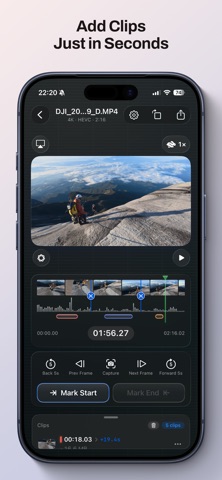
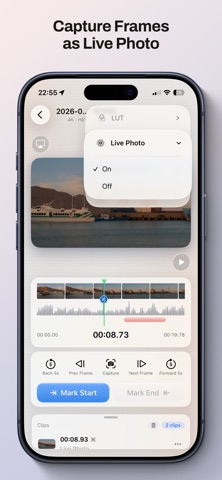
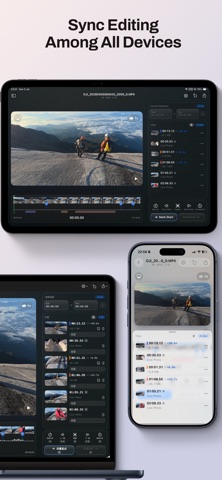
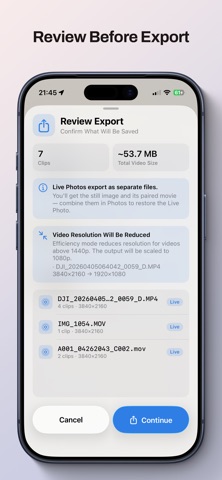
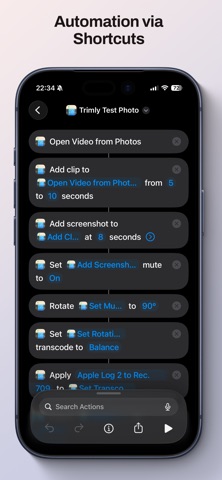
The best moments should live in your Photos library — not buried in an hour-long video or trapped in bulky editing software. Trimly does one thing: helps you find the highlights, cut them out, and save them where you open them every day. Wedding vows, baby’s first steps, a sunset clip, the moment everyone laughed. Many apps try to turn you into a pro editor. Trimly helps you finish in minutes. What Trimly can do • Cut multiple clips from one video: export vows, hugs, confetti and more separately without starting over • Export to Photos, local storage, or an external drive for easy sharing and viewing • Preserve original quality as much as possible • Batch export clips in chronological order, ideal for turning a trip into highlight videos • Share a video from another app and start trimming directly in Trimly From video to highlights in seconds • Reads the source file directly with no extra copy, saving storage • Drag the timeline to set in and out points, create as many clips as you need, with undo support • Add labels such as “Vows,” “Sunset,” or “Funny” • Waveform timeline helps you cut interviews and vlogs by sound • Fine-tune frame by frame, or jump five seconds with one tap • Capture a still image or export a Live Photo at any moment (HDR supported) • iPhone landscape mode for a wider view and more comfortable editing • Rotate footage directly without slow transcoding Built for real shooting scenarios • Travel vlogs: split long videos into shareable clips of arrival, food and more • Outdoor adventures: pick out summit moments or dramatic downhill turns • Family gatherings: save candles, gifts and laughs as separate clips • Concerts: keep the chorus and encore, skip the queue and warm-up Everything belongs in the right place in Photos • Calculates the real time of every exported frame from the source video’s capture time and clip position • Exported videos, screenshots and Live Photos return to Photos with the correct time, alongside that day’s memories • Preserves GPS location, capture device, lens model and other metadata Local AI and automation • On-device AI scene and sound recognition: identifies subjects and sound types locally and lets you add related segments with one tap • On-device AI transcription and subtitle export: speech-to-text and translation run locally; tap text to jump to the exact position; export subtitle files • Shortcuts automation: fits into system workflows for one-tap actions and batch processing A creative relay across devices • Progress is saved automatically and synced through iCloud. Rough cut on iPhone during a commute, then continue on Mac at home • Handoff support: switch devices without tedious importing • AirPlay support: cast trip highlights to the TV and share them with family For photography and video enthusiasts • Built-in Rec. 709 restoration LUTs for Apple Log 2, GoPro, DJI and Insta360 footage • Apply a LUT while trimming to make footage look vivid instantly • Supports the Apple Photos extension, so you can apply LUTs to videos directly in the Photos app • New LUT manager: import custom .cube files, with all LUTs synced through iCloud Privacy by design • Core features run locally on device, with no account and no ads • Your footage never leaves your device. Network requests are limited to syncing progress and presets through your iCloud • AI models are provided by Apple system frameworks and run entirely on device • No third-party cloud processing, user tracking, or behavioral analytics Legal • Apple, iPhone, iPad and Mac are trademarks of Apple Inc. • GoPro is a trademark of GoPro, Inc. • DJI is a trademark of SZ DJI Technology Co., Ltd. • Insta360 is a trademark of Arashi Vision Inc. • Trimly is independently developed and is not affiliated with or endorsed by the companies above • Built-in LUTs are for personal footage only and not for commercial use • All trademarks belong to their respective owners © 2026 Trimly
What's new · 1.8.0
What’s New • Fully optimized for iPhone Duo for a better overall experience • Added support for highlights (HiLight) recorded by DJI and GoPro devices • Added support for Spatial Audio • Added support for adjusting the original capture date and time of videos • Added intelligent text search to quickly find specific text in videos Bug Fixes • Fixed inaccurate HDR LUT color rendering in some cases • UI improvements, bug fixes, and overall stability improvements
Details