

TrimCut - Video Editor
CLIPCUT TECHNOLOGY LIMITED · Photo & Video
Independent analytics for this App Store listing. AppTracker is not affiliated with CLIPCUT TECHNOLOGY LIMITED.
Chart standing · US
What changed · US
Listing changes AppTracker has observed for this app in this storefront — new versions, price moves, rating shifts, and store copy.
Fixed some known issues and improved overall stability.
Price & rating history · US
Reconstructed from the listing changes AppTracker has observed in this storefront. A field is charted once it has changed more than once, and each line starts at the value it moved from.
Average rating · ★ 4.26 now · 9 changes on record
Ratings breakdown · US
The star breakdown behind this app's rating in this storefront.
In-app purchases · US
What this app sells inside itself, grouped by kind and priced for this storefront.
Screenshots




Similar apps
Competitors and close alternatives, as estimated by AppTracker.
 Splice - Video Editor & Maker
Bending Spoons Apps ApS
Splice - Video Editor & Maker
Bending Spoons Apps ApS
 ClipMix Video Editor
AHMAD ALMHASNEH
ClipMix Video Editor
AHMAD ALMHASNEH
 VivaVideo - Video Cut & Editor
Hangzhou Xiaoying Innovation Technology Co., Ltd.
VivaVideo - Video Cut & Editor
Hangzhou Xiaoying Innovation Technology Co., Ltd.
 PowerDirector: AI Video Editor
CyberLink Corp.
PowerDirector: AI Video Editor
CyberLink Corp.
 Pixelcut: AI Photo & Video
Pixelcut Inc.
Pixelcut: AI Photo & Video
Pixelcut Inc.
 Time Cut: Smooth Slow Motion
立亚 林
Time Cut: Smooth Slow Motion
立亚 林
 CapCut: Photo & Video Editor
Bytedance Pte. Ltd
CapCut: Photo & Video Editor
Bytedance Pte. Ltd
 Trimly - Memories within Reach
思涵 朱
Trimly - Memories within Reach
思涵 朱
About
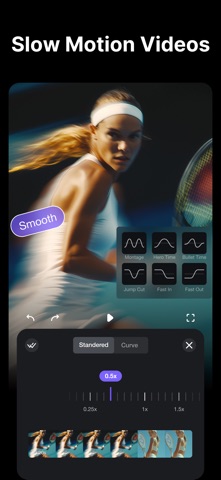
Unleash your creativity with TrimCut: your all-in-one video editing studio and pro retouching app. Use our powerful AI tools, slow-motion effects, auto captions and background removal to transform your ideas into captivating stories for Reels, YouTube and FaceBook! Powerful AI Tools • AI Retouch: Smooth skin, eliminate blemishes and wrinkles, whiten teeth, you can easily create flawless videos for social media. • Auto Captions: Generate accurate subtitles or lyrics with a single tap. Perfect for making your YouTube stories or Instagram Reels accessible and engaging. • AI Remove Background: Instantly remove your video's background with one tap. • Slow-motion effects: Transform your moment into smooth and cinematic sequences that heighten the drama and emotion. • Auto Adjust: Automatically balances colors and lighting to make your videos or vlogs look their best. Basic Video Editing • Trim & Merge: Seamlessly stitch multiple clips together. • Speed Adjustment: Precisely control the pace of your video with customizable speed curves. • Easy Reordering & Deletion: Manage your clips intuitively with drag-and-drop. • Draft Saving: Save your projects anytime and undo/redo with confidence. Advanced Video Editing • Picture-in-Picture (PIP): Layer multiple video clips to create dynamic content. • Multi-Track Timeline: Easily overlay videos, photos, stickers, and text on a user-friendly timeline. • Blur Video: Artfully blur the background to make yourself stand out, or add a dreamy haze to a memory, turning ordinary clips into professional-looking scenes. Text & Brush Tools • Use playful texts and draw directly on your video to highlight a moment, wish someone a happy birthday, or create a unique viral clip. Trending Filters & Effects • Professional Effects: Access a rich library of glitch, transition, VHS, and FX effects. • Cinematic Filters: Apply movie-style filters to your videos to set the perfect mood. Photo to Video Templates • Turn your favorite photos into stunning videos in seconds. • Choose from trending templates with cinematic transitions, stylish effects, and perfectly synced music. • Simply select your photos and let TrimCut automatically create eye-catching slideshows, travel stories, birthday videos, memories, and social media clips. • Customize text, filters, music, and timing to make every video uniquely yours. • Perfect for Reels, TikTok, Shorts, YouTube, and Instagram. Music & Sound • Explore a vast library of music to find the perfect audio match for your video • Music Beat Detection: Automatically add markers to sync your edits with the music's rhythm, taking your videos to the next level. • Adjust sound: Easily make your voice clear over the music, or emphasize a key moment with a sound effect boost. Easy to Share • 4K HD & GIF Export: Save and share your creations in stunning 4K quality or as fun GIFs. • One-Tap Sharing: Directly share your masterpieces to your favorite social platforms. TrimCut Pro Unlimited Subscription - Subscription type: Weekly, Monthly, Yearly. - Subscription automatically renews unless auto-renew is turned off at least 24-hours before the end of the current period. - Subscriptions may be managed by the user and auto-renewal may be turned off by going to the user's Account Settings after purchase. - Any unused portion of a free trial period will be forfeited when the user purchases a subscription. - Payment will be charged to iTunes Account at confirmation of purchase. - An account will be charged for renewal within 24 hours prior to the end of the current period. The cost depends on the selected plan. Privacy Policy: https://pzmobile.com/app/en/policy Terms of Use: https://pzmobile.com/app/en/terms
What's new · 3.2.24
Fixed some known issues and improved overall stability.
Details