

SaySpend: AI Expense Tracker
依欢 孙 · Finance
Independent analytics for this App Store listing. AppTracker is not affiliated with 依欢 孙.
Chart standing · US
What changed · US
Listing changes AppTracker has observed for this app in this storefront — new versions, price moves, rating shifts, and store copy.
- Added a spending report center. Pro users can generate reports for the full previous week and month, with key metrics and insights based on recorded transactions. - Save, favorite and share generated reports. Improved PDF exports to include transaction findings and the full report commentary. - Transaction PDF exports now include the item's photo sticker. - Voice shortcuts now use your default payment method, keep the reviewed selection when saving and update the corresponding account balance. - Refined date headers and amount layouts on the home screen for easier browsing. - Completed interface translations for supported languages.
Ratings breakdown · US
The star breakdown behind this app's rating in this storefront.
In-app purchases · US
What this app sells inside itself, grouped by kind and priced for this storefront.
Screenshots





Similar apps
Competitors and close alternatives, as estimated by AppTracker.
 Expense Tracker: Budget AI
Aleksandr Gostiuzhev
Expense Tracker: Budget AI
Aleksandr Gostiuzhev
 Smart Receipt: Scan & Track
Glayzer LLC
Smart Receipt: Scan & Track
Glayzer LLC
 Spenso: Expense Tracker
Chirill Ceban
Spenso: Expense Tracker
Chirill Ceban
 Quanto: Expense Tracker
Alejandro Ausejo
Quanto: Expense Tracker
Alejandro Ausejo
 ReceiTracker: Receipt Scanner
HIROKI MURAI
ReceiTracker: Receipt Scanner
HIROKI MURAI
 MoneyKu: AI Expense Tracker
PT Pelita Kode Indonesia
MoneyKu: AI Expense Tracker
PT Pelita Kode Indonesia
 AI Expense Tracker: Spent
Eduardo Ozanan Correia
AI Expense Tracker: Spent
Eduardo Ozanan Correia
 Cashful: Money Tracker
Nazar Ashyrov
Cashful: Money Tracker
Nazar Ashyrov
About
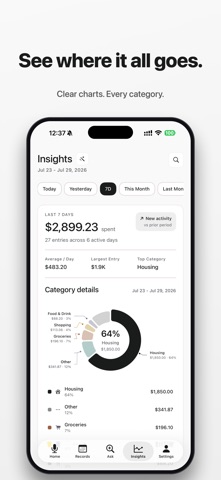
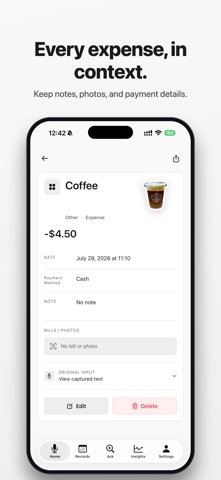
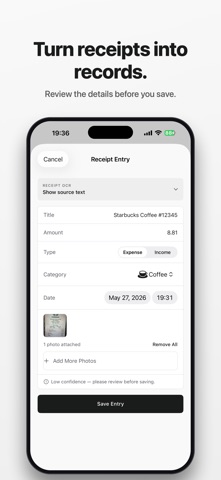
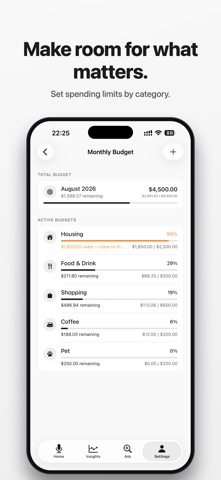
Speak an expense or scan a receipt. Centee helps extract the details so you can review, save, and track your spending—without linking a bank account. Add a purchase in the quickest way for you. Centee helps recognize the item, amount, date, and category, then you review every detail before saving. Capture every expense in seconds No ads, account registration, bank connection, or long forms. Speak naturally, for example: “I bought a coffee this morning for $5.” Centee recognizes the item, amount, and time, then turns your words into a record you can review before saving. Keep receipts, bills, and payment screens together Store receipts, invoices, payment screens, and bills with each expense. Scan a photo and let AI help extract key details before you save. Track how you paid Record cash, cards, digital wallets, bank transfers, and other payment methods alongside each expense. Ask your ledger with AI When your ledger has enough history, search a purchase or ask a question about spending. Centee bases answers on your saved titles, amounts, categories, dates, and notes—not generic financial advice. Receipt photos are not shared for these answers. Review AI results before acting. Capture faster with Back Tap Set up Centee Shortcuts and assign them to Back Tap in iPhone Settings. Double-tap to send a screenshot of a receipt or payment screen to Centee. Triple-tap to enter and save an expense through Quick Add without opening the app. More ways to stay on top of spending - Log expenses by voice - Scan receipts and bills - Track spending, income, subscriptions, and daily costs - Review category trends and AI summaries - Ask Centee about your ledger and spending patterns - Attach photos and item stickers to records - Use widgets and Shortcuts for faster capture - Export or review your history when needed Minimal by design A calm, focused interface keeps daily expense tracking simple, with no unnecessary setup. Private by design Centee does not require bank linking. AI results may need review before saving, and your records should be checked for accuracy. Centee is a personal finance tracking tool. It does not provide financial, tax, investment, credit, debt, or legal advice. Terms of Use (EULA): https://www.apple.com/legal/internet-services/itunes/dev/stdeula/ Privacy Policy: https://sunheihei.github.io/app-policie/centee-ios-privacy.html Terms of Use: https://sunheihei.github.io/app-policie/centee-ios-terms.html
What's new · 1.1.14
- Added a spending report center. Pro users can generate reports for the full previous week and month, with key metrics and insights based on recorded transactions. - Save, favorite and share generated reports. Improved PDF exports to include transaction findings and the full report commentary. - Transaction PDF exports now include the item's photo sticker. - Voice shortcuts now use your default payment method, keep the reviewed selection when saving and update the corresponding account balance. - Refined date headers and amount layouts on the home screen for easier browsing. - Completed interface translations for supported languages.
Details