

Roomly 3D
Hangfang Zhang · Utilities
Independent analytics for this App Store listing. AppTracker is not affiliated with Hangfang Zhang.
Chart standing · US
In-app purchases · US
No in-app purchases.
Screenshots


Similar apps
Competitors and close alternatives, as estimated by AppTracker.
 Lidar Larry
AARON MONTANO
Lidar Larry
AARON MONTANO
 Dot3D: Precision LiDAR Scanner
DotProduct LLC
Dot3D: Precision LiDAR Scanner
DotProduct LLC
 3D Snap: LiDAR Scanner & Ruler
BP Mobile LLC
3D Snap: LiDAR Scanner & Ruler
BP Mobile LLC
 Make Plan 2D/3D LiDAR Scanner
Bimdiag International
Make Plan 2D/3D LiDAR Scanner
Bimdiag International
 AI Room & Home Planner: LiDAR
Rocket Digital Ltd
AI Room & Home Planner: LiDAR
Rocket Digital Ltd
 DepthEye - 3D LiDAR Scanner
Knoet Studio
DepthEye - 3D LiDAR Scanner
Knoet Studio
 Tiny Room Scanner
Felix Hunger
Tiny Room Scanner
Felix Hunger
 Roomantic: Furniture Planner
Blank Slate Labs Limited Liability Company
Roomantic: Furniture Planner
Blank Slate Labs Limited Liability Company
About
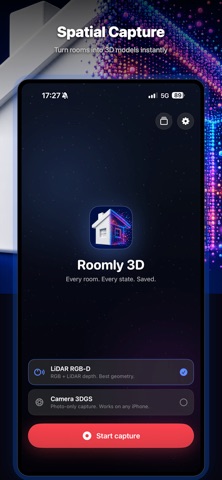
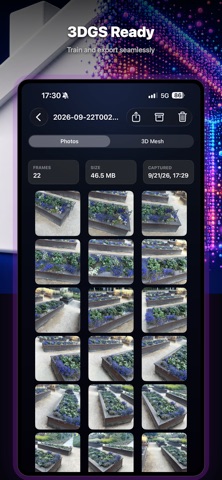
Every room. Every state. Saved. Roomly 3D turns your iPhone Pro's LiDAR sensor into a precision room scanner. Each capture preserves synchronized colour, depth, and camera pose, so the result can be turned into a photoreal 3D model for evidence, virtual tours, or comparing a space across time. WHAT IT'S FOR • Evidence preservation — insurance claims, rental move-in/move-out, property disputes • Virtual tours — remote viewing for sales or sharing • State diffing — comparing a room's state across time HOW IT WORKS • Walk through a room with your iPhone. Roomly 3D auto-captures sharp frames at the right moments — no shutter button to press. • A live coverage overlay colours the room as you scan, showing which surfaces are done and which still need a pass. • Motion and sharpness gates reject blurry or rushed frames before they are ever written, so what you take home is clean. • Stop when the room reads as fully covered. Share the result as a single archive, or save the raw scan to Files. OUTPUT • Industry-standard Nerfstudio-compatible format (transforms.json + RGB JPGs + depth EXRs + LiDAR mesh) • Drop straight into Nerfstudio, DN-Splatter, or any 3D Gaussian Splatting / NeRF pipeline that reads the Nerfstudio schema • Metric scale: one unit is one metre, no rescaling needed REQUIREMENTS • iOS 17 or later • LiDAR RGB-D capture — the full depth pipeline and the live coverage overlay — requires an iPhone Pro with a LiDAR sensor (12 Pro family and later). Without LiDAR the app still runs and captures a camera-only sequence, but depth and the coverage overlay are unavailable. PRIVACY • All processing happens on your device. • No analytics, no accounts, no third-party SDKs, no data leaves your phone.
What's new · 1.2.1
Bug fixes and a capture-quality improvement. • Fixed a crash when starting a LiDAR scan on iOS 27. • Exposure and white balance now stay locked for the whole scan, so color and brightness stay consistent from frame to frame.
Details