

DepthEye - 3D LiDAR Scanner
Knoet Studio · Photo & Video
Independent analytics for this App Store listing. AppTracker is not affiliated with Knoet Studio.
Chart standing · US
What changed · US
Listing changes AppTracker has observed for this app in this storefront — new versions, price moves, rating shifts, and store copy.
- Improved loading of large point cloud files - Choose how many points to load for better performance Thanks for the feedback!
Price & rating history · US
Reconstructed from the listing changes AppTracker has observed in this storefront. A field is charted once it has changed more than once, and each line starts at the value it moved from.
Average rating · ★ 3.52 now · 8 changes on record
Ratings breakdown · US
The star breakdown behind this app's rating in this storefront.
In-app purchases · US
No in-app purchases.
Screenshots



Keywords this app targets
Search terms AppTracker associates with this app — estimates, not search volume. ❝ = in the app's title; a highlighted number is its current position for that term.
Similar apps
Competitors and close alternatives, as estimated by AppTracker.
 3D Snap: LiDAR Scanner & Ruler
BP Mobile LLC
4 shared title words
3D Snap: LiDAR Scanner & Ruler
BP Mobile LLC
4 shared title words
 Make Plan 2D/3D LiDAR Scanner
Bimdiag International
5 shared title words
Make Plan 2D/3D LiDAR Scanner
Bimdiag International
5 shared title words
 Stray Scanner
Kenneth Blomqvist
1 shared title word
Stray Scanner
Kenneth Blomqvist
1 shared title word
 VOID Vision lidar reality scan
Isaac Fajardo Gregorio
1 shared title word
VOID Vision lidar reality scan
Isaac Fajardo Gregorio
1 shared title word
 Dot3D: Precision LiDAR Scanner
DotProduct LLC
Dot3D: Precision LiDAR Scanner
DotProduct LLC
 Roomly 3D
Hangfang Zhang
Roomly 3D
Hangfang Zhang
 Lidar Larry
AARON MONTANO
Lidar Larry
AARON MONTANO
 3d Scanner App™
AI Photo Editor Lab SRL
2 shared title words
3d Scanner App™
AI Photo Editor Lab SRL
2 shared title words
About
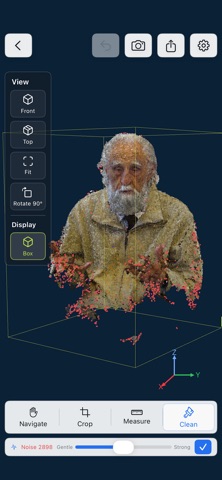
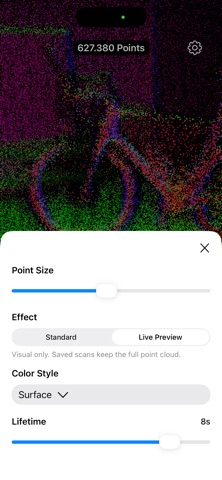
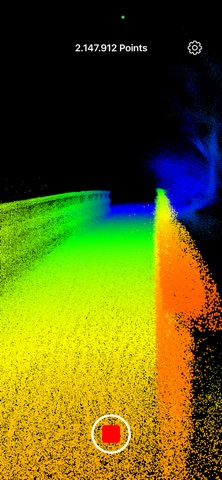
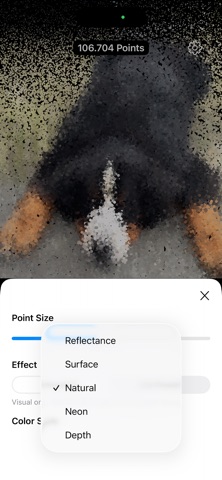
Explore and reveal the world in an entirely new way with DepthEye, a unique point cloud scanner app. Each capture transforms familiar spaces into a digital world, where depths are visualized through a color-coded gradient of depth effects. Close objects come alive in vibrant reds, while distant ones fade into cool blues, with yellows and greens defining the spaces in between. For an added touch of realism, toggle to view the actual colors of your surroundings. You can also use surface colors to better see different walls, floors, and objects. Inspired by the hypnotic visuals of industrial LiDAR scans, this app reveals the world as if all warmth has been stripped away, leaving behind a surreal digital beauty. While scanning, DepthEye gives you simple guidance to help improve your scan. You can also enable Live Scanning, where older points slowly disappear for a more dynamic effect. Highlights: - Capture detailed LiDAR point clouds - Get guidance while scanning - Adjust point size for optimal visualization - Customize the color palette to suit your style (surface, natural, depth, neon and reflectance) - Export your scans in .PLY point cloud format (XYZ, RGB, Normal values) - View scanned point clouds directly in the app, with tools to remove noise, measure and crop. - Explore scanned or imported point clouds at full scale in AR. This app requires a built-in LiDAR sensor (iPhone Pro models).
What's new · 1.2.1
- Improved loading of large point cloud files - Choose how many points to load for better performance Thanks for the feedback!
Details