

txt.edit - Simple Text Editor
Titans of Industry · Productivity
Independent analytics for this App Store listing. AppTracker is not affiliated with Titans of Industry.
Chart standing · US
What changed · US
Listing changes AppTracker has observed for this app in this storefront — new versions, price moves, rating shifts, and store copy.
txt.edit 2.3 is our biggest update yet. • Command palette: search every action, sample and recent file in one place (⇧⌘P) • Format Document: tidy JavaScript, TypeScript, JSON, HTML, CSS, Markdown and YAML with built-in Prettier • Symbol outline: jump straight to functions, types and headings • Minimap: a bird's-eye view of your document (turn it on in Settings) • Coding keyboard row: tab, brackets, symbols and cursor keys right above the keyboard, plus theme, language and tools • Document statistics: tap the word count for reading time, code metrics and more • Smarter editing: auto-indent, bracket pairing and matching-bracket highlights • Sample documents: a Welcome guide and samples for many languages, in your iCloud Drive • New Settings screen Fixes • The line you're typing no longer hides behind the keyboard. The editor now scrolls with your cursor • Swipe down on your text to dismiss the keyboard • Small files no longer trigger the large-file restore prompt
Ratings breakdown · US
The star breakdown behind this app's rating in this storefront.
In-app purchases · US
No in-app purchases.
Screenshots


Keywords this app targets
Search terms AppTracker associates with this app — estimates, not search volume. ❝ = in the app's title; a highlighted number is its current position for that term.
Similar apps
Competitors and close alternatives, as estimated by AppTracker.
 Text Editor : Code Editor
Devashy Rangpariya
2 shared topics · 3 shared title words
Text Editor : Code Editor
Devashy Rangpariya
2 shared topics · 3 shared title words
 Tidytext - Text Editor
Ayman Hunjol
2 shared topics · 3 shared title words
Tidytext - Text Editor
Ayman Hunjol
2 shared topics · 3 shared title words
 Text Editor - HTML Code Editor
Rajalben Vavadiya
2 shared topics · 3 shared title words
Text Editor - HTML Code Editor
Rajalben Vavadiya
2 shared topics · 3 shared title words
 Text Editor.
TAPUNIVERSE LLC
2 shared topics · 3 shared title words
Text Editor.
TAPUNIVERSE LLC
2 shared topics · 3 shared title words
 DraftCode: Code & Text Editor
献慧 陈
2 shared topics · 3 shared title words
DraftCode: Code & Text Editor
献慧 陈
2 shared topics · 3 shared title words
 Textastic Code Editor
Alexander Blach
2 shared topics · 1 shared title word
Textastic Code Editor
Alexander Blach
2 shared topics · 1 shared title word
 GTW - Markdown & Text Editor
Christoph Gogolin
2 shared topics · 3 shared title words
GTW - Markdown & Text Editor
Christoph Gogolin
2 shared topics · 3 shared title words
 Text Editor - LiquidLogic
MEGASOFT Inc.
2 shared topics · 3 shared title words
Text Editor - LiquidLogic
MEGASOFT Inc.
2 shared topics · 3 shared title words
About
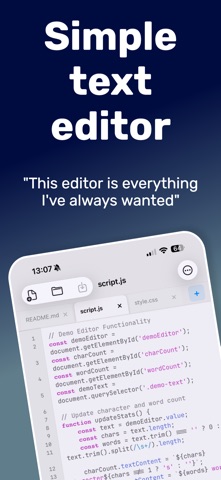
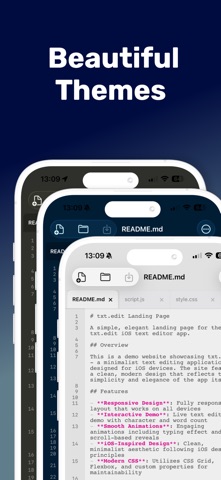
WHAT'S NEW IN v2.3 • Command palette - Every action, sample and recent file in one search • Format Document - Built-in Prettier for JavaScript, JSON, HTML, CSS, Markdown and YAML • Symbol outline & minimap - Find your way around big files • Coding keyboard row - Brackets, symbols and cursor keys above the keyboard • Document statistics - Words, reading time and code metrics WHY TXT.EDIT? • 191 programming languages with syntax highlighting • 242 beautiful themes for any mood or workflow • iCloud integration - Access files anywhere • Zero ads, zero subscriptions - Pay once, own forever • Files app integration - Work with any cloud service POWER FEATURES • Syntax highlighting for HTML, JavaScript, JSON, Markdown, Swift, Python, PHP, YAML, and 183 more • Multiple tabs - Edit several files simultaneously • Open and save files from iCloud, Dropbox, Google Drive • Search and replace • Customizable fonts and sizes • Professional line numbers • Multiple encoding support Perfect for developers, writers, students, and anyone who values clean, distraction-free text editing. One-time purchase. No subscriptions. No ads. Just pure text editing.
What's new · 2.3.0
txt.edit 2.3 is our biggest update yet. • Command palette: search every action, sample and recent file in one place (⇧⌘P) • Format Document: tidy JavaScript, TypeScript, JSON, HTML, CSS, Markdown and YAML with built-in Prettier • Symbol outline: jump straight to functions, types and headings • Minimap: a bird's-eye view of your document (turn it on in Settings) • Coding keyboard row: tab, brackets, symbols and cursor keys right above the keyboard, plus theme, language and tools • Document statistics: tap the word count for reading time, code metrics and more • Smarter editing: auto-indent, bracket pairing and matching-bracket highlights • Sample documents: a Welcome guide and samples for many languages, in your iCloud Drive • New Settings screen Fixes • The line you're typing no longer hides behind the keyboard. The editor now scrolls with your cursor • Swipe down on your text to dismiss the keyboard • Small files no longer trigger the large-file restore prompt
Details