

OnMyDesk: Private Vault
Iri You · Productivity
Independent analytics for this App Store listing. AppTracker is not affiliated with Iri You.
Chart standing · US
What changed · US
Listing changes AppTracker has observed for this app in this storefront — new versions, price moves, rating shifts, and store copy.
What’s New in Version 1.0.3: Smarter Library Organization This update makes organizing and filtering your vault easier on iPhone and iPad. One of these improvements came directly from thoughtful user feedback: unused built-in categories now stay out of the Library filters until you use them. All built-in categories remain available when adding or editing an item, and you can now create or manage custom categories directly from Quick Add and an item’s details. Quick Add now suggests tags already used in your library. Library filtering also supports selecting multiple tags, with Any to show items matching at least one selected tag and All to show only items matching every selected tag. Built-in category names now follow your selected app language, and in-app search understands their localized names. Empty and filtered Library states are clearer, with direct actions to scan, import, or show all items. Category and tag controls are also easier to tap, more accessible with VoiceOver, and smoother to scroll. The main app now uses a consistent dark appearance, together with additional interface refinements.
In-app purchases · US
No in-app purchases.
Screenshots




Keywords this app targets
Search terms AppTracker associates with this app — estimates, not search volume. ❝ = in the app's title; a highlighted number is its current position for that term.
Similar apps
Competitors and close alternatives, as estimated by AppTracker.
 Vault: Private Photos & Videos
Piotr Sochalewski
2 shared title words
Vault: Private Photos & Videos
Piotr Sochalewski
2 shared title words
 Offgrid Gallery: Photo Vault
Yanli Wang
1 shared title word
Offgrid Gallery: Photo Vault
Yanli Wang
1 shared title word
 Secret Vault - Hide Photos
嘉露 姚
1 shared topic · 1 shared title word
Secret Vault - Hide Photos
嘉露 姚
1 shared topic · 1 shared title word
 Privacy Vault - Photo & Video
NAICAI LI
1 shared title word
Privacy Vault - Photo & Video
NAICAI LI
1 shared title word
 My Media Vault - Secure Media
Matthew Aguiar
My Media Vault - Secure Media
Matthew Aguiar
 Files Vault Pro, Security Lock
EyeOS Store Inc.
1 shared title word
Files Vault Pro, Security Lock
EyeOS Store Inc.
1 shared title word
 Privatsache: Photo Vault
Robert Siegmund
Privatsache: Photo Vault
Robert Siegmund
 Password Manager Data Vault
Ascendo Inc.
1 shared title word
Password Manager Data Vault
Ascendo Inc.
1 shared title word
About
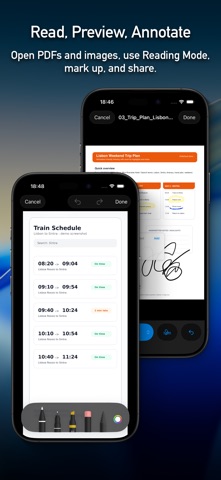
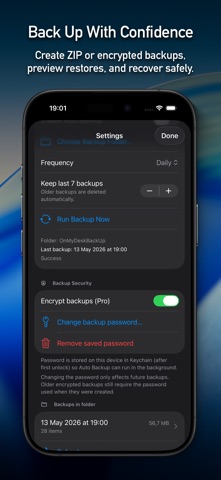
OnMyDesk for iPhone and iPad is a local-first private vault for files and captured content you want to keep close, organized, searchable, recoverable, and synced across your Apple devices. Use it when everyday information starts to scatter across apps, folders, chats, screenshots, emails, and notes. Scan a document, import a PDF, save a link, record an audio note, or capture content from another app, then keep it in one vault that can auto sync across iPhone, iPad, and Mac where supported. Capture on the go: • Scan documents and save them as PDFs • Import PDFs, images, files, audio, and video • Save links and text notes • Record audio and keep transcript support • Save from other apps with the Share Extension • Use Quick Add to set title, category, tags, and pinned state before saving Sync across devices: • Auto sync keeps supported vault changes moving across iPhone, iPad, and Mac • Use the same vault model across the iOS app, Share Extension, and native Mac app • Keep important items connected across the places you work, without creating separate libraries Find it again: • Search titles, notes, tags, categories, filenames, and supported OCR text when enabled • Use Spotlight for supported indexed vault content, with OCR included only when enabled • Filter by category, tag, pinned state, and file type • Sort your library and use bulk actions • Keep custom categories, notes, and tags Work with many item types: • PDFs: preview, Reading Mode, annotation, extracted text, and file info • Images: preview, annotate, export, and share • Audio: playback, transcript viewing, copy, share, and notes actions • Video: inline preview and full preview flows • Links: host and URL context with Open Link • Text: safe editing, copy, share, revert, and save flows Protect and recover your vault: • Local-first storage keeps your vault centered on your device workflows • App Lock helps hide your vault when you leave and return • Privacy overlay can hide app content in the app switcher • Plain ZIP backups and encrypted .odmbackup backups are supported • Restore preview and smart merge help avoid accidental duplicates • Trash, duplicate tools, diagnostics, and repair actions help keep the vault manageable OnMyDesk is made for everyday life: a private, searchable place for the documents, notes, links, scans, files, and media you may need again later. Use it for bills, travel documents, school material, work files, health records, vehicle papers, research links, screenshots, PDFs, audio notes, videos, and personal reference material — anything you want to keep organized instead of scattered. No account needed to keep your vault organized, searchable, and recoverable. Keep it close. Keep it searchable. Keep it recoverable. Keep it synced.
What's new · 1.0.3
What’s New in Version 1.0.3: Smarter Library Organization This update makes organizing and filtering your vault easier on iPhone and iPad. One of these improvements came directly from thoughtful user feedback: unused built-in categories now stay out of the Library filters until you use them. All built-in categories remain available when adding or editing an item, and you can now create or manage custom categories directly from Quick Add and an item’s details. Quick Add now suggests tags already used in your library. Library filtering also supports selecting multiple tags, with Any to show items matching at least one selected tag and All to show only items matching every selected tag. Built-in category names now follow your selected app language, and in-app search understands their localized names. Empty and filtered Library states are clearer, with direct actions to scan, import, or show all items. Category and tag controls are also easier to tap, more accessible with VoiceOver, and smoother to scroll. The main app now uses a consistent dark appearance, together with additional interface refinements.
Details