

ShotTetherPro
arcion Inc. · Photo & Video
Independent analytics for this App Store listing. AppTracker is not affiliated with arcion Inc.
Chart standing · US
What changed · US
Listing changes AppTracker has observed for this app in this storefront — new versions, price moves, rating shifts, and store copy.
• The free trial now starts automatically. There is nothing to do on a purchase screen: open the app and start using it right away. You get 3 days with every feature, counted from when the first photo is received. • You can start using the app right away even on location with no internet, while connected directly to your camera’s Wi-Fi. • The days left in your trial are shown at launch and in Settings. • Improved connection stability.
In-app purchases · US
No in-app purchases.
Screenshots


Keywords this app targets
Search terms AppTracker associates with this app — estimates, not search volume. ❝ = in the app's title; a highlighted number is its current position for that term.
Similar apps
Competitors and close alternatives, as estimated by AppTracker.
 ProShot
Rise Up Games
1 shared topic
ProShot
Rise Up Games
1 shared topic
 ProCamera. Professional Camera
Cocologics
1 shared topic
ProCamera. Professional Camera
Cocologics
1 shared topic
 Pro Camera - Reeflex
Reeflex GmbH
1 shared topic
Pro Camera - Reeflex
Reeflex GmbH
1 shared topic
 Even Longer
Mario Tomiak
1 shared topic
Even Longer
Mario Tomiak
1 shared topic
 Exif Wizard-Pro
homedatasheet.com, Inc.
1 shared topic
Exif Wizard-Pro
homedatasheet.com, Inc.
1 shared topic
 RemoteLens Pro
Brent Gaddis
1 shared topic
RemoteLens Pro
Brent Gaddis
1 shared topic
 PicDeploy - IPTC Editor
Ardan Fuessmann
PicDeploy - IPTC Editor
Ardan Fuessmann
 PhotoSync – transfer photos
touchbyte GmbH
PhotoSync – transfer photos
touchbyte GmbH
About
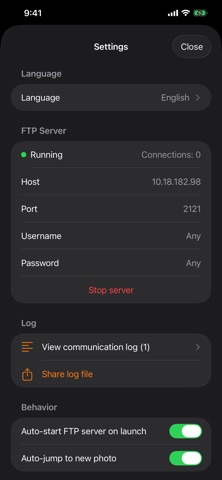
Free to download. There is no purchase screen to deal with: open the app and start using it right away. You get a 3-day free trial of every feature, counted from when the first photo is received. After the trial, the full version is a one-time purchase. No subscription, no additional charges. ShotTetherPro requires a camera with built-in FTP upload. The moment you press the shutter, your photo arrives wirelessly on your iPad / iPhone. ShotTetherPro is a wireless tethering receiver built for professional photographers — with every unnecessary feature stripped away. [Why we built it] ShotTetherPro was developed in-house by arcion Inc., a production studio specializing in photo and video shoots, focused only on the features that truly matter on set — rebuilt from the ground up to eliminate wasted screen space, slow transfers, and sluggish response. [Key features] ■ Stay on camera Wi-Fi Keeps your iPad / iPhone connected to the Wi-Fi of the camera you registered. Even if you open the app while connected to another Wi-Fi network (such as at home or the office), it switches to the camera’s Wi-Fi automatically. If the connection drops during a shoot, a banner at the top of the screen and a vibration let you know, and the app tries to reconnect every 10 seconds until it succeeds. You can also tap “Connect” to reconnect yourself. On iPadOS 18 / iOS 18 or later, once you register a camera, no confirmation screen appears on later reconnections. To set it up, join the camera’s Wi-Fi, register the camera’s name, and enter the Wi-Fi password once. ■ Register multiple cameras Register the Wi-Fi of several cameras, such as a second body, and simply choose the one you want to use from the list. ■ A perfectly optimized display An immersive UI that fills the screen with your photo, at maximum size with aspect ratio preserved. ■ Zero bloat — blazing fast and light No editing, social sharing, ads, or histograms. One tap from launch to the incoming shot; jumps instantly to the newest frame even in burst shooting (pausable while a client reviews). ■ Freely customizable thumbnail position & size Switch between horizontal scroll (bottom) and vertical scroll (left); drag to resize freely. ■ Works with every FTP-capable camera Any camera that can push photos over FTP / FTPS works, regardless of brand: Nikon Z9 / Z8, Sony α1 / α7R V, Canon EOS R5 / R3, FUJIFILM GFX / X-H series, Panasonic GH series, OM SYSTEM, and more. ■ Immersive single-photo viewer A full-screen viewer without unnecessary menus. Tap left/right for the previous/next shot. ■ Auto-display on arrival The newest photo appears the instant it's captured, even in burst shooting. Lock it for a closer look. ■ Photo grid & save to Camera Roll Browse in a grid, select multiple, and export to the iOS Photos app (Camera Roll) with one tap. ■ Project management One project per shoot, named automatically by date and time; switch with one tap. ■ 5-star rating Rate favorites instantly with the five stars on the right edge. Filter to speed up your selects. ■ Instant EXIF display ISO, aperture, shutter speed, focal length, and file name shown at the lower left — toggle on or off. ■ Aspect-ratio-preserving thumbnails Tell portrait and landscape shots apart at a glance and avoid mistaps. [Requirements] iPad (iPadOS 17 or later recommended) / iPhone (iOS 17 or later) On the camera side, any model that can push over FTP (PASV mode) [Setup] 1. Launch the app -> the FTP server starts automatically 2. Join your camera to the iPad's Wi-Fi (or make the camera an access point and join it with the iPad) 3. Enter the IP shown in the app and port 2121 into your camera's FTP profile 4. Press the shutter -> the photo appears within a few seconds For detailed setup, see In-app Settings -> Camera setup examples. [Support] Feature requests & bug reports: info@arcion.jp Official site: https://arcion.jp Developed by arcion Inc.
What's new · 1.1.1
• The free trial now starts automatically. There is nothing to do on a purchase screen: open the app and start using it right away. You get 3 days with every feature, counted from when the first photo is received. • You can start using the app right away even on location with no internet, while connected directly to your camera’s Wi-Fi. • The days left in your trial are shown at launch and in Settings. • Improved connection stability.
Details