
Chart standing · US
What changed · US
Listing changes AppTracker has observed for this app in this storefront — new versions, price moves, rating shifts, and store copy.
FPS Logger iOS • Server fixes • Updated Catalogue • Fixed apps in Catalogue not showing the correct devices tested • Added a privacy/analytics opt-in with a settings screen to review your choice anytime FPS Logger Mac • Server fixes • Added better support for iPad (6th generation) • Added Local Network Settings into Settings window • Fixed not being able to do Cmd+C in Logs
Price & rating history · US
Reconstructed from the listing changes AppTracker has observed in this storefront, so each line starts at the first change on record.
Price · USD
Screenshots


Keywords this app targets
Search terms AppTracker associates with this app — estimates, not search volume. ❝ = in the app's title; a highlighted number is its current position for that term.
Similar apps
Competitors and close alternatives, as estimated by AppTracker.
 SensorLog
Bernd Thomas
1 shared topic
SensorLog
Bernd Thomas
1 shared topic
 Device Monitor: iDevice
Grima Hdez
1 shared topic
Device Monitor: iDevice
Grima Hdez
1 shared topic
 SensorStream, powered by ROS 2
Martijn Habers
1 shared topic
SensorStream, powered by ROS 2
Martijn Habers
1 shared topic
 Console Remote
莼乾 沈
Console Remote
莼乾 沈
 ProMovie Recorder +
Panda Apps Limited
ProMovie Recorder +
Panda Apps Limited
 Metal Detector & Magnetometer
andrea machetti
Metal Detector & Magnetometer
andrea machetti
 AirBeam Video Surveillance
Appologics UG (haftungsbeschrankt)
AirBeam Video Surveillance
Appologics UG (haftungsbeschrankt)
 Speed Tracker: GPS Speedometer
Oxagile LLC
Speed Tracker: GPS Speedometer
Oxagile LLC
About
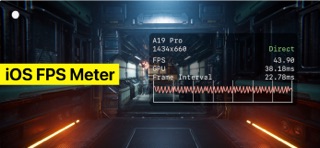
READ BEFORE BUYING: Please expand this description and read the full details of Metal HUD Compatibility on iPhone, iPad and Apple TV. FPS Logger for iPhone, iPad and Apple TV is a companion app. It requires FPS Logger for Mac, running on the same Wi-Fi network. You cannot enable Metal Performance HUD locally on iPhone, iPad or Apple TV. Both apps must be open at the same time — to launch apps with Metal HUD and to access the online server. WHAT IT DOES • See apps installed on your device • Launch a game with the Metal Performance HUD enabled • See real-time frame rate, frame time, GPU and memory stats on the device screen • See Metal HUD compatibility for games via online server database • HUD customisation — metric presets, position and scale === REQUIREMENTS FPS Logger on iOS requires iOS 17 or later to enable Metal HUD. Apple TV requires tvOS 26 or later. Wi-Fi is required to connect to a Mac and access the online server. Supported iPhones: • iPhone XR and later • iPhone SE - 2nd Generation (2020) & later • iPhone Air Supported iPads: • iPad - 6th Generation (2018) and later • iPad mini - 5th Generation (2019) and later • iPad Air - 3rd Generation (2019) and later • iPad Pro (2017) and later Supported Apple TV: • Apple TV 4K (1st gen, 2017) & later If you require assistance, please contact support at support@fpslogger.com
What's new · 7.0.2
FPS Logger iOS • Server fixes • Updated Catalogue • Fixed apps in Catalogue not showing the correct devices tested • Added a privacy/analytics opt-in with a settings screen to review your choice anytime FPS Logger Mac • Server fixes • Added better support for iPad (6th generation) • Added Local Network Settings into Settings window • Fixed not being able to do Cmd+C in Logs
Details