

Riffer Madness
Joseph Granados · Music
Independent analytics for this App Store listing. AppTracker is not affiliated with Joseph Granados.
Chart standing · US
What changed · US
Listing changes AppTracker has observed for this app in this storefront — new versions, price moves, rating shifts, and store copy.
• Compositions are now called Arrangements • Library redesign: Audio is exposed as an organizational tool for Riffs • Library redesign: sort, Audio, Arrangements, and filter buttons added to the footer • Auto level of recording gain, with a target of −23 LUFS • Settings: change primary and secondary theme colors
Price & rating history · US
Reconstructed from the listing changes AppTracker has observed in this storefront. A field is charted once it has changed more than once, and each line starts at the value it moved from.
Price · 6.99 USD now · 2 changes on record
In-app purchases · US
What this app sells inside itself, grouped by kind and priced for this storefront.
Screenshots


Keywords this app targets
Search terms AppTracker associates with this app — estimates, not search volume. ❝ = in the app's title; a highlighted number is its current position for that term.
Similar apps
Competitors and close alternatives, as estimated by AppTracker.
 MeloStock
NOBUHIRO MIYARA
2 shared topics
MeloStock
NOBUHIRO MIYARA
2 shared topics
 Tape It - Pro Audio Recorder
Tape It Music GmbH
2 shared topics
Tape It - Pro Audio Recorder
Tape It Music GmbH
2 shared topics
 Reel: 4-Track Recorder
TUGKAN MUTLU
2 shared topics
Reel: 4-Track Recorder
TUGKAN MUTLU
2 shared topics
 iRig Recorder
IK Multimedia US, LLC
2 shared topics
iRig Recorder
IK Multimedia US, LLC
2 shared topics
 Ableton Note
Ableton AG
2 shared topics
Ableton Note
Ableton AG
2 shared topics
 Recording Studio Pro!
Glauco Percopo
2 shared topics
Recording Studio Pro!
Glauco Percopo
2 shared topics
 Riffler
Jonathan Bell
Riffler
Jonathan Bell
 Practice Recorder
Paul Zabelin
1 shared topic
Practice Recorder
Paul Zabelin
1 shared topic
About
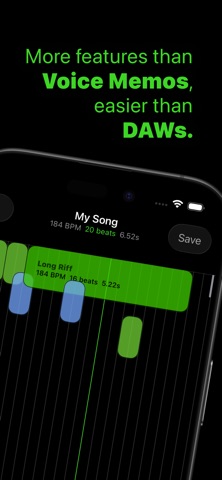
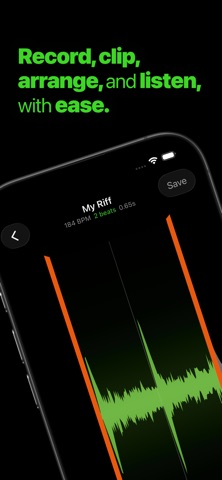
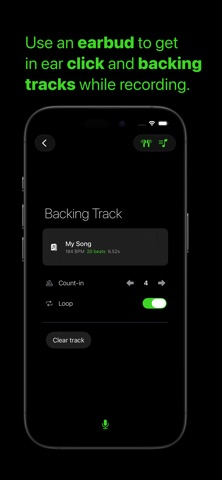
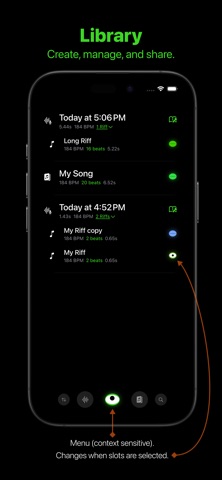
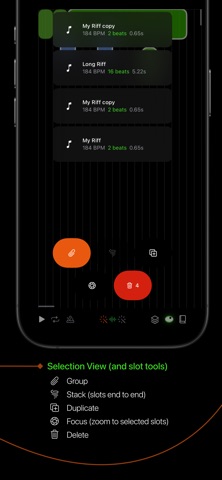
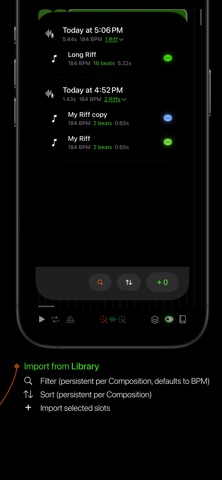
Record, clip, arrange, and listen, with ease. Capture your instrument or voice as ideas come and explore how they fit together with an efficient tempo first approach to audio clipping, arranging, and low latency mixing. Practice a part with in earbud click and backing track options. Whistle a tune and loop it in any arrangement you want. When you're happy with the sound, export your creations through sharing. Explore: • Library: filter, sort, manage, share, and preview all your creations • Recorder: capture audio while optional metronome clicks plus backing track play in headphones • Editor: make Riffs - clip audio to exact beats • Canvas: arrange Riffs and Arrangements over beat lines Concepts: • Audio: imported or recorded to be used in Riffs • Riff: Clipped audio • Arrangement: Musical slots arranged on a 10 minute canvas of beat lines (Arrangements can be nested within other Arrangements) • Slot: either a Riff or a Arrangement • Low Cut: removes low frequency noise that makes mixes muddy Features: • Low latency playback - preview anything you create, quickly • Duplicate Riffs share a single audio source - make multiple Riffs from a single recording without storage penalties • Tools for metadata management - use tags to stay organized • Metronome clicks in headphones while recording - get your timing right • Backing track in headphones while recording - follow an Arrangement or practice a song • Auto level of recording gain by default, with a target of −23 LUFS • Default recording low cut of 30 Hz TOOLS • Sort • Audio filter • Eye Button (context sensitive): (No slots selected) • Create Empty Arrangements • Create Riffs • Settings • Support (can be disabled in iOS settings) (One or more slots selected) • Arrange: start a new Arrangement with the selected slot(s) • Duplicate • Share • Tag • Delete • Arrangements filter • FIlter Recorder: • Set BPM • Toggle headphones • Configure backing track with count-in and loop settings • Record from bottom mic with no audio processing Editor: • Adjust Clip Boundaries • Play • Loop (toggle) • Metronome (toggle): BPM can be changed in the Book tool • Snap to Leading Beat (toggle): leading clip edge snaps to beat lines • Snap to Trailing Beat (toggle): trailing clip edge snaps to beat lines • Focus: zoom to the region of selected slots • Adjust Gain and Low Cut • Book: edit metadata: name, start, end, gain, low cut, BPM, color, and tags Canvas: • Rectangle Select (long hold on the Canvas will trigger it) • Play • Loop (toggle) • Metronome (toggle): BPM can be changed in the Book tool • Snap to Leading Beat (toggle): slots snap their leading edge to the nearest beat when dragged • Snap to Trailing Beat (toggle): slots snap their trailing edge to the nearest beat when dragged • Slot Tools: • Group (toggle): treat selected slots as a single unit • Tornado: arrange selected slots end to end • Duplicate: copy selected slots and place copies • Focus: zoom to the region of selected slots • Delete: remove selected slots from the canvas • Library: import Riffs and Arrangements • Book: edit metadata: name, BPM, color, and tags CONTACT Questions or feedback? Please contact us at support@riffermadness.app.
What's new · 1.7
• Compositions are now called Arrangements • Library redesign: Audio is exposed as an organizational tool for Riffs • Library redesign: sort, Audio, Arrangements, and filter buttons added to the footer • Auto level of recording gain, with a target of −23 LUFS • Settings: change primary and secondary theme colors
Details