

Pocket: Expense Tracker
Mustafa Bhatkar · Finance
Independent analytics for this App Store listing. AppTracker is not affiliated with Mustafa Bhatkar.
Chart standing · US
What changed · US
Listing changes AppTracker has observed for this app in this storefront — new versions, price moves, rating shifts, and store copy.
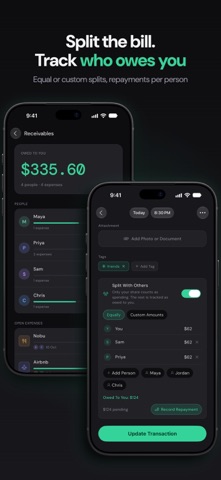
iPhone Duo - Optimised for iPhone Duo: Pocket is now optimised for iPhone Duo — tabs, the add button, back buttons and page actions sit in the vertical bar along the edge of the display. - Inner & Outer Display: Layouts adapt to both the inner and outer display, making full use of the available screen space. - Bigger Screens: On the inner display and on iPad, Home, Analytics and Budgets now use two columns, so you see more at a glance. CSV Export - Payment Mode & Account: Exported CSV files now include payment mode (Cash or Digital) and the debited account or card. Smart Subcategories - Most-Used First: Subcategories are now sorted by how often you use them, with recent picks ranked highest, so your go-to choices are always first in line. Shared Expenses - Split With Others: Paid for someone else too? Turn on Split With Others and only your share counts as spending — the rest is tracked as owed to you. Split with one person or several, equally or by custom amounts. - Receivables: See who owes you what on the dashboard or in Settings, and record full or partial repayments. Repayments update your balance without counting as income. More Colors - Categories & Books: Pick from 24 colors to tell your categories and books apart at a glance. Bug Fixes - Analytics Period: Tapping a category or account in Analytics now shows only transactions from the selected period. - Currencies & Languages: Currency symbols now sit in the right place for kr, zł, Kč and ₫, the widget shows the right amounts for currencies without decimals, and longer languages fit better.
Price & rating history · US
Reconstructed from the listing changes AppTracker has observed in this storefront. A field is charted once it has changed more than once, and each line starts at the value it moved from.
Price · 1.99 USD now · 2 changes on record
In-app purchases · US
No in-app purchases.
Screenshots



Keywords this app targets
Search terms AppTracker associates with this app — estimates, not search volume. ❝ = in the app's title; a highlighted number is its current position for that term.
Similar apps
Competitors and close alternatives, as estimated by AppTracker.
 Expense, Budget Tracker Kirum
Jerome Sasan Bieler
3 shared topics · 2 shared title words
Expense, Budget Tracker Kirum
Jerome Sasan Bieler
3 shared topics · 2 shared title words
 Pennyworth Expense Tracker App
Jack Xuan
2 shared topics · 3 shared title words
Pennyworth Expense Tracker App
Jack Xuan
2 shared topics · 3 shared title words
 Expense Tracker - Money Note
Komorebi Inc.
2 shared topics · 3 shared title words
Expense Tracker - Money Note
Komorebi Inc.
2 shared topics · 3 shared title words
 Expense Tracker• Money Manager
Devarsh Patel
2 shared topics · 3 shared title words
Expense Tracker• Money Manager
Devarsh Patel
2 shared topics · 3 shared title words
 CashJot - Expense Tracker
Jun Sheng Pierre Teo
2 shared topics · 3 shared title words
CashJot - Expense Tracker
Jun Sheng Pierre Teo
2 shared topics · 3 shared title words
 Budget - Expense Tracker
EHM TECH LLC
2 shared topics · 3 shared title words
Budget - Expense Tracker
EHM TECH LLC
2 shared topics · 3 shared title words
 Smart Budget – Money Manager
Carlo Di Giuseppe
3 shared topics
Smart Budget – Money Manager
Carlo Di Giuseppe
3 shared topics
 Expenses: Spending Tracker
BLUE COMET LABS LLC
2 shared topics · 1 shared title word
Expenses: Spending Tracker
BLUE COMET LABS LLC
2 shared topics · 1 shared title word
About
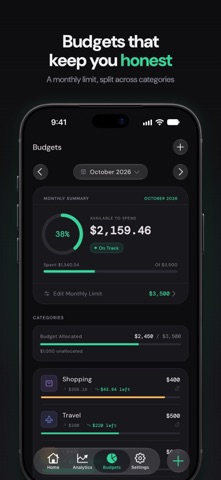
Pocket is the expense tracker that gets smarter every time you use it. No spreadsheets. No manual setup. Just open the app, confirm what it already knows, and move on. LEARNS YOUR HABITS Pocket silently learns your patterns. It knows you grab coffee on weekday mornings, order food on Friday evenings, and pay your subscriptions on the same date. Over time, it pre-fills amounts, pre-selects categories, and surfaces the right merchants before you even start typing. ADD AN EXPENSE IN UNDER 5 SECONDS Open the app. Your most likely amount is already suggested. Category and merchant suggestions are ready as instant-tap chips. Confirm and you're done. Pocket is faster than any other expense app on the market. YOUR DASHBOARD IS YOUR COMMAND CENTER One number tells you everything: Left to Spend. Not just your balance — your budget minus upcoming known expenses, recalculated daily. Below it, a monthly timeline shows the shape of your spending. Customise list views to show/hide tags and account details. SMART FEATURES THAT WORK QUIETLY - Time-aware amount suggestions based on your last 90 days - Category & Subcategory suggestions as you type - Merchant memory ranked by frequency and recency - Automatic recurring bill detection — no manual setup - Spending spike alerts when any category exceeds 2x your average - Contextual bank account memory — remembers which account you use - Account-to-Account transfers — move money without skewing expense totals - Biometric App Lock — secure your data with FaceID / TouchID unlock ICLOUD & LOCAL BACKUPS Enjoy complete peace of mind. Pocket automatically backs up your data to iCloud in the background—keeping it secure and entirely private. You can also export your history as a secure, local .pocket file. RECEIPTS & DOCUMENT ATTACHMENTS Never lose a receipt. Snap a photo, choose from your gallery, or upload PDF invoice files directly to any transaction. View full-screen interactive previews anytime. NESTED SUBCATEGORIES & CUSTOM TAGS Track spending with total precision. Create custom tags to filter transactions across dimensions, and use nested subcategories (like Food > Groceries) for granular logs. Easily bulk-update subcategories for past transactions. HOME SCREEN WIDGETS Keep your finances visible. The Quick Add widget lets you log expenses directly from your home screen in two taps. Today's spend and monthly total are always visible. Fully supports Light and Dark themes. MULTIPLE BOOKS & ACCOUNTS Separate personal and business expenses with Books. Switch between them instantly. Copy existing bank accounts between Books. Adjust cash balances with automatic offset calculations, and view total balances across Cash, Banks, and Wallets. INTERACTIVE ANALYTICS See spending by category, subcategory, merchant, account, and time period. Tap any segment in your charts to jump straight to its pre-filtered transaction list. COMPLETELY PRIVATE BY DESIGN No account required. No cloud sync to third-party servers. No ads. Ever. Every piece of data lives on your device. All suggestions, patterns, and predictions run entirely on-device. Nothing is sent anywhere. AVAILABLE IN 18 LANGUAGES English, Arabic, Chinese (Simplified & Traditional), French, German, Spanish, Portuguese, Italian, Japanese, Korean, Dutch, Polish, Swedish, Czech, Thai, Indonesian, Vietnamese, and Malay.
What's new · 1.0.20
iPhone Duo - Optimised for iPhone Duo: Pocket is now optimised for iPhone Duo — tabs, the add button, back buttons and page actions sit in the vertical bar along the edge of the display. - Inner & Outer Display: Layouts adapt to both the inner and outer display, making full use of the available screen space. - Bigger Screens: On the inner display and on iPad, Home, Analytics and Budgets now use two columns, so you see more at a glance. CSV Export - Payment Mode & Account: Exported CSV files now include payment mode (Cash or Digital) and the debited account or card. Smart Subcategories - Most-Used First: Subcategories are now sorted by how often you use them, with recent picks ranked highest, so your go-to choices are always first in line. Shared Expenses - Split With Others: Paid for someone else too? Turn on Split With Others and only your share counts as spending — the rest is tracked as owed to you. Split with one person or several, equally or by custom amounts. - Receivables: See who owes you what on the dashboard or in Settings, and record full or partial repayments. Repayments update your balance without counting as income. More Colors - Categories & Books: Pick from 24 colors to tell your categories and books apart at a glance. Bug Fixes - Analytics Period: Tapping a category or account in Analytics now shows only transactions from the selected period. - Currencies & Languages: Currency symbols now sit in the right place for kr, zł, Kč and ₫, the widget shows the right amounts for currencies without decimals, and longer languages fit better.
Details