

Tare: Calorie & Macro Tracker
OLEG VELB · Health & Fitness
Independent analytics for this App Store listing. AppTracker is not affiliated with OLEG VELB.
Chart standing · US
What changed · US
Listing changes AppTracker has observed for this app in this storefront — new versions, price moves, rating shifts, and store copy.
• Search recipes (US): in Foods → Recipes tap + and choose Search Recipes, type a dish, and see calories, protein, carbs and fat per serving • Save a recipe ready to log: every ingredient arrives already matched to a food and weighed — look it over, swap anything, save • A saved recipe keeps its name, servings, ingredients and a link to its fatsecret page, and you can share it like any other • Share recipes, templates and food lists that use restaurant or store-brand foods: they arrive whole, and the phone that opens the file fetches those foods itself (US) • Search results show the moment they're found; the rest fill in below instead of waiting behind a spinner • Cardio time is logged in minutes: type 35 on a treadmill walk and it records 35 minutes. Holds and quick bursts like high knees stay in seconds, and a tap on the Time column switches the unit for that exercise
Price & rating history · US
Reconstructed from the listing changes AppTracker has observed in this storefront. A field is charted once it has changed more than once, and each line starts at the value it moved from.
Price · 6.99 USD now · 2 changes on record
Average rating · ★ 4.13 now · 8 changes on record
Ratings breakdown · US
The star breakdown behind this app's rating in this storefront.
In-app purchases · US
What this app sells inside itself, grouped by kind and priced for this storefront.
Screenshots




Keywords this app targets
Search terms AppTracker associates with this app — estimates, not search volume. ❝ = in the app's title; a highlighted number is its current position for that term.
Similar apps
Competitors and close alternatives, as estimated by AppTracker.
 Calometric - Calorie Tracker
Ricardo Dantas Goncalves
1 shared title word
Calometric - Calorie Tracker
Ricardo Dantas Goncalves
1 shared title word
 Talk Calories
Creative Crow Ltd
1 shared topic
Talk Calories
Creative Crow Ltd
1 shared topic
 Daily Tracker for Weight Loss
Keith Kiser
1 shared topic · 1 shared title word
Daily Tracker for Weight Loss
Keith Kiser
1 shared topic · 1 shared title word
 Calorie Tracker - Calorya
Ona Pacholo Asis
1 shared title word
Calorie Tracker - Calorya
Ona Pacholo Asis
1 shared title word
 Deficit - Calorie Counter
Evgenii Bykov
2 shared topics
Deficit - Calorie Counter
Evgenii Bykov
2 shared topics
 Calorie Counter - MyNetDiary
MyNetDiary Inc.
2 shared topics
Calorie Counter - MyNetDiary
MyNetDiary Inc.
2 shared topics
 CaloriePro
PAUL MILLS
CaloriePro
PAUL MILLS
 TransformationBuddy
Matthew Brown
TransformationBuddy
Matthew Brown
About
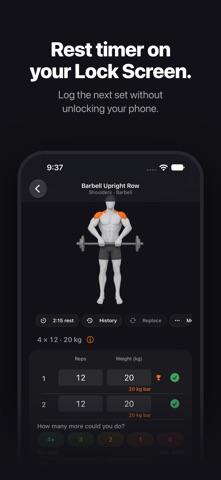
Track what you eat. Learn what you burn. Tare is a calorie and macro tracker that runs on your iPhone and stays there. No account to create, no ads, no analytics. Your food log lives on your device and, if you want it to, in your own iCloud. One payment. No subscription. EVERY DAY • Log food from three sources — a built-in food index that works offline, USDA FoodData Central, and Open Food Facts — or scan a barcode, or point your camera at a nutrition label • Watch calories, protein, carbs, and fat fill against your goals as the day goes on • Build your own foods, recipes, and meal templates once, then log them in a tap • Sort your day into meal categories you name, color, and order yourself • Track water with quick-add buttons sized to your own glass BEYOND CALORIES • Over 20 vitamins and minerals tracked alongside your macros, each against its daily value • Short on iron, calcium, protein, or fiber? Tap it and Tare tells you what to eat to close the gap, ranked from your own foods first • Already on target? The same tap shows which foods got you there TARGETS THAT KEEP UP • Tare learns what you actually burn from your weight trend and what you log, then suggests new targets each week. You accept them or you don't • Body fat from a smart scale lets it tell muscle from fat, so a recomposition stops reading as standing still • Your weight is smoothed into a trend, so one heavy dinner doesn't read as a setback FASTING AND SUPPLEMENTS • Run a fasting schedule with a Lock Screen timer, and correct a fast that started or ended at the wrong moment • Keep supplements in timing groups with reminders, and log the water you take them with WORKOUTS (BETA) • Log sets, reps, and weight with a rest timer on the Lock Screen and in the Dynamic Island, and log the next set from there • Start the workout Up Next builds from your gym's equipment, your goal, your time, and which muscles have recovered — and see why it chose each exercise — or save your own • 600+ exercises with how-to animations, and a muscle figure that shows what each workout trained • Records per exercise, Apple Watch workouts in History, Fitbod import, and finished workouts written to Apple Health • Off by default: turn it on in Profile → Workouts. Needs iOS 26.4 REPORTS AND CHECK-INS • Weight, body composition, calories, macros, and micronutrients over one, three, or six months • A daily check-in on energy, mood, sleep, and hunger, and what those move with ON YOUR WRIST AND HOME SCREEN • Home Screen and Lock Screen widgets for calories and macros • Apple Watch logs water and supplements, shows your day, your fast, and the set you are on during a workout, with a calorie ring complication IN YOUR LANGUAGE • English, Spanish, Russian, Ukrainian, and Polish — every screen, number, and reminder, on iPhone, widgets, and Apple Watch • Food search understands all five: the built-in food index knows everyday foods by their names in each language • It opens in your iPhone's language, and you can change it in Profile → Language & Region • Translations are built into the app. Choosing a language sends nothing anywhere PRIVATE BY CONSTRUCTION • No account, no tracking, no advertising or analytics frameworks • Sync runs through your own iCloud account, which we cannot read • Apple Health is optional, and every data type is permitted separately • Export everything you have recorded as CSV, whenever you like One purchase. No subscription. No ads. iPhone, iPad, watch. Tare is not a medical device and does not provide medical, dietary, or nutritional advice. Food data comes from USDA FoodData Central and Open Food Facts and is provided as-is. Exercise data by RepDB (repdb.co).
What's new · 2.3.0
• Search recipes (US): in Foods → Recipes tap + and choose Search Recipes, type a dish, and see calories, protein, carbs and fat per serving • Save a recipe ready to log: every ingredient arrives already matched to a food and weighed — look it over, swap anything, save • A saved recipe keeps its name, servings, ingredients and a link to its fatsecret page, and you can share it like any other • Share recipes, templates and food lists that use restaurant or store-brand foods: they arrive whole, and the phone that opens the file fetches those foods itself (US) • Search results show the moment they're found; the rest fill in below instead of waiting behind a spinner • Cardio time is logged in minutes: type 35 on a treadmill walk and it records 35 minutes. Holds and quick bursts like high knees stay in seconds, and a tap on the Time column switches the unit for that exercise
Details