

SpeedCheck+ Drive Copilot
Hawk iMedia · Navigation
Independent analytics for this App Store listing. AppTracker is not affiliated with Hawk iMedia.
Chart standing · US
What changed · US
Listing changes AppTracker has observed for this app in this storefront — new versions, price moves, rating shifts, and store copy.
- This update helps first-time users get the most out of the app with a post-onboarding tutorial (also available from Settings). - We have also improved ride detection, prompting, and drive start when initiated from notifications on Apple Watch or CarPlay. Happy driving! Got feedback? Contact support@hawkimedia.com directly or through the app. Thanks!
Ratings breakdown · US
The star breakdown behind this app's rating in this storefront.
In-app purchases · US
What this app sells inside itself, grouped by kind and priced for this storefront.
Screenshots




Keywords this app targets
Search terms AppTracker associates with this app — estimates, not search volume. ❝ = in the app's title; a highlighted number is its current position for that term.
Similar apps
Competitors and close alternatives, as estimated by AppTracker.
 Speedometer Limit Camera
IBN Software GmbH
2 shared topics
Speedometer Limit Camera
IBN Software GmbH
2 shared topics
 Speed-Tracker
Moonshot Apps UG (haftungsbeschränkt)
1 shared topic
Speed-Tracker
Moonshot Apps UG (haftungsbeschränkt)
1 shared topic
 Speedometer»
Tim O's Studios, LLC
1 shared topic
Speedometer»
Tim O's Studios, LLC
1 shared topic
 Speedometer: Driving Tracker
Taohidul Islam
1 shared topic
Speedometer: Driving Tracker
Taohidul Islam
1 shared topic
 Digital Speed GPS Speedometer
BITHAUS.TECH, UNIPESSOAL LDA
1 shared topic
Digital Speed GPS Speedometer
BITHAUS.TECH, UNIPESSOAL LDA
1 shared topic
 Speedometer 55 Pro. GPS kit.
Stanislav Dvoychenko
1 shared topic
Speedometer 55 Pro. GPS kit.
Stanislav Dvoychenko
1 shared topic
 Speedometer: Speed Tracker&GPS
PB Studios OU
Speedometer: Speed Tracker&GPS
PB Studios OU
 Driven: Speed Tracker
Revfluence, LLC
1 shared topic
Driven: Speed Tracker
Revfluence, LLC
1 shared topic
About
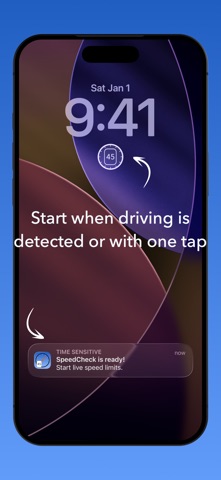
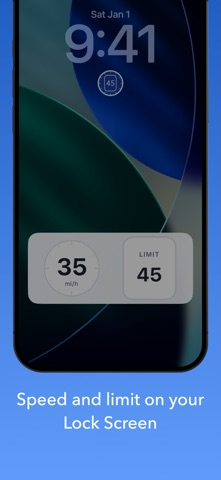
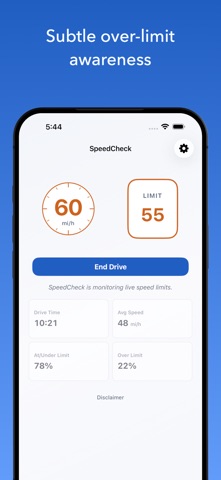
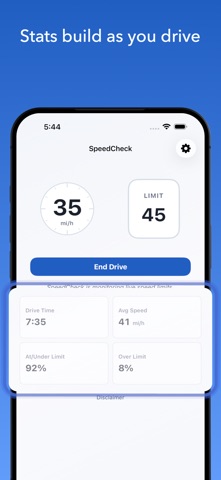
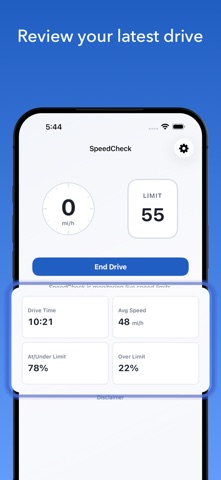
SpeedCheck answers a simple question at exactly the right time: What's the speed limit here? See your speed and the posted speed limit quickly from the app, Lock Screen, CarPlay, or Apple Watch Smart Stack. SpeedCheck can prompt you automatically when it detects that you're driving, so getting started is as easy as a tap. No route setup, no maps, no full navigation session required. Your speed and the posted speed limit are shown in an easy-to-read display just where you want it. Try 5 posted-limit drives free to see the app in action. Keep live posted limits with a paid pass or subscription. In the app, you can also review useful stats for your current or most recent drive. SpeedCheck provides subtle over-limit awareness, personalization settings, and richer speed-limit-aware stats in a focused experience built for quick clarity. Great for - New drivers building confidence with local speed limits - Daily drivers who regularly end up on unfamiliar roads or changing traffic patterns - Delivery, service, and field-work drivers moving between neighborhoods - Travelers driving in an unfamiliar city - Anyone who wants speed context without finding and starting a full navigation app What makes SpeedCheck different - A Live Activity for easy viewing from your Lock Screen, CarPlay and Apple Watch Smart Stack - Automatic trip detection and prompting - Focused design for current speed and the posted limit - Over-limit awareness using color, not sounds - Drive stats for current and most recent trip - Lock Screen widget for one-tap access - CarPlay support for a glanceable in-car SpeedCheck display - Appearance options, including an Automatic mode that adjusts with the sun Note: Posted speed limit display is available during free drives, a non-recurring paid pass, or recurring Premium access. Disclaimer: SpeedCheck is provided for informational purposes only. Always obey posted speed limits, temporary traffic controls, directions from law enforcement or authorized traffic personnel, and your vehicle’s speedometer. See app for full disclaimer. Terms & Conditions: https://www.apple.com/legal/internet-services/itunes/dev/stdeula/
What's new · 1.0.4
- This update helps first-time users get the most out of the app with a post-onboarding tutorial (also available from Settings). - We have also improved ride detection, prompting, and drive start when initiated from notifications on Apple Watch or CarPlay. Happy driving! Got feedback? Contact support@hawkimedia.com directly or through the app. Thanks!
Details