

Speedometer: Driving Tracker
Taohidul Islam · Navigation
Independent analytics for this App Store listing. AppTracker is not affiliated with Taohidul Islam.
Chart standing · US
What changed · US
Listing changes AppTracker has observed for this app in this storefront — new versions, price moves, rating shifts, and store copy.
Convoy Walkie-Talkie (Beta) • Talk to everyone in your convoy. The host turns on the Walkie-Talkie when starting a convoy, or at any time during it. • Tap the mic, talk, and your message sends when you stop. Or hold the mic to talk and let go to send. Slide away while holding to cancel. • Messages play for every member, even when Odo is in the background or the phone is locked. In CarPlay they play through your car's speakers, and the mic button is on the navigation map. • See who is talking and which members can't hear right now. Touch and hold a member to mute them, or use Mute All. • Please don't use your phone while driving. Let a passenger do the talking. Co-Driver Calls • Navigation can call out the bends ahead like a rally co-driver: "Easy left", "Medium right", "Hard left, into Easy right". Choose Early, Normal or Late timing. Turn it on in Settings > Driving > Navigation. Engine Grid for the Live Activity • A new Engine Grid (OBD II) layout shows six live readings from your car on the Lock Screen. CarPlay • When you arrive, see how your time compares with your usual drive. • Fixed a crash when adding a stop during navigation. Fixes • Speeds now always use your chosen unit: on the CarPlay map, in the trip summary's Time at Speed chart, and in recorded videos. • In mainland China, place names, navigation destinations and map links now line up with where you actually are. • Better connection with some newer cars that use the latest OBD II standard. We hope you love these updates! Please take a moment to rate us if you're enjoying these new features. Your rating helps us grow and improve! Have feedback? support@speedometerproapp.com
Price & rating history · US
Reconstructed from the listing changes AppTracker has observed in this storefront. A field is charted once it has changed more than once, and each line starts at the value it moved from.
Average rating · ★ 4.84 now · 7 changes on record
Ratings breakdown · US
The star breakdown behind this app's rating in this storefront.
In-app purchases · US
What this app sells inside itself, grouped by kind and priced for this storefront.
Screenshots





Keywords this app targets
Search terms AppTracker associates with this app — estimates, not search volume. ❝ = in the app's title; a highlighted number is its current position for that term.
Similar apps
Competitors and close alternatives, as estimated by AppTracker.
 Speedometer: Speed Tracker&GPS
PB Studios OU
2 shared topics · 2 shared title words
Speedometer: Speed Tracker&GPS
PB Studios OU
2 shared topics · 2 shared title words
 Speedometer 55 Pro. GPS kit.
Stanislav Dvoychenko
3 shared topics · 1 shared title word
Speedometer 55 Pro. GPS kit.
Stanislav Dvoychenko
3 shared topics · 1 shared title word
 Speedometer: MPH Tracker
Orin Light Limited
3 shared topics · 2 shared title words
Speedometer: MPH Tracker
Orin Light Limited
3 shared topics · 2 shared title words
 Speedometer»
Tim O's Studios, LLC
2 shared topics · 1 shared title word
Speedometer»
Tim O's Studios, LLC
2 shared topics · 1 shared title word
 Speedometer GPS : MPH Tracker
WE DAO TECH LIMITED
2 shared topics · 2 shared title words
Speedometer GPS : MPH Tracker
WE DAO TECH LIMITED
2 shared topics · 2 shared title words
 GPS Speedometer MPH Tracker
BITHAUS.TECH, UNIPESSOAL LDA
1 shared topic · 2 shared title words
GPS Speedometer MPH Tracker
BITHAUS.TECH, UNIPESSOAL LDA
1 shared topic · 2 shared title words
 Speed Tracker: GPS Speedometer
Oxagile LLC
1 shared topic · 2 shared title words
Speed Tracker: GPS Speedometer
Oxagile LLC
1 shared topic · 2 shared title words
 Digital Speed GPS Speedometer
BITHAUS.TECH, UNIPESSOAL LDA
1 shared topic · 1 shared title word
Digital Speed GPS Speedometer
BITHAUS.TECH, UNIPESSOAL LDA
1 shared topic · 1 shared title word
About
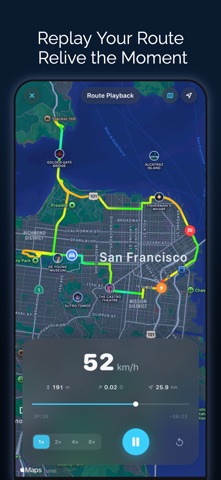
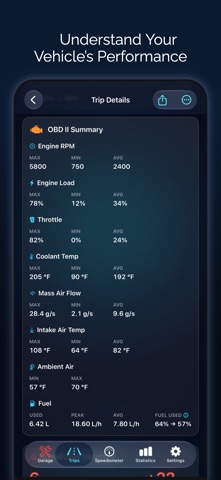
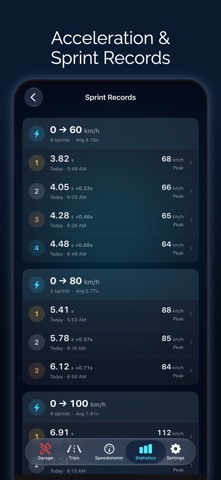
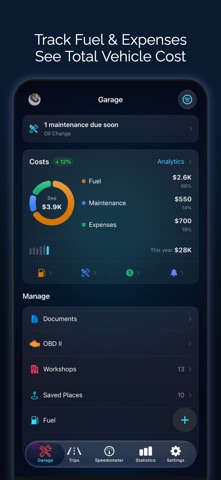
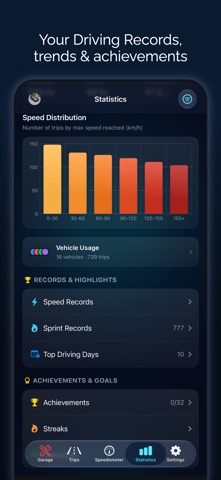
Odo is a GPS speedometer, drive and mileage tracker for car, motorcycle and bike, on iPhone, iPad and CarPlay. Record every drive automatically, get speed limit alerts, navigate turn by turn, time 0-60 sprints, read OBD2 codes, and keep your mileage log, fuel, EV charging and maintenance in one place. AUTOMATIC TRIP TRACKING • Trips start and stop on their own using motion detection, CarPlay or Bluetooth, for car, motorcycle or bike • Auto-pause, auto-end and automatic vehicle matching by CarPlay, Bluetooth or VIN • Distance, duration, moving time, average and top speed, elevation, turns and max G-force • Mileage tracker for work or personal trips: tags, saved places, auto-tagging, favorites, merge and split LIVE SPEEDOMETER • Digital, analog, map and windshield HUD displays in mph, km/h, knots or m/s • 50+ gauge designs, from automotive and sport to marine and aviation • Speed limit alerts with custom presets and a violations history • Picture in Picture shows your speed over other apps • Dynamic Island, Live Activities, and Home and Lock Screen widgets NAVIGATION & CARPLAY • Turn-by-turn navigation with voice and lane guidance, from Apple Maps or OpenStreetMap, plus your own usual routes • Live Comparison against your usual time, and the next turn on the Lock Screen • Add fuel, charging or food stops; avoid tolls, highways, ferries or any spot you choose • Muted and Dark map styles, live traffic and a 3D view, also in CarPlay • CarPlay map, dashboard and instrument cluster with live speed, trip stats and OBD readings ROUTES, REPLAY & STATS • Replay any trip or imported GPX route, heading-up or north-up, with speed-colored routes • Route History compares every run of the same route • 0-60 sprint timer: 0-60 mph, 0-100 km/h or custom ranges, with trophy rankings • Speed and elevation charts, speed distribution, top speed medals, most visited cities and lifetime stats • AI Trip Insights explain each drive, on device • Monthly Recap of your driving, ready to share FUEL, EV & EXPENSES • Fuel log and gas mileage tracker with cost, volume and fuel economy (MPG, L/100km, km/L) • Scan the fuel pump display with your camera, or touch and hold the app icon to log fuel fast • EV charging, battery level and electric efficiency • Car maintenance tracker, service reminders by date or mileage, expenses with custom types, and calendar reminders • Nearby fuel stations and EV chargers, garages and any currency • Insurance and registration documents with expiry reminders and PDF receipts • Multiple vehicles with plate and VIN, plus each car's last parked spot OBD2 SCANNER & DIAGNOSTICS • Live engine data: RPM, coolant, fuel level, battery voltage, throttle, O2 sensors and more • Read and clear check engine codes (stored, pending, permanent) with freeze frames, in plain language • Emissions readiness monitors • Tire pressure (TPMS), diesel DPF, 12 V battery charging check and custom PIDs • Per-vehicle history by VIN and a PDF report for your mechanic FRIENDS & CONVOY • Convoy: drive with friends on one live map, with a meeting point, arrival alerts and a walkie-talkie • Add friends, compare drives and climb the leaderboards RECORD & SHARE • Dashcam-style video with a live speed overlay, up to 4K • Trip photos, Trip Reels, replay videos and share cards with or without the map • GPX and CSV import and export by date or tag, automatic export to Files, full backup and restore • On Mac, review your trips, stats and logs, synced through iCloud SIRI & SHORTCUTS • "Hey Siri, navigate to Home with Odo", or start, stop, pause and resume trips • Automations from CarPlay, Bluetooth, NFC, Focus or the Action Button PRIVACY • No account needed to track trips. Data syncs privately through your own iCloud. • Route Privacy hides where your trips start and end when you share Available in English and 35 other languages. Terms of Use: https://www.apple.com/legal/internet-services/itunes/dev/stdeula/ Privacy Policy: https://speedometerproapp.com/privacy
What's new · 4.1.0
Convoy Walkie-Talkie (Beta) • Talk to everyone in your convoy. The host turns on the Walkie-Talkie when starting a convoy, or at any time during it. • Tap the mic, talk, and your message sends when you stop. Or hold the mic to talk and let go to send. Slide away while holding to cancel. • Messages play for every member, even when Odo is in the background or the phone is locked. In CarPlay they play through your car's speakers, and the mic button is on the navigation map. • See who is talking and which members can't hear right now. Touch and hold a member to mute them, or use Mute All. • Please don't use your phone while driving. Let a passenger do the talking. Co-Driver Calls • Navigation can call out the bends ahead like a rally co-driver: "Easy left", "Medium right", "Hard left, into Easy right". Choose Early, Normal or Late timing. Turn it on in Settings > Driving > Navigation. Engine Grid for the Live Activity • A new Engine Grid (OBD II) layout shows six live readings from your car on the Lock Screen. CarPlay • When you arrive, see how your time compares with your usual drive. • Fixed a crash when adding a stop during navigation. Fixes • Speeds now always use your chosen unit: on the CarPlay map, in the trip summary's Time at Speed chart, and in recorded videos. • In mainland China, place names, navigation destinations and map links now line up with where you actually are. • Better connection with some newer cars that use the latest OBD II standard. We hope you love these updates! Please take a moment to rate us if you're enjoying these new features. Your rating helps us grow and improve! Have feedback? support@speedometerproapp.com
Details